Make Team Accountability Stick for Managers: One Objective, Two KRs
The most effective way to handle team accountability tracking is a visible scoreboard tied to a weekly 15-minute check-in, with one accountable owner per key result. Success looks like this: updates happen on schedule, low scores get flagged early, and every goal has a name attached to it. Start there, using an Atlassian-style cadence and Google’s 0.0 to 1.0 scoring model, before adding software like Ayyes to automate reporting.
TL;DR:
- Teams should limit accountability objectives to one to three key results to ensure focus and reduce maintenance complexity.
- A shared, real-time scoreboard with one owner per key result enhances transparency and encourages mutual accountability without surveillance concerns.
- Weekly 15-minute check-ins on progress, flagged low scores, and corrective actions are essential to sustain an effective tracking rhythm.
- Use simple tools like spreadsheets or dedicated trackers based on team size, and integrate updates into existing meetings or channels to maintain consistency.
- Automated tools like Ayyes support reporting but do not replace the need for regular, honest conversations and clear ownership in accountability systems.
Table of Contents
- Why Making Progress Visible Improves Accountability
- How to Set Up a Minimal, Sustainable Tracking System
- Cadence: Weekly, Monthly, and Quarterly Check-Ins
- Metrics That Matter: Lead Measures, Lag Measures, and OKR Scoring
- Ownership and Roles: Making Accountability Auditable
- Tool Categories: Spreadsheets, OKR Boards, and Lightweight Trackers
- Privacy and Trust: Monitoring Progress Without Eroding Morale
- Ayyes: How a Time-Tracking Approach Maps to This Guide
- How Accountability Tracking Fits Into Team Communication
- Turning Tracking Data Into Better Feedback
- Using Accountability Data to Motivate Performance
- What Successful Tracking Rollouts Look Like in Practice
- A Week-One Checklist for Rolling Out Tracking
- How Ayyes Can Help You Put This Into Practice
- Sources
- FAQ
Why Making Progress Visible Improves Accountability
Teams follow through more consistently when their progress is visible to peers, not just to a manager. A public scoreboard changes the psychology of work: instead of updates disappearing into private messages or one-on-one meetings, everyone can see where things stand, and that shared view creates its own pressure to keep moving.
This isn’t the same as surveillance. Surveillance watches behavior; visibility reports outcomes. A scoreboard that shows “Key Result 2 is at 0.4 with three days left” tells the team something useful without monitoring anyone’s keystrokes or screen time.
Visibility works best when it flows automatically instead of depending on someone chasing status updates. That distinction matters for how you build the system:
- Use a shared dashboard, doc, or board that updates in near real time.
- Route weekly scores into the same place every time so nobody has to search for context.
- Let the team see peer progress, not just their own, so accountability becomes mutual rather than hierarchical.
- Reserve manager commentary for coaching, not for policing the numbers.
Done right, transparency builds trust because everyone is playing by the same visible rules.
How to Set Up a Minimal, Sustainable Tracking System
Most accountability systems fail because they are too heavy to maintain past week three. The fix is starting smaller than feels comfortable.
- Pick 1 to 3 objectives. More than that and nobody remembers what they’re working toward.
- Write 2 to 4 measurable key results per objective. Each one needs a number, a deadline, or both. “Improve onboarding” is not a key result; “cut new-hire time-to-first-commit from 12 days to 7” is.
- Choose a scoring method. The 0.0 to 1.0 scale Google popularized through OKRs works well because it resists false binaries like done or not done.
- Assign one owner per key result. Contributors can help, but only one name is accountable for the score.
- Decide where the board lives. A shared spreadsheet or doc is fine for teams under 10 people. Larger or distributed teams usually need a dedicated tracker with notifications and roll-ups.
- Attach updates to a ritual that already exists. Bolt the score update onto your existing weekly team meeting instead of inventing a new one.
Pro Tip: Build the first scoreboard in under an hour. If setup takes longer than that, you’re designing a system for the team you wish you had, not the one you actually manage.
The goal isn’t a perfect framework. It’s a habit that survives contact with a busy quarter.
Cadence: Weekly, Monthly, and Quarterly Check-Ins
A tracking system lives or dies on rhythm. Atlassian’s model of weekly, monthly, and quarterly touchpoints covers three different jobs, and mixing them up is a common way teams burn out on tracking altogether.
Weekly (15 minutes):
- Score each key result on the 0.0 to 1.0 scale.
- Flag anything below 0.3 for discussion.
- Commit to one specific corrective action per flagged item, owned by one person.
Monthly (30 minutes):
- Step back from weekly scores and review whether the objectives still make sense.
- Rewrite or drop any key result that turned out to be unmeasurable or irrelevant.
- Check whether owners still match workload reality.
Quarterly (60 to 90 minutes):
- Score every OKR against its original target.
- Run a short retrospective on the tracking system itself: was the cadence too heavy, too light, ignored?
- Set the next cycle’s objectives using what you learned.
Distributed teams often skip live weekly meetings in favor of async patterns. A Slack or Teams bot that pings owners for a one-line score update, or a short async form due by a fixed time each week, keeps the cadence intact without forcing everyone into a shared calendar slot. The check-in that actually happens beats the perfect one that gets rescheduled twice.
Metrics That Matter: Lead Measures, Lag Measures, and OKR Scoring
Lag measures tell you what already happened. Revenue closed, deliverables shipped, churn rate for the quarter that just ended. Lead measures tell you what’s happening right now that will produce that outcome, and they give you time to actually do something about it.
FranklinCovey’s research on team goals makes a direct case for this: managers who track only lag measures find out too late that a goal is off track, because by the time revenue or a final deliverable shows the problem, the quarter is nearly over.
- Lag measure example: Client retention rate for Q3.
- Lead measure example: Number of client check-in calls completed per week.
- Lag measure example: Feature shipped by deadline.
- Lead measure example: Percentage of sprint tasks moved to “done” by Wednesday.
On scoring, a 0.6 to 0.7 average is considered a healthy range for a key result, since it reflects ambitious targets that stretched the team without being fantasy. Scores that consistently land above 1.0 usually mean the target was set too conservatively, not that the team is overperforming.
The minimum viable version of this whole system: one objective, two key results, one weekly 15-minute slot on the calendar. Everything else is an upgrade you add once that baseline sticks.

Ownership and Roles: Making Accountability Auditable
Ambiguous ownership is the single most common way accountability systems quietly fall apart. If a key result has three names attached and no clear lead, nobody actually owns the outcome, and the score becomes nobody’s business to explain.
- Assign exactly one accountable owner per key result. Contributors help; the owner reports the score and answers for it.
- Use a lightweight RACI only where confusion already exists. You don’t need a RACI matrix for a five-person team with obvious roles. You do need one when a key result crosses departments.
- Standardize the weekly owner update to three lines: current score, one blocker, one commitment for next week.
Teams that build OKRs together instead of receiving them from above tend to hold ownership better, according to Martin Fowler’s writing on team OKRs, because co-created goals carry less resentment and fewer compliance-only updates.
Tool Categories: Spreadsheets, OKR Boards, and Lightweight Trackers
The right tool depends on team size and how scattered your people are, not on which platform has the flashiest dashboard.
- Shared spreadsheet or doc: Best for teams under 10 running a fast experiment with a new tracking habit. Zero setup cost, and everyone already knows how to use it.
- Dedicated OKR trackers: Worth the switch once you need roll-up reporting across multiple teams, an audit trail of score history, or automated reminders.
- Learning management systems: Relevant when part of accountability ties to training completion or certification progress, not just output metrics.
- Accountability apps with chat integrations: Useful for distributed teams doing async scoring through Slack or Teams bots instead of live meetings.
When comparing options, run through a short checklist: does it make progress visible without extra clicks, is updating fast enough that owners won’t skip it, does it notify people automatically, and can it roll individual scores up into a team or department view. A tool that fails any one of those four tends to get abandoned by month two.
Privacy and Trust: Monitoring Progress Without Eroding Morale
The line between accountability and surveillance is real, and crossing it quietly destroys the trust the whole system depends on. Guidance on execution culture recommends tracking metadata and outcomes, not continuous content-level monitoring of what people type or say.
- Track aggregated signals like task completion timestamps or PR activity, not keystrokes or message content.
- Write a short policy that states plainly what data gets collected and why, and share it with the team before rollout, not after.
- Use tracking data to offer help or redistribute workload, never as ammunition in a performance conversation.
- Treat a sudden drop in activity as a possible burnout signal worth a conversation, not an automatic red flag.
Pro Tip: If you wouldn’t be comfortable explaining a tracking metric to the person it measures, don’t collect it.
Ayyes: How a Time-Tracking Approach Maps to This Guide
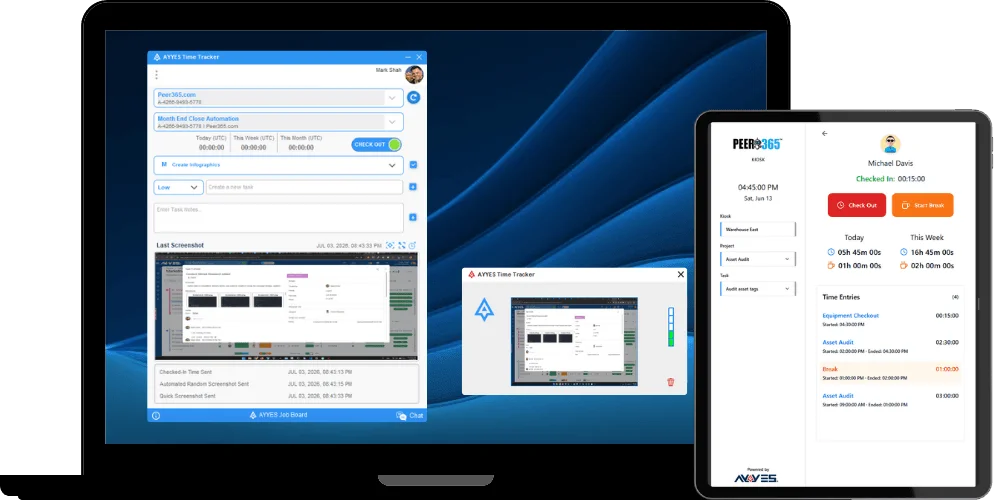
Software should support the habits above, not replace them. Ayyes combines time tracking with AI automations, reporting, and screenshot blur for privacy, which lines up with several practices this guide recommends: a visible board that updates without manual chasing, async owner reporting instead of status meetings, and aggregated productivity signals rather than granular content monitoring.
None of that replaces the weekly 15-minute check-in or the decision to name one accountable owner per key result. Automation makes an existing habit easier to sustain. It does not create the habit. Build the cadence first, then let a platform carry the reporting load once the rhythm is already working.
How Accountability Tracking Fits Into Team Communication
Accountability tracking works best when it lives inside the channels your team already checks, not in a separate system nobody opens. If your team runs on Slack or Teams for daily coordination, the scoreboard update should show up there too, through a bot post or pinned summary, rather than requiring a login to a different tool.
The failure mode to avoid is running two parallel conversations: one about the actual work in your chat tool, and another about scores in a tracker nobody references during real discussions. When a key result flags red, that update should trigger a conversation in the same thread where the work itself gets discussed, so context isn’t lost translating between systems.
Weekly check-ins work better as an agenda item bolted onto an existing standup or team sync than as a standalone meeting. This is partly about calendar fatigue and partly about signal: when accountability review happens inside the regular flow of work, it reads as normal business, not as a special inspection.
For distributed teams, async forms or bot prompts that post directly into the team channel keep the update visible to everyone without demanding synchronous attendance. The key design choice is making sure the accountability data and the collaboration data sit in the same visual space, so a manager scanning Slack for project status and a manager checking key result scores are looking at the same picture, not two disconnected ones.

Turning Tracking Data Into Better Feedback
Accountability data changes feedback conversations for the better because it replaces vague impressions with specific, agreed-upon numbers. Instead of “I feel like this project is behind,” a manager can say “Key Result 2 has been at 0.3 for two weeks; let’s talk about what’s blocking it.” That specificity removes a lot of the defensiveness that vague feedback tends to trigger.
The most useful pattern is separating the score conversation from the coaching conversation, even when they happen back to back. Review the number first, without judgment attached to it. A low score is information, not an accusation. Then move into a second, shorter conversation about what support, resource, or scope change would move that number.
Feedback should flow both directions. Owners reporting a weekly score should also get a short window to flag what’s not working about the goal itself, whether the target was unrealistic, the metric doesn’t capture the real work, or a dependency outside their control is the actual blocker. A tracking system that only sends feedback downward from manager to owner misses half its value.
One practical habit: when a key result scores well two weeks running, say so specifically in the next check-in rather than letting silence be the only feedback a strong performer receives. Positive reinforcement tied to real data lands differently than generic praise.
Using Accountability Data to Motivate Performance
Accountability data is most motivating when it’s used to explain trajectory, not to hand out judgment. Showing a team that a key result moved from 0.2 to 0.5 over three weeks tells a story of momentum that a single static number never captures. Trend lines motivate; snapshots often just create anxiety.
The same data can guide where a manager spends coaching time. If one key result across the team consistently underperforms while others hit healthy 0.6 to 0.7 ranges, that pattern points to a systemic issue, an unrealistic target, a missing resource, or unclear ownership, rather than an individual performance problem. Aggregated scores across a team surface those patterns faster than any single one-on-one conversation would.
Recognition tied to specific, visible numbers tends to land better than generic praise because it’s harder to dismiss as flattery. “You moved the onboarding metric from 12 days to 8 in six weeks” carries more weight than “great work this quarter,” because the team can see the number too.
Motivation also comes from removing friction, not just from praise. If tracking data shows an owner consistently blocked by the same dependency, reallocating that resource does more for morale than any amount of encouragement. The scoreboard’s real job is pointing managers toward where intervention will actually help.
What Successful Tracking Rollouts Look Like in Practice
Teams that get accountability tracking to stick tend to share a few traits, even across very different industries. They start with a genuinely minimal system, often just one objective and two key results, and resist the urge to track everything in the first cycle. Adding scope comes after the habit survives a full quarter, not before.
The teams that co-create their key results rather than receiving them from above report fewer compliance-only updates and more honest scoring, a pattern documented in team OKR practice. When people help set the target, they’re more likely to report an honest 0.4 instead of quietly inflating it to 0.7 to avoid an uncomfortable conversation.
Another consistent pattern: successful rollouts protect the weekly check-in from being the first meeting cancelled during a busy sprint. Teams that treat the 15-minute score review as non-negotiable, even in a shortened form, keep their tracking system alive through the stretches when it matters most. The teams that let it slide during crunch time are usually the ones restarting from scratch the following quarter.
The common thread across working implementations isn’t a specific tool or template. It’s the discipline of keeping the system small enough that maintaining it costs less effort than the value it produces.
A Week-One Checklist for Rolling Out Tracking
Getting a tracking system running takes less than a full workday if you keep the first version deliberately small. Here’s the sequence worth following in week one: define one objective, pick two key results with real numbers attached, assign a single owner to each, put a 15-minute weekly slot on the calendar, and build the scoreboard in whatever tool your team already checks daily.
Watch three early signals to know if it’s working: whether updates actually happen on schedule, what percentage of owners post without being chased, and whether flagged issues get resolved rather than repeated. If updates stall, the check-in is probably scheduled at the wrong time, not that the team is lazy. If ownership gets argued over, that’s a sign the key result was written too broadly to assign to one person. If scores look suspiciously inflated week after week, the target was likely set too easy, or the team doesn’t yet trust that a low score is safe to report honestly.
— Mark
How Ayyes Can Help You Put This Into Practice
Ayyes gives managers who already have a cadence in place a faster way to keep the scoreboard current without adding manual reporting work. Its time-tracking software with AI automations generates reporting automatically, which maps directly onto the async owner updates this guide recommends, and its screenshot blur feature keeps that visibility outcome-focused rather than intrusive.

If your team already has a weekly check-in running on a shared doc, Ayyes becomes the layer that turns those manual updates into automated reports your whole team can see without anyone compiling a status email. Freelancers logging billable hours and larger teams running multiple projects both fit the same core workflow: track time and progress, generate the report, keep the owner accountable for the number. Start with a small pilot, one team, one objective, and see whether the automated reporting actually reduces the admin load of your existing cadence. You can explore the platform and start a trial at Ayyes.
Sources
A few sources shaped the recommendations in this guide and are worth reading directly if you want more depth on any single piece.
- Atlassian — Team goals, signals, and measures
- Set up an OKR tracking system — Goals & Progress
- FranklinCovey — How to set effective team goals
FAQ
What are examples of team accountability?
Concrete examples include a single owner reporting a weekly key result score, a team publicly tracking sprint completion percentage, and a manager following up promptly on a flagged blocker instead of letting it sit until the next meeting.
What are the 7 pillars of accountability?
Definitions of the “7 pillars” vary by source and aren’t standardized across accountability frameworks, so treat any specific numbered list with caution. The practices this guide covers, clear ownership, measurable key results, regular cadence, and transparent reporting, cover the core ground most versions share.
What do the 3 C’s of accountability stand for?
Common versions define these as clarity (a clearly defined goal), commitment (an owner who agrees to deliver it), and consequence (a visible outcome tied to whether it happens), though exact wording differs across sources.
How often should teams check in on accountability tracking?
Weekly 15-minute check-ins for scoring, monthly 30-minute reviews for adjusting goals, and quarterly retrospectives for scoring the full cycle, a rhythm Atlassian’s OKR framework and OKR practitioners both recommend.
Can software like Ayyes replace manual accountability check-ins?
No. Tools like Ayyes automate reporting and time data, but the weekly check-in, single ownership assignment, and honest scoring conversation still need to happen between people.