
Start on AYYES’ $0 Plan: ActivTrak Alternatives for Teams
If you want an ActivTrak alternative that balances clear productivity reports, privacy controls, and AI-driven time-saving automations, AYYES is the recommended starting point. Beyond that, most teams end up comparing three vendor-agnostic categories: privacy-first analytics platforms, enterprise forensic monitoring suites, and lightweight time trackers built for freelancers and small teams. The right fit depends on how much surveillance depth your legal and HR teams can justify, not on which tool has the longest feature list. AYYES offers a free plan for up to 12 team members.
TL;DR:
- Most teams should match their monitoring needs to the level of surveillance depth, balancing privacy controls and compliance requirements accordingly.
- AYYES combines time tracking, app and website usage monitoring, and AI automations with privacy features like screenshot blur and scheduling, making it suitable for remote and in-house teams.
- Choosing an alternative depends on specific use cases, with privacy-first platforms for HR-sensitive environments, forensic suites for security, and lightweight trackers for freelancers or small teams.
- Vendors must be assessed for default privacy settings, data retention policies, and whether they require explicit user opt-in for surveillance features.
- A trial should verify that screenshot rules, AI automations, and compliance reports align with actual team workflows and privacy policies before scaling deployment.
Table of Contents
- Best ActivTrak Alternatives by Category and Use Case
- Comparing Monitoring Depth, Privacy, and Reporting Across Categories
- How Do You Choose the Right ActivTrak Substitute?
- What AYYES Offers and How to Validate It in a Trial
- Weighing Monitoring Depth Against Employee Trust
- Getting Started With AYYES
- Primary Sources for Monitoring Compliance and Vendor Defaults
- Sources
- FAQ
Best ActivTrak Alternatives by Category and Use Case
Choosing among ActivTrak competitors gets easier once you stop comparing feature checklists and start comparing categories. Each category below solves a different problem, and mixing them up is the fastest way to overpay for capabilities you’ll never use or under-buy on the compliance features you actually need. AYYES leads this list because it pairs time tracking with AI automation agents rather than treating monitoring as a standalone surveillance layer. It fits remote teams, agencies, and in-house departments that need screenshot captures, app and website usage tracking, and compliance reporting without turning the tool into a full forensic suite. AYYES includes screenshot blur for privacy, kiosk clock-in for shared devices, idle time detection, and automated invoice generation, all inside one scalable platform. In a trial, test how the AI automations handle repetitive reporting tasks, how granular the screenshot scheduling gets, and whether the Free plan for up to 12 team members covers your smallest team before you commit to paid seats. Here’s how the rest of the market breaks down by category:
- Privacy-first analytics platforms focus on aggregate productivity trends instead of raw screen captures. Best for HR-sensitive environments where trust matters more than granular oversight. Pricing typically runs per-user with a free trial tier, and deployment is usually a lightweight browser extension or desktop agent.
- Enterprise forensic monitoring suites capture continuous screen recordings, keystroke logs, and detailed session playback. Best for security teams protecting intellectual property or regulated data. Pricing shifts toward enterprise contracts with custom quotes, and deployment often requires IT provisioning across managed devices.
- Lightweight time trackers strip monitoring down to timers, timesheets, and basic reporting. Best for freelancers, agencies billing hourly, and small teams that need proof of work without screenshots at all. Most offer a generous free tier and simple per-user pricing once you scale past a handful of seats.
- Workforce analytics with team benchmarking layers productivity scoring and department comparisons on top of standard time tracking. Best for operations leaders managing distributed teams across multiple locations. Pricing tends to sit in the mid-tier per-user range, with add-ons for advanced dashboards.
- Attendance and scheduling-first platforms prioritize shift management, kiosk clock-in, and payroll integration over screen monitoring. Best for hourly workforces, retail, and hospitality operations. Deployment usually includes a physical kiosk option alongside mobile clock-in.
- Insider-risk and data-loss prevention tools monitor for specific risk triggers like file transfers or unusual login patterns rather than general activity. Best for finance, healthcare, or legal teams under strict regulatory obligations. These tend to carry the highest price point and the longest implementation timelines.
- All-in-one project and time management suites bundle task management, time tracking, and light monitoring into a single workspace. Best for project-driven teams who want billing accuracy tied directly to deliverables. Pricing usually bundles per-user rates with tiered feature unlocks.
- Employee experience and wellbeing trackers measure workload balance and burnout indicators alongside time data. Best for companies prioritizing retention over strict oversight. These are newer entrants, often priced per-user with limited enterprise tiers so far.
Named products across these categories that decision-makers commonly evaluate include Apploye, Insightful, Hubstaff, Kickidler, Time Doctor, TimeCamp, Monitask, Teramind, WebWork Time Tracker, We360.ai, DeskTime, InterGuard, Toggl Track, Memtime, and Clockify. Each sits in one or more of the categories above, and none of them approach monitoring depth, pricing, or privacy controls the same way. Gartner’s own alternatives and competitors listing reflects this same pattern of buyers comparing platforms across deployment style, integration depth, and support quality rather than picking on brand recognition alone.
Comparing Monitoring Depth, Privacy, and Reporting Across Categories
The categories above diverge sharply once you line them up against the axes that actually matter during procurement. Monitoring depth is the biggest fork in the road: continuous screenshot capture and session recording sit at one end, while activity-only tracking (app usage, active time, idle detection) sits at the other. Privacy controls and reporting sophistication tend to move in opposite directions as monitoring depth increases, which is exactly why no single category wins on every axis.
| Capability axis | Privacy-first analytics | Enterprise forensic suites | Lightweight time trackers | AYYES |
|---|---|---|---|---|
| Best for / use case | HR-sensitive remote teams | Security and IP protection | Freelancers, hourly billing | Remote and in-house teams needing both tracking and automation |
| Monitoring depth | Activity-only, aggregated | Continuous screenshots, keystroke logs, session replay | Timers and timesheets only | Screenshot captures with adjustable frequency, app/website tracking |
| Privacy controls & compliance | Strong defaults, minimal raw capture | Configurable but capture-heavy by design | Minimal by design, low risk | Screenshot blur, scheduling controls, privacy settings |
| Reporting/analytics | Trend dashboards, less granular | Detailed forensic reports and audit trails | Basic hours and project reports | Productivity analytics plus automated compliance reporting |
| Pricing shape | Per-user, free trial common | Enterprise quotes, custom contracts | Free tier, low per-user cost | Free forever plan, per-seat monthly or annual |
| Deployment & integrations | Browser extension or lightweight agent | IT-managed device deployment | Simple app or browser install | Desktop, mobile, and kiosk clock-in with reporting integrations |
Monitoring depth is the single biggest legal risk variable on this table. The ICO’s guidance on monitoring workers confirms that monitoring itself isn’t prohibited under UK data protection law, but it does require balancing the intrusion against the actual business necessity, and typically calls for a Data Protection Impact Assessment before deployment. That single requirement should influence which category you pick well before you look at pricing.
How Do You Choose the Right ActivTrak Substitute?
Start with the job, not the feature list. A monitoring tool bought to satisfy a security team’s forensic needs will feel invasive and unnecessary to an operations manager who just wants accurate timesheets, and vice versa. Reconcile those needs explicitly before you shortlist vendors, or you’ll end up running two tools instead of one. Prioritize these criteria in order:
- Job-to-be-done fit: are you solving for billing accuracy, performance reporting, or security risk?
- Data minimization: does the tool default to collecting less, or does it require you to manually restrict capture?
- Privacy controls: can you schedule monitoring windows, blur screenshots, or exclude personal devices?
- Reporting depth: do the reports match what managers actually review in performance conversations?
- Integration and export options: can data move into payroll, project management, or BI tools without manual work?
- Admin burden: how much ongoing configuration does the tool demand from IT or HR?
Due-diligence checklist to run with every vendor:
- How long is data retained by default, and can retention periods be shortened?
- Are screenshots and screen recordings on by default, or do they require explicit enablement?
- Will the vendor assist with a DPIA, or point you to self-service documentation only?
- What support SLA applies during rollout, and does it change after the trial period ends?
- What does the pilot or trial scope actually include: full features, or a capped subset?
Watch for a few recurring red flags during evaluation. Excessive default surveillance, meaning screenshots or keystroke logging enabled without a clear opt-in step, is one of the most common complaints procurement teams flag. Hidden fees for add-ons like advanced screen capture are another. So is a lack of scheduling controls that would let you limit collection to work hours only. If a vendor can’t export data through an API or standard file format, that’s a sign you’ll be locked into their reporting dashboard indefinitely. Pro Tip: Ask every vendor for their default privacy settings in writing before the trial starts. ActivTrak, for instance, documents that screenshots and screen views are disabled by default and require explicit admin enablement, which is the kind of default you want confirmed in writing, not assumed from a sales call.
What AYYES Offers and How to Validate It in a Trial
AYYES combines time tracking with AI automation agents designed to cut down on manual reporting work rather than add another layer of surveillance. The platform includes project and task management, screenshot captures with adjustable privacy settings, app and website usage tracking, attendance and scheduling management, and kiosk clock-in for teams that share physical devices. Compliance reporting and productivity analytics run alongside idle time detection, so managers get a fuller picture of where time actually goes without relying on invasive session recording. The plans include a Free plan for up to 12 team members and paid options for larger organizations; screenshot tracking, app and website monitoring, advanced analytics, and AI Agents automation require a paid plan, which matters if you’re testing the platform with a small department before rolling it out company-wide. During a trial, focus on three things:
- Configure screenshot rules and blur settings to match your company’s actual privacy policy, not the vendor’s default.
- Run sample productivity and compliance reports to see whether the output matches what your managers currently review manually.
- Test the AI automations on a repetitive task, like generating weekly time summaries or flagging idle time patterns, to see how much manual work they actually remove.
Success in a pilot looks like fewer manual reporting hours, reports that hold up in a performance conversation without needing extra context, and no employee pushback once the monitoring policy is explained clearly.
Weighing Monitoring Depth Against Employee Trust
The instinct to buy the most powerful monitoring tool available is usually the wrong one. Deep forensic capture, continuous screen recording, keystroke logging, makes sense for a security team defending intellectual property. It makes no sense for a marketing department that just needs to know whether billable hours match project timelines. Matching monitoring depth to the actual risk, rather than to what’s technically available, is the decision that determines whether your rollout succeeds or triggers an HR complaint in month one. 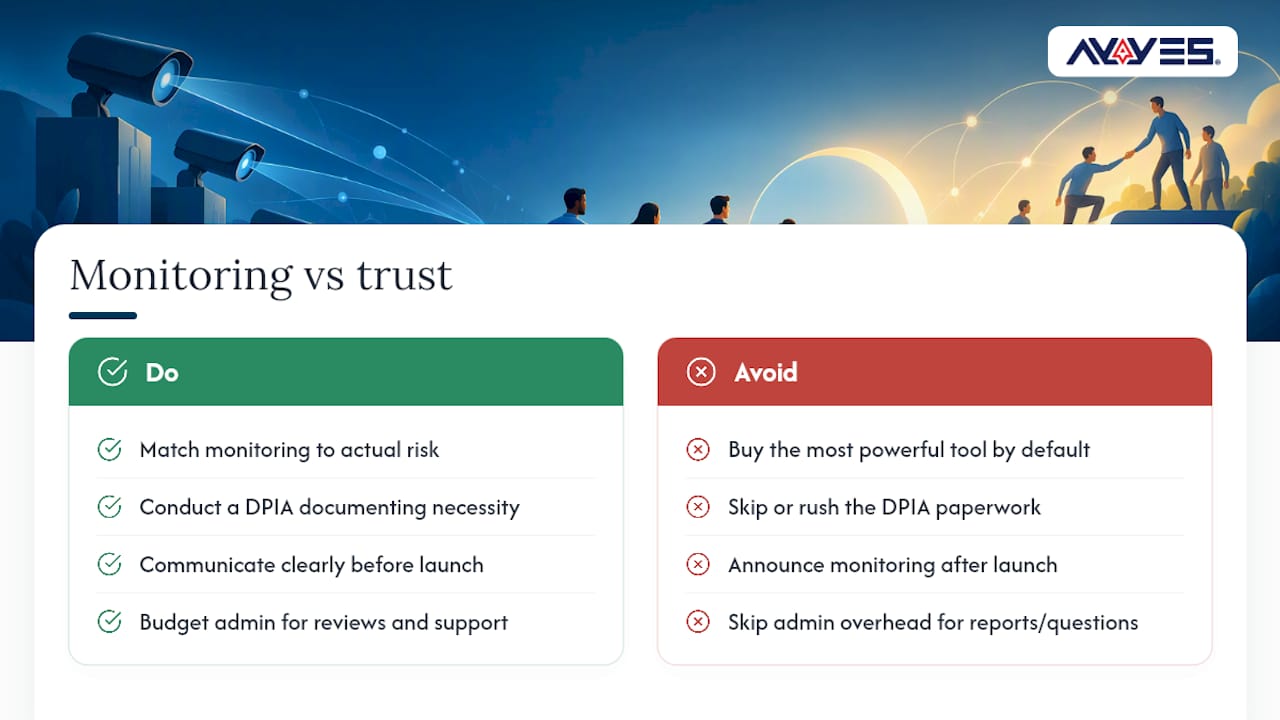 A DPIA isn’t paperwork to get through quickly. Documenting necessity and minimization up front, as ICO guidance recommends, gives you a defensible position if an employee ever questions why the company collects what it collects. Pair that with a clear internal communication plan before launch, not after, and you avoid the trust erosion that turns a productivity tool into a symbol of surveillance. Budget for real admin overhead too. Someone has to review reports, adjust screenshot schedules, and answer employee questions in the first few weeks. Skipping that step is how good tools get abandoned within a quarter.
— Mark
Getting Started With AYYES
AYYES fits teams that want time tracking and monitoring without the forensic overhead of enterprise surveillance suites, and without losing reporting features offered by lightweight trackers. Operations managers, agency owners, and startup founders comparing ActivTrak alternatives tend to get the clearest signal from a short, focused trial rather than a long evaluation cycle. 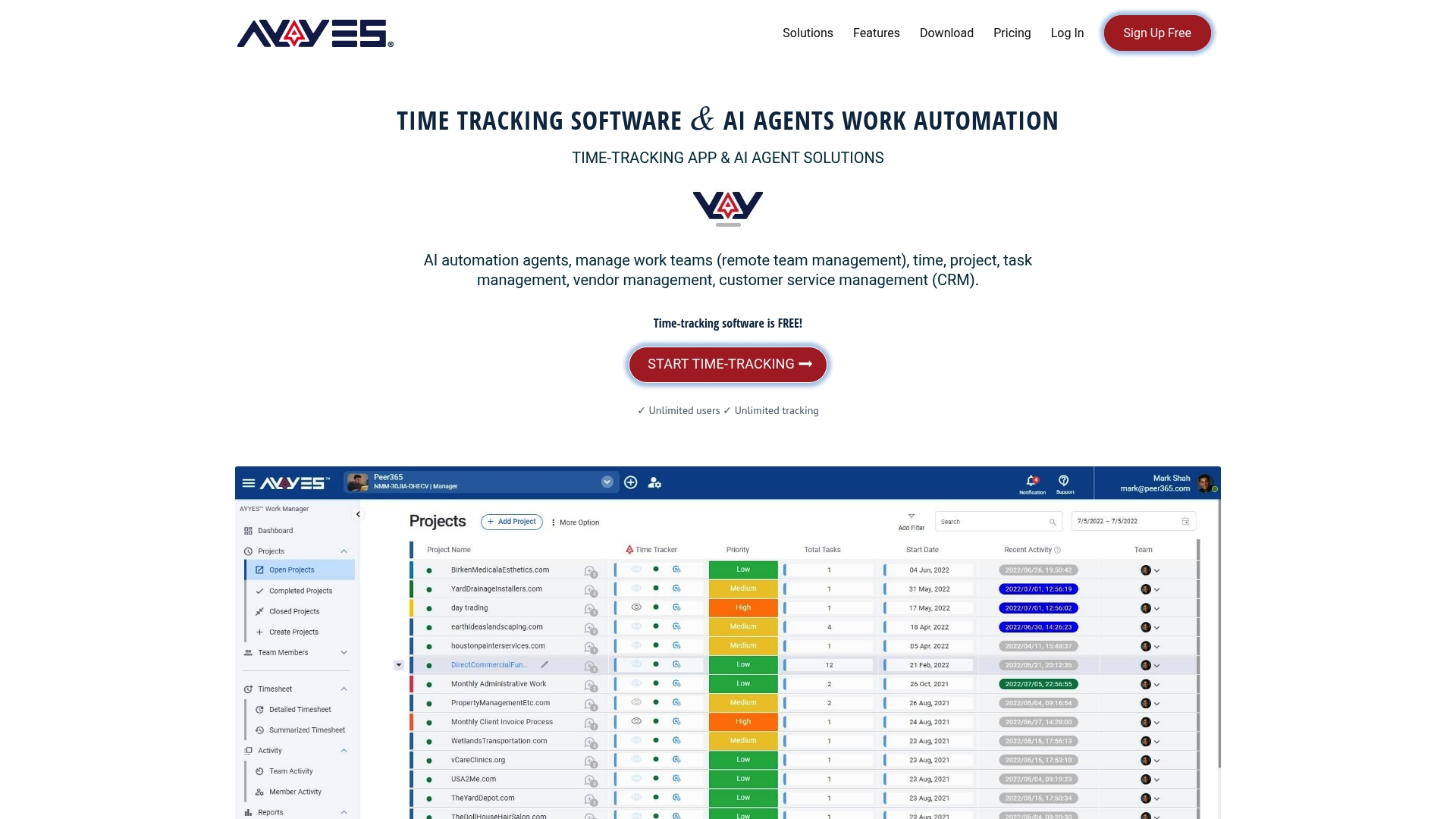 Start by configuring screenshot rules and privacy blur settings to match your existing policy, then run a week of sample productivity and compliance reports against real projects. Finally, test one AI automation, like automated weekly summaries, against a task your team currently does by hand. The AYYES pricing page lists the Free plan at $0 per month for up to 12 team members, the Monthly plan at $0.99 per seat, and the Annual plan at $0.88 per seat per month, so you can start on the free forever tier and upgrade once you’ve confirmed the fit. AYYES offers a free plan for up to 12 team members.
Primary Sources for Monitoring Compliance and Vendor Defaults
- ICO guidance on monitoring workers: DPIA requirements and necessity balancing.
- European Commission data protection overview: EU-wide legal framework.
Sources
- ICO: Data protection and monitoring workers
- European Commission: Data protection
- Top ActivTrak Alternatives & Competitors 2026
FAQ
Does ActivTrak See Your Screen?
Not by default. ActivTrak’s own documentation confirms that screenshots and screen views are disabled out of the box and require an admin to enable the Screen Details add-on or set up specific alarms before any screen capture happens.
What Are the Top Employee Monitoring Software Options?
There’s no single official “top 10,” but the most commonly compared platforms include AYYES, Apploye, Insightful, Hubstaff, Kickidler, Time Doctor, TimeCamp, Monitask, Teramind, WebWork Time Tracker, We360.ai, DeskTime, InterGuard, Toggl Track, Memtime, and Clockify. Buyers typically compare them across monitoring depth, deployment, and support rather than by feature count alone.
What Is the Best Productivity Tracking Tool?
The best tool depends on whether you need activity reporting, forensic security monitoring, or simple time tracking for billing. AYYES fits teams that want time tracking combined with AI automations and screenshot privacy controls, while lightweight trackers suit freelancers who only need timesheets. AYYES offers a free plan for up to 12 team members.
What Does ActivTrak Actually Track?
ActivTrak tracks app and website usage, active and idle time, and productivity classifications by default, with screenshots and detailed screen views requiring separate admin enablement. Its help center outlines exactly which data points collect automatically versus which require opt-in configuration.
How Much Does AYYES Cost Compared to Other Options?
AYYES offers a Free plan at $0 per month for up to 12 team members, a Monthly plan at $0.99 per seat, and an Annual plan at $0.88 per seat per month, according to the AYYES pricing page. Pricing across the broader market varies widely, from free tiers on lightweight trackers to custom enterprise quotes on forensic monitoring suites. AYYES offers a free plan for up to 12 team members.



