
Best Contractor Time Tracking App: Software, Templates & Best Practices
Contractors often work across multiple clients, projects, locations, and billing arrangements. Without a reliable way to record hours, it becomes easy to miss billable time, delay invoices, or lose visibility into project labor costs. Contractor time tracking software helps contractors and businesses record working hours, organize time by project or task, create timesheets, and prepare accurate records for billing, payroll, or client reporting. Whether you are an independent contractor, subcontractor, construction business, agency, or company managing external workers, the right system should make tracking time simple without creating unnecessary administration.
Key takeaways:
- Track contractor hours by client, project, job, or task.
- Use timesheets to review hours before billing or payroll.
- Choose tracking methods that fit office, remote, and field teams.
- Use reports to understand billable time and project labor costs.
What Is Contractor Time Tracking?
Contractor time tracking is the process of recording how much time contractors spend working for clients, projects, jobs, or tasks. Businesses can use contractor timesheets, mobile apps, web timers, desktop trackers, kiosks, or manual entries depending on how and where contractors work. Accurate records can support billing, payroll workflows, project costing, client reporting, and internal productivity analysis.
Contractors vs. Subcontractors vs. Employees
Contractors usually provide services independently, while subcontractors may complete part of a larger contracted project. Employees generally work under a different employment relationship. Time tracking can support all three, but their billing, payroll, and reporting needs may differ.
Why Contractors Need Time Tracking
Contractor time tracking gives businesses and contractors a clearer record of where working hours are being spent. Instead of estimating hours at the end of a project, teams can create consistent records throughout the workday or workweek.
1. Accurate Billing and Faster Payment
Recording hours as work happens makes it easier to prepare accurate invoices. Contractors can clearly show how much time was spent on each client, project, or task instead of reconstructing hours from memory.
2. Better Project and Labor-Cost Control
Tracking contractor hours by project helps managers compare planned labor with actual time spent. This can highlight jobs that are taking longer than expected and help businesses understand real project costs.
3. Smarter Estimates and Future Bids
Historical time records help contractors see how long similar work actually took. Those records can support more realistic project estimates, staffing decisions, budgets, and future proposals.
4. Cleaner Records for Clients, Accounting, and Tax Support
Organized timesheets create a clearer history of completed work, billable hours, projects, and dates. These records can support invoicing and accounting processes while reducing dependence on scattered notes or spreadsheets.
Also Suggest this : Best Time Tracking Software for Consultants
Contractor Time Tracking Methods: Apps, Timesheets & More
Different contractors need different tracking methods. A freelancer working from a laptop may use a web timer, while construction teams may prefer kiosk or mobile clock-ins.
| Method | Best For | Main Benefit |
| Web Timer | Remote and office contractors | Quick browser-based tracking |
| Desktop App | Computer-based work | Automatic or detailed tracking |
| Mobile App | Field contractors | Track time while away from a desk |
| Kiosk | Construction and on-site teams | Shared clock-in point |
| Manual Entry | Flexible contractors | Add or correct hours manually |
| Weekly Timesheet | Simple workflows | Review total hours by period |
| Excel Sheet | Very small operations | Familiar manual format |
| Automatic Tracking | Digital work | Reduces forgotten time entries |
The best method is usually the one contractors can use consistently without interrupting their work.
Key Features of Time Tracking Software for Contractors
Good time tracking software for contractors should do more than start and stop a timer. It should help organize time around real projects, clients, jobs, and business workflows.
1. Centralised Dashboard and Time Tracking
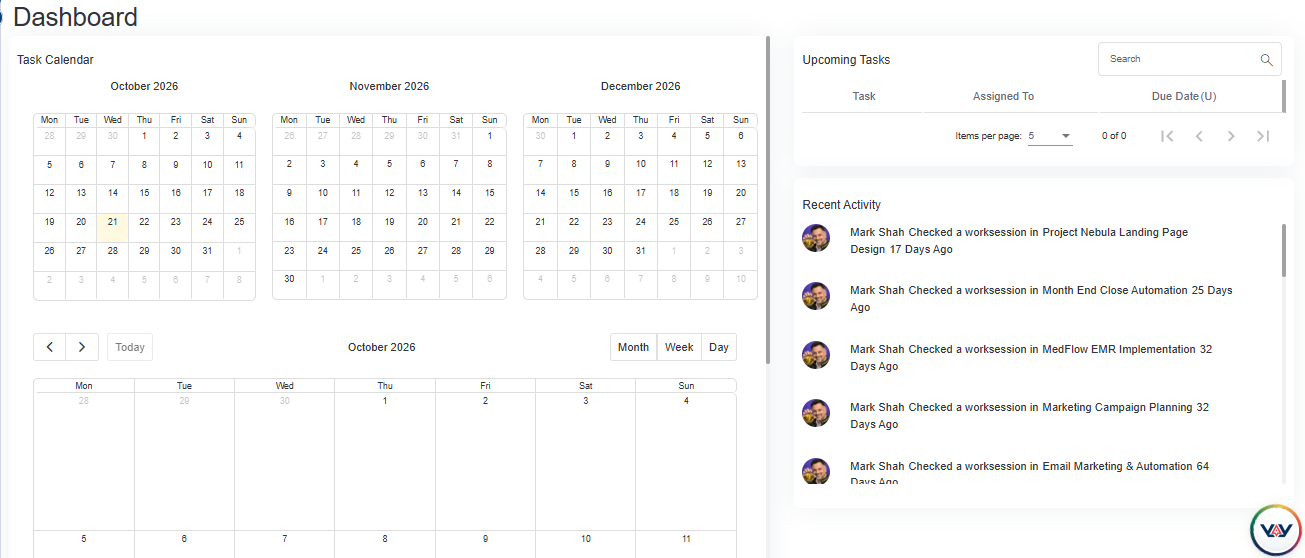
A centralised dashboard helps contractors and managers access essential time tracking information from one place. Features such as team member management, online team member status, and licensing controls make it easier to oversee workforce activity and manage access as the team changes.
2. Project and Job-Based Time Tracking
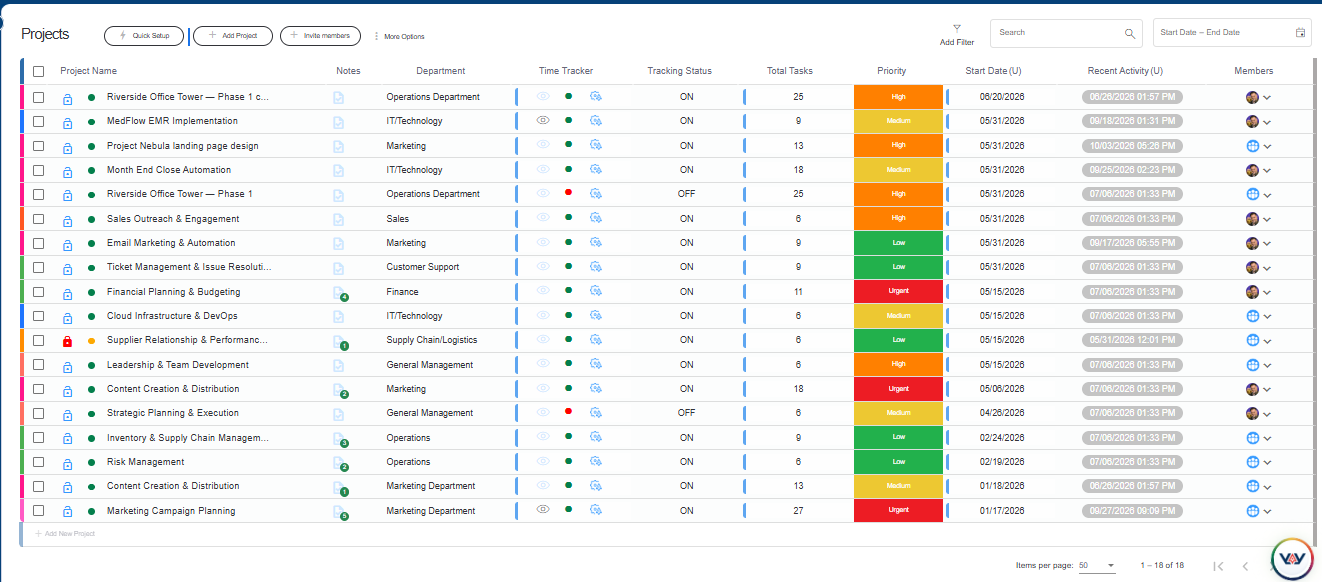
Project management features help contractors organise work and associate tracked hours with specific projects. This makes it easier to review time spent on different assignments, understand project workloads, and evaluate how contractor hours are distributed across jobs.
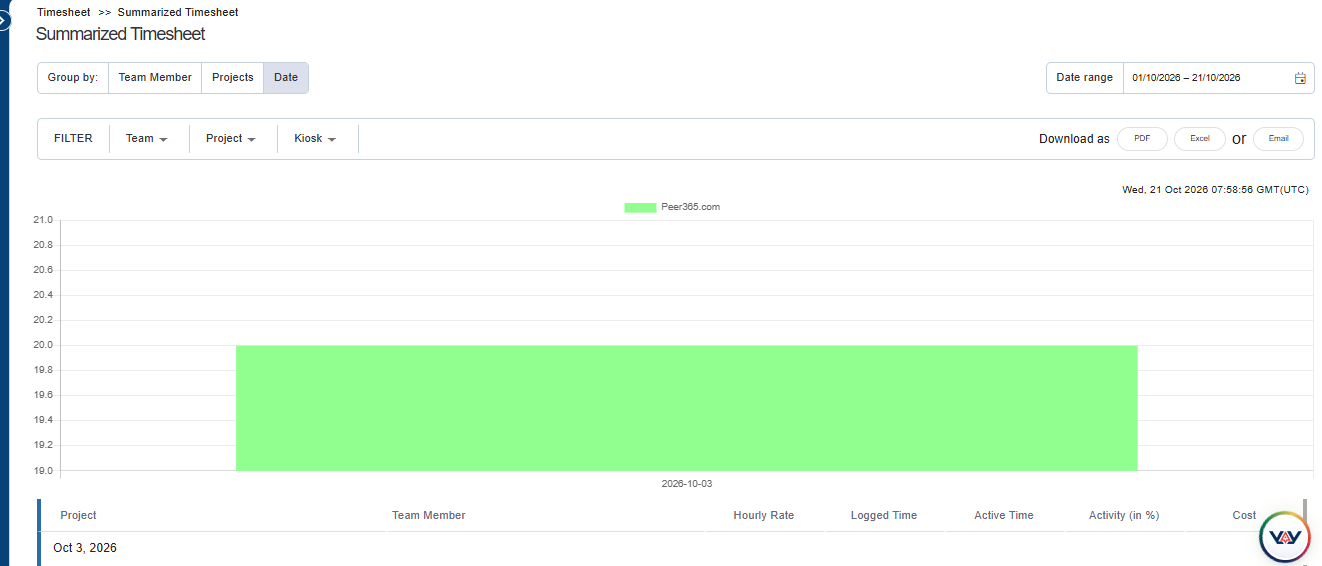
3. Detailed and Summarised Timesheets
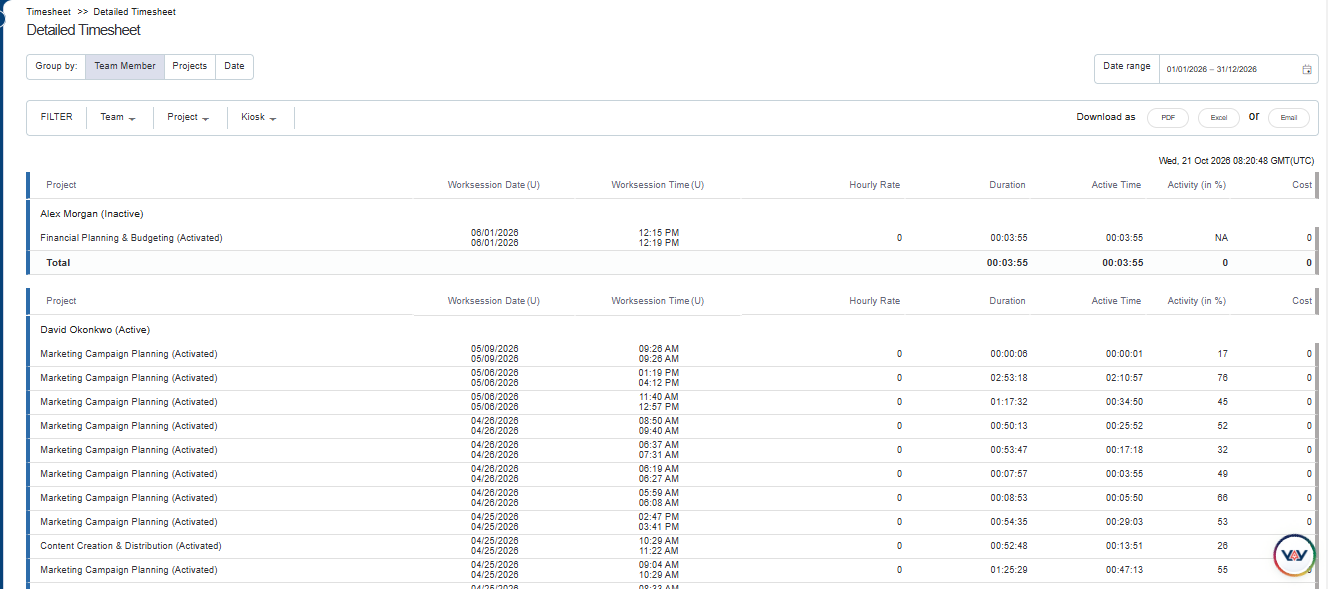
Detailed and summarised timesheets help contractors review recorded hours according to their reporting needs. Detailed timesheets provide individual time entries, while summarised timesheets offer an overview of total hours. These records help managers identify missing entries, verify contractor hours, and prepare time data for client billing or payment processing.
4. Team Activity and Member Monitoring
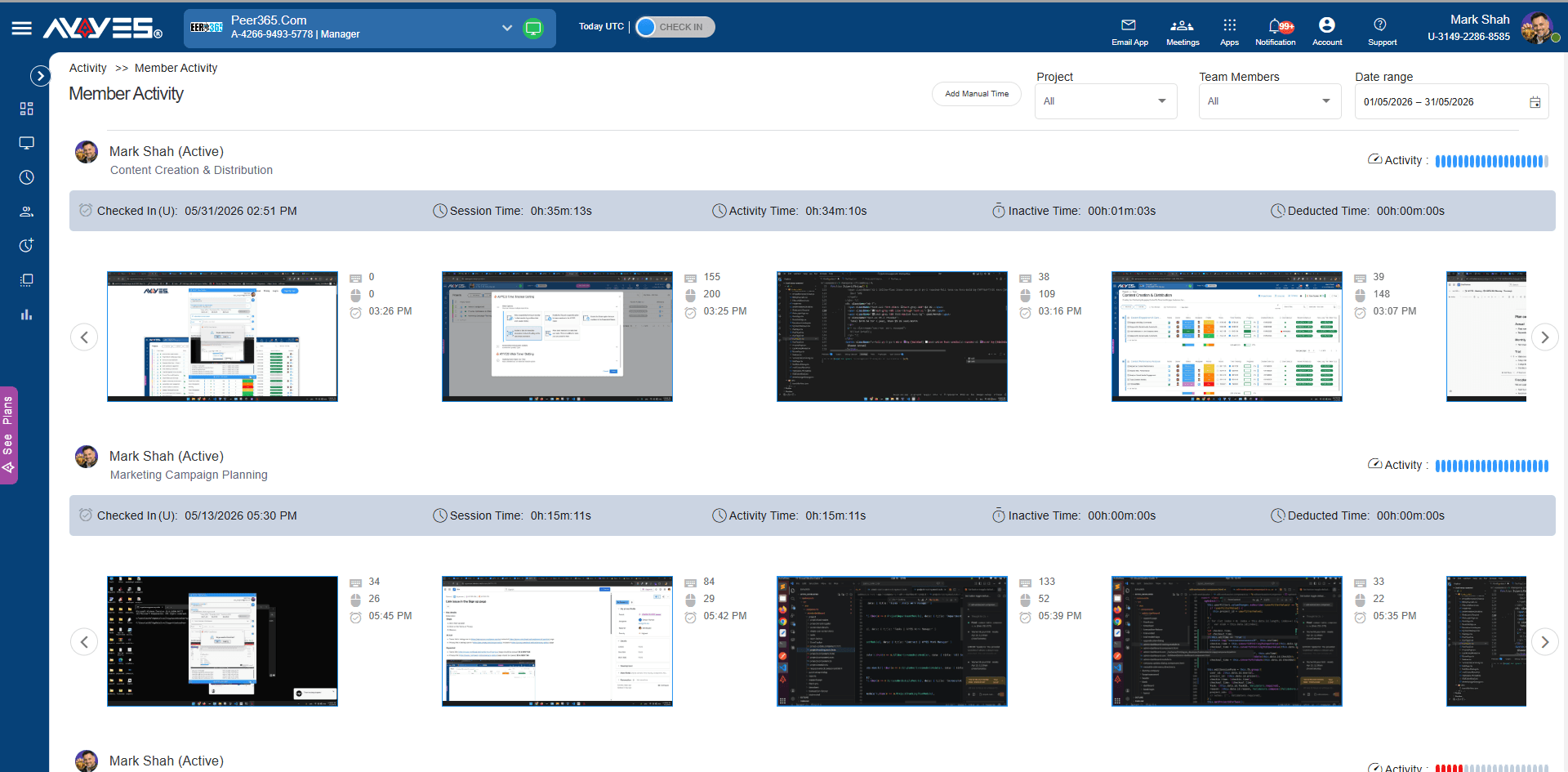
Team activity and member activity features provide visibility into tracked work periods. Contractors and managers can use time tracker user activity records to review work patterns and investigate discrepancies in recorded time. Where enabled, screenshot reports and active window information can provide additional context, subject to appropriate employee notice and privacy requirements.
5. Kiosk and Flexible Time Entry Options

Kiosk functionality supports clock-ins through a shared device, making it useful for on-site contractors and teams working from a common location. Combined with desktop time tracking and timesheet management, these options can help businesses maintain consistent records across office-based and field-based work.
6. Contractor Reporting and Billing Records
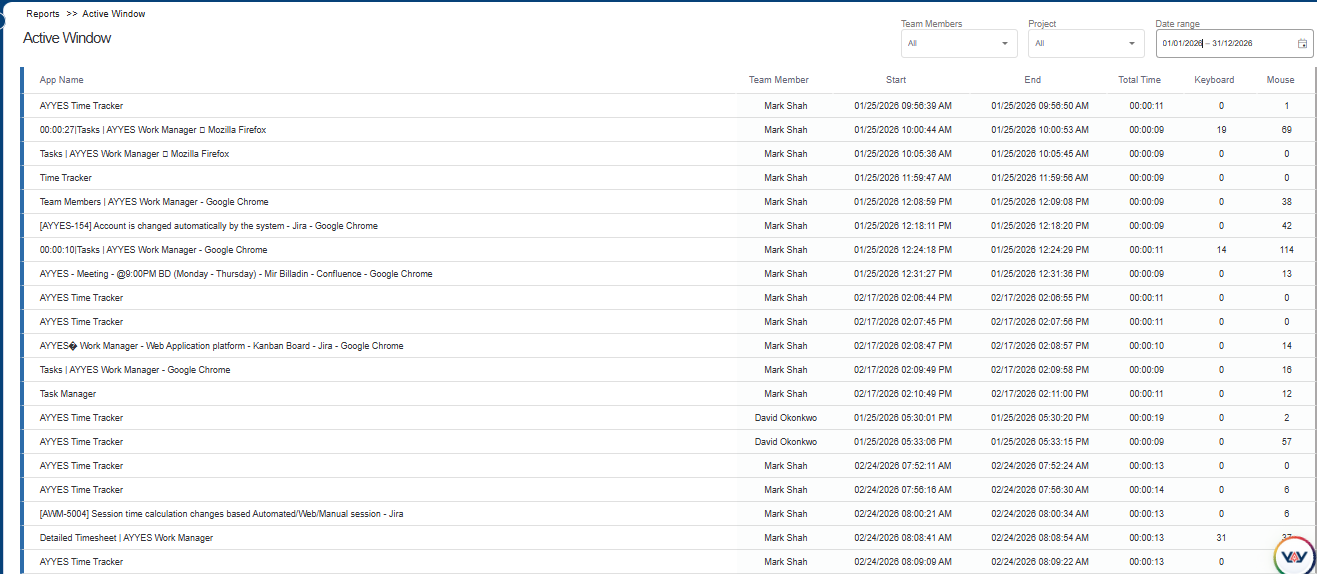
Reporting tools help contractors review time data at both individual and team levels. Detailed timesheets, summarised timesheets, and activity reports can support project cost reviews, billable-hour calculations, and client reporting. Before choosing a solution, contractors should also confirm that it supports their required invoice exports, payment workflows, or payroll integrations.
Contractor Time Tracking Template
A contractor time tracking template is a simple way to record hours when a business is not yet ready for dedicated software. Templates can work for freelancers or small contractor teams, but they often require more manual checking as projects and worker numbers increase.
1. What Should a Contractor Timesheet Include?
A useful contractor timesheet can include:
- Contractor name
- Client or company
- Work date
- Project or job
- Task or description
- Start and finish time
- Breaks
- Total hours
- Billable hours
- Hourly rate where required
- Notes
- Approval status
The exact fields should match the business’s billing and reporting process.
2. Contractor Time Tracking in Excel
Excel can work for contractors with simple tracking needs. Create columns for dates, clients, projects, tasks, start and end times, total hours, and billable time. As the contractor team grows, dedicated software can reduce manual formulas, duplicate files, missing entries, and version-control problems.
Time Tracking for Construction Contractors and Field Teams
Construction and field teams often work differently from office-based contractors. Workers may move between job sites, work in crews, or have limited access to desktop computers. Tracking methods therefore need to be quick, accessible, and connected to the correct job.
1. Track Hours Across Multiple Job Sites
Contractors working across different sites should record time against the correct location, project, or job. This makes it easier to compare labor hours across active projects.
2. Kiosk and On-Site Clock-In
A shared kiosk can provide a simple clock-in point for workers arriving at a site. This is useful when individual contractors do not need to open a desktop application.
3. Track Labor by Project or Job
Assigning hours to specific jobs helps contractors understand how much labor each project consumes and whether actual working time matches the original estimate.
4. Monitor Field Team Timesheets
Managers should regularly review field timesheets for missing entries, unusual hours, incorrect jobs, or incomplete records instead of waiting until invoicing or payroll deadlines.
How to Track Contractor Hours Step by Step
A simple contractor time tracking process makes it easier for workers and managers to follow the same system consistently.
1. Set Up Contractors and Projects
Add each contractor and create the clients, jobs, projects, or tasks they work on. Clear project structures make later reporting more accurate.
2. Choose a Time Tracking Method
Select web, desktop, mobile, kiosk, manual, or automatic tracking based on how contractors actually work. Different groups may need different options.
3. Record Hours by Project or Task
Contractors should record time against the correct project or task while the work is being completed rather than rebuilding an entire week from memory.
4. Review Contractor Timesheets
Check submitted hours for missing entries, unusually long sessions, incorrect projects, or duplicate time before records are finalized.
5. Approve Hours for Billing or Payroll
Once entries are checked, approved hours can become the basis for contractor invoices, client reports, internal costs, or payroll-related processing where applicable.
6. Generate Reports
Use reports to summarize hours by contractor, project, client, task, or date. These insights can support billing, budgeting, workload planning, and future estimates.
How to Choose the Best Time Tracking Software for Contractors
The best contractor time tracking software depends on the type of work being performed, where contractors work, and how tracked hours are used afterward.
1. Match the Software to Your Contractor Workflow
Choose software based on how contractors work. Remote professionals may prefer web or desktop tracking, while construction and field teams may need mobile or kiosk options.
2. Compare Web, Desktop and Mobile Tracking
Check which tracking methods are available and whether contractors can switch between them. Flexible options are useful when teams work across offices, homes, and job sites.
3. Check Project and Job Tracking Features
Look for the ability to organize time by client, project, task, job, or department. Clear allocation makes contractor reports and labor-cost analysis more useful.
4. Review Timesheets and Reporting
Managers should be able to filter timesheets, review contractor hours, identify missing entries, and generate reports without manually combining multiple spreadsheets.
5. Check Billing and Payroll Options
Review how tracked hours can be exported or transferred into invoicing, accounting, contractor payment, or payroll workflows. The process should minimize unnecessary re-entry.
6. Compare Pricing and Scalability
Compare user limits, projects, tracking methods, reports, exports, kiosk features, permissions, integrations, and upgrade costs before choosing a platform.
What Should a Contractor Time Tracking App Include?
A contractor time tracking app should make recording work simple whether contractors are in an office, working remotely, or moving between job sites.
Useful features include:
- Quick start-and-stop timer
- Manual time entry
- Mobile or web access
- Project and task tracking
- Contractor timesheets
- Billable-hour tracking
- Kiosk or field tracking
- Reports and exports
- Manager review
- Privacy controls
The best time tracking app for contractors should reduce administrative work rather than create another complicated process.
How AYYES Supports Contractor Time Tracking
AYYES combines multiple time tracking methods with projects, tasks, timesheets, reports, activity information, and kiosk tracking in one workspace.
1. Flexible Contractor Time Tracking
Contractors can track time through the AYYES web timer, desktop application, manual entries, or kiosk system, allowing businesses to choose a method based on how each contractor works.
2. Kiosk Tracking for Contractors and On-Site Teams
AYYES Kiosk supports shared check-ins and can be assigned to projects. Multiple kiosks can also be managed from one dashboard, making it useful for teams working across different locations.
3. Contractor Timesheets and Billing Reports
Tracked hours flow into timesheets that can be grouped by team member, project, or date. AYYES also supports report exports, helping businesses prepare contractor and client records.
4. Project and Task-Based Time Tracking
AYYES allows businesses to create projects and tasks, assign team members, and track time directly against work. This helps connect contractor hours with the jobs and deliverables they support.
5. Contractor Productivity Reports
Reports can show tracked duration, active time, projects, team members, and date-based information. Managers can use these views to understand workload and time distribution.
Common Contractor Time Tracking Mistakes to Avoid
1. Reconstructing Hours From Memory
Waiting until the end of the week to remember working hours can lead to missing or estimated entries. Encourage contractors to record time as work happens.
2. Mixing Multiple Clients and Projects
Recording all working hours under one general category makes billing and project-cost analysis difficult. Contractors should select the correct client, project, or task.
3. Missing Billable Hours
Small calls, revisions, meetings, and administrative work can be forgotten. Clear tracking rules help contractors understand which activities should be recorded.
4. Submitting Timesheets Late
Late timesheets can delay billing, contractor payments, reporting, and project reviews. Set a consistent submission schedule for all contractors.
5. Skipping Timesheet Review
Timesheets should be checked before they are finalized. Reviews can identify missing hours, duplicate entries, incorrect projects, or unusual sessions.
6. Relying on Spreadsheets as the Team Grows
Spreadsheets may work for a small number of contractors but can become difficult to manage as clients, projects, and workers increase.
7. Choosing the Wrong Tracking Method
A desktop-only tool may not suit construction workers, while a kiosk-only setup may not work for remote consultants. Match the tracking method to the actual workflow.
Why Choose AYYES for Contractor Time Tracking?
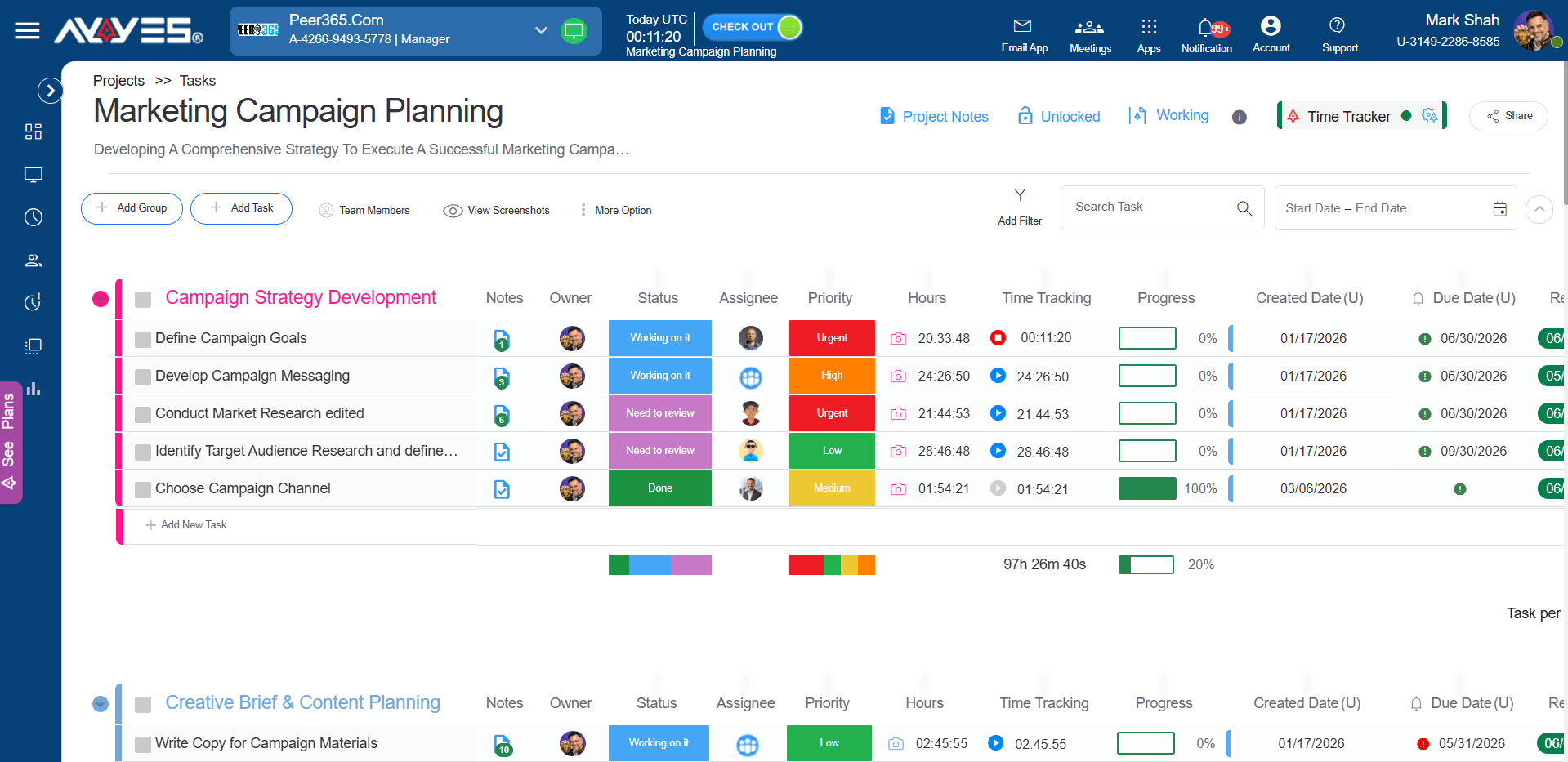
AYYES provides one workspace for recording contractor hours, connecting time to projects, reviewing timesheets, and generating useful reports.
1. Flexible Time Tracking Methods
Contractors can use web, desktop, manual, or kiosk tracking, giving businesses more flexibility across remote, office, and on-site work.
2. Project and Task Tracking
Tracked time can be connected to projects and tasks, helping businesses understand how contractor hours contribute to specific jobs and deliverables.
3. Contractor Timesheets
Detailed and summarized timesheet views make it easier to review contractor time by person, project, or date before records are used elsewhere.
4. Billing and Productivity Reports
AYYES reports can be filtered and grouped, then exported for further analysis, billing records, or internal reporting.
5. Kiosk Tracking for On-Site Teams
AYYES Kiosk lets workers check in from shared locations while their time records flow into the same timesheet system as web and desktop sessions.
6. Affordable Pricing for Contractor Teams
For businesses managing contractor hours, AYYES offers a low-cost way to get started. The free plan supports up to 12 team members with unlimited time tracking, projects, tasks, kiosk access, and timesheets. Paid plans start at $0.88 per user/month annually or $0.99 per user/month monthly. Screenshot tracking and activity/app monitoring are paid features and are not included on the Free plan.
Start Tracking Contractor Time With AYYES
Managing contractor hours should not require scattered spreadsheets, handwritten records, and repeated manual calculations. AYYES helps contractors and teams track hours, organize work by projects and tasks, review timesheets, use kiosk tracking for on-site teams, and generate reports from one connected workspace.
Start using AYYES to create clearer contractor timesheets and better visibility into where project time is going.
FAQs About Contractor Time Tracking
1. What Is Contractor Time Tracking?
Contractor time tracking records the hours contractors spend on clients, projects, jobs, or tasks. The records can support timesheets, billing, reporting, project costing, and payment workflows.
2. What Should a Contractor Time Tracking Template Include?
A contractor template should normally include the contractor name, date, client, project or job, task, start and end time, breaks, total hours, billable hours, notes, and approval where needed.
3. Can I Use a Contractor Timesheet Template in Excel?
Yes. Excel can work for simple contractor timesheets and small teams. As contractor numbers and projects grow, dedicated software can make tracking, reviewing, and reporting hours easier.
4. What Is the Best Construction Contractor Time Tracking Method?
The best method depends on the job site. Construction businesses commonly benefit from mobile or kiosk clock-ins combined with project-based timesheets and regular manager reviews.
5. What Is the Best Time Tracking Software for Contractors?
The best software depends on your workflow. Look for flexible tracking, projects, contractor timesheets, billable-hour reporting, mobile or kiosk options, useful exports, and pricing that fits your team.
6. Can a Contractor Time Tracker Be Used for Personal Time Tracking?
Yes. Contractors can also use a time tracker to understand personal work patterns, project allocation, and daily productivity, even when client billing is not required.
7. Should Contractor Time Tracking Include Screenshots or Activity Data?
It depends on the work and company policy. Activity data can provide additional context for some remote projects, but businesses should use clear policies, appropriate privacy controls, and transparent expectations.
8. Does Contractor Time Tracking Replace Invoices or Contracts?
No. Time tracking creates records of hours and work activity. Contracts define the commercial agreement, while invoices formally request payment according to the agreed billing terms.
9. How Does AYYES Support Contractor and Subcontractor Time Tracking?
AYYES supports web, desktop, manual, and kiosk tracking together with projects, tasks, timesheets, reports, exports, and activity information, allowing different types of contractors to work within one system.



