Best Employee Monitoring Software for Productivity and Transparency in 2026
Selecting the best employee monitoring software requires a careful balance between ensuring operational accountability and maintaining a healthy company culture. For modern businesses, especially those managing hybrid or remote teams, visibility into workflows is essential to protect profit margins and optimize resource allocation. The objective is not to surveil for the sake of restriction, but to gain data-driven insights that help teams remove bottlenecks and improve output quality.
Quick Summary
The best employee monitoring software provides organizations with transparent visibility into digital workflows, helping managers identify productivity patterns and streamline project management. By automating time tracking and activity logging, these tools support fair payroll processing and operational efficiency without compromising team trust or violating privacy compliance standards.
- Data-backed insights into task duration and project progress.
- Automated compliance for labor laws and overtime calculations.
- Improved transparency for remote and hybrid workforce management.
- Objective proof of work for client-facing service agencies.
Table of Contents
- Quick Summary
- Comparison of Workforce Productivity Solutions
- Automated Work OS Platforms
- Desktop Activity Monitoring Suites
- Time Tracking and Proof-of-Work Tools
- How to Choose the Right Monitoring Tool
- FAQ
- Recommended Reads
Comparison of Workforce Productivity Solutions
| Category | Core Features | Pros | Cons | Best For |
|---|---|---|---|---|
| Work OS Platforms | Project management + tracking | Centralized data, scalability | Steep learning curve | Medium to large agencies |
| Desktop Monitoring | Screenshotting, app logs | High granular visibility | Can feel intrusive | Focused remote teams |
| Time Tracking Tools | Timesheets, kiosk clock-in | Simplistic, easy to adopt | Less granular analytics | Field and hourly workers |
Automated Work OS Platforms
These platforms serve as a comprehensive hub, integrating project management platform capabilities with deep analytical tracking. Unlike singular tracking apps, Work OS solutions allow managers to oversee the entire lifecycle of a task, from initial planning to final invoicing. This category is ideal for businesses that require a bird’s-eye view of how team members spend their hours relative to project milestones.
By leveraging automated time tracker technology, these systems reduce the burden of manual logging. They provide clear evidence of work, which is invaluable for agencies that bill clients based on hourly rates or project output. This transparency builds long-term trust and ensures that labor costs remain aligned with budget projections.
Desktop Activity Monitoring Suites
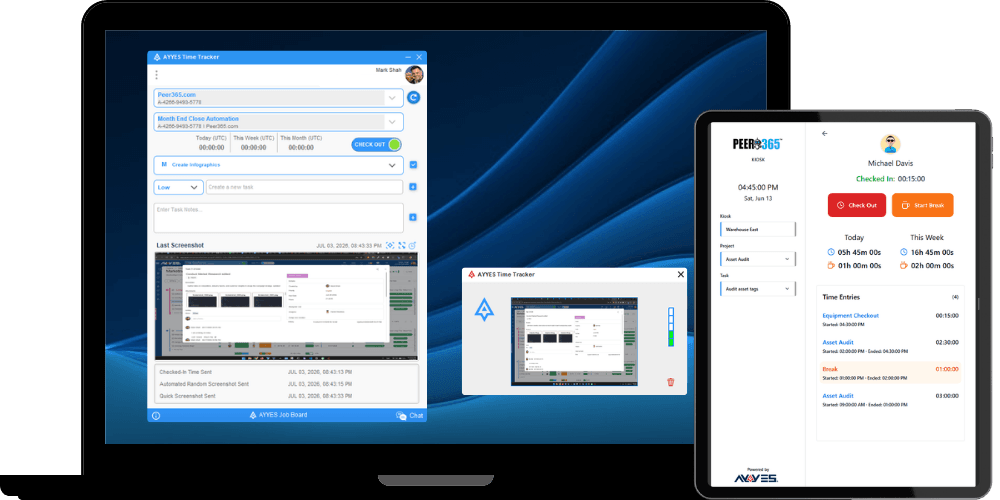
For organizations where digital security and focus are paramount, desktop monitoring suites excel by capturing real-time metrics on how employees interact with their devices. These tools typically utilize screen monitoring and app activity logs to generate reports on active vs. idle time. This level of detail helps identify patterns of distraction and provides the necessary feedback to improve individual workflow efficiency.
However, implementing these solutions requires clear communication regarding expectations. When monitoring employee activity, it is best practice to focus on professional output metrics rather than invasive surveillance. When used correctly, these tools serve as a productivity ally, helping top performers receive recognition for their contributions based on objective activity logs.
Time Tracking and Proof-of-Work Tools
Reliable time tracking software is the foundation for any remote or field workforce. These tools often feature a kiosk mode, allowing teams to clock in and out seamlessly from tablets or shared terminals. This is particularly effective for businesses in sectors like construction, logistics, or hospitality, where clocking in is a frequent physical requirement.
Beyond simple attendance, these systems often include reports that highlight discrepancies between scheduled shifts and actual hours worked. For managers, this means more accurate payroll processing and fewer manual errors. By consolidating app tracking and attendance in one dashboard, companies maintain high operational standards while keeping the administrative workload manageable.
How to Choose the Right Monitoring Tool
Choosing the right solution depends heavily on your team’s specific environment. For remote creative teams, an all-in-one agency management software is usually the most efficient choice because it links tracking directly to project tasks. If your primary focus is on labor law compliance and payroll, prioritize platforms that offer robust timesheet auditing and automated overtime calculations.
Consider the cultural impact of the tool as well. Features such as privacy-respecting activity logs are often better received by employees than invasive monitoring. Always pilot the software with a small, representative group to gather feedback on usability. A tool that provides clear value to the employee – such as making it easier to track their own hours or demonstrating their personal productivity – will always achieve higher adoption rates than one viewed solely as a surveillance device.
FAQ
- Q: Is it legal to use employee monitoring software?
A: Yes, generally it is legal to monitor company-provided equipment, provided that you comply with local and federal privacy regulations. Always inform your employees of the policies in place. - Q: How can I ensure monitoring software doesn’t hurt team morale?
A: Focus on transparency. Explain the “why” behind the tracking, emphasize that it is for operational efficiency, and share the insights with employees so they can monitor their own productivity. - Q: What is the primary difference between time tracking and activity monitoring?
A: Time tracking focuses on the duration of work for payroll and billing, while activity monitoring captures data on how that time is spent, such as app usage or active mouse movement.
Recommended Reads
- Learn about the benefits of modern agency management software
- Explore advanced screen monitoring and activity logs
- Understand how to improve team efficiency with detailed reporting
- Visit the AYYES help center for integration guidance