Top 12 Best Time Tracker Software for Teams and Freelancers in 2026
Choosing the right time tracker can improve billing accuracy, payroll preparation, project planning, and visibility across remote, hybrid, and on-site work. The challenge is that the best tool for a solo consultant is not always the best choice for an agency, field team, or growing company.
This guide compares 12 of the best time tracker software options for teams and freelancers in 2026. We looked at everyday usability, free-plan value, project and task support, reporting, team management, platform availability, privacy controls, and the ability to scale.
Editorial disclosure: This article is published by AYYES, and AYYES is listed first. The other products are included to help readers compare realistic alternatives. Our research used publicly available product information and competitor roundups available on August 21, 2026. Features, free-plan limits, and prices can change, so verify important details directly with each provider before purchasing.
Quick Answer: What Is the Best Time Tracker Software in 2026?
AYYES is our top overall choice for teams and freelancers who want time tracking, projects, tasks, timesheets, desktop tracking, kiosk clock-ins, and reporting in one platform. Its free plan supports up to two team members with unlimited tracking, projects, and tasks, making it a practical free time tracking app for freelancers and micro-teams.
However, every workflow is different. Clockify is attractive for broad free access, Toggl Track is known for a simple timer experience, Harvest suits time-to-invoice workflows, Everhour fits teams that live in project-management tools, and RescueTime focuses on personal productivity.
Top 12 Best Time Tracking Software at a Glance
| Rank | Software | Best For | Free Option | Standout Capability |
|---|---|---|---|---|
| 1 | AYYES | Freelancers, small teams, remote and on-site work | Yes, up to 2 members | Web, desktop, and kiosk tracking with projects |
| 2 | Clockify | Freelancers and budget-conscious teams | Yes | Unlimited-user free time tracking |
| 3 | Toggl Track | Freelancers and creative teams | Yes, limited team size | Fast timer and clear reports |
| 4 | Harvest | Agencies and client billing | Limited free plan | Time-to-invoice workflow |
| 5 | Everhour | Project-management-heavy teams | Free plan available | Deep integrations with work tools |
| 6 | Apploye | Contractors and distributed teams | Free starter option | Time, tasks, budgets, and invoicing |
| 7 | Hubstaff | Remote and field teams | Trial available | GPS, activity, and optional screenshots |
| 8 | Time Doctor | Teams needing productivity oversight | Trial available | Website, app, and idle-time insights |
| 9 | DeskTime | Hybrid teams | Limited free option | Automatic time and productivity tracking |
| 10 | My Hours | Consultants and service businesses | Yes | Project budgets and approval workflows |
| 11 | RescueTime | Personal productivity | Limited free access/trial | Automatic focus and distraction analysis |
| 12 | wAnywhere | Workforce analytics and compliance | Trial available | AI-assisted workforce insights |
How We Evaluated the Best Time Tracking Apps
We compared the tools using criteria that matter to both individuals and employers:
- Ease of use: How quickly can someone start a timer, add a manual entry, or correct a timesheet?
- Core tracking: Web, desktop, mobile, kiosk, automatic tracking, idle detection, and offline support where available.
- Freelancer value: Client and project organization, billable hours, exports, budgets, and invoicing support.
- Team management: Roles, permissions, approvals, schedules, attendance, and manager visibility.
- Reporting: Useful summaries, detailed activity, payroll-ready exports, and project profitability insights.
- Privacy and trust: Whether monitoring features can be configured transparently and appropriately.
- Price flexibility: Free access, trials, and the ability to move to paid plans as a team grows.
The ranking is an editorial comparison, not a laboratory test or a guarantee that one product will suit every organization. Your best choice depends on team size, tracking style, reporting needs, budget, and employee privacy expectations.
12 Best Time Tracking Software for Teams and Freelancers
1. AYYES — Best Overall Time Tracking Software for Teams and Freelancers
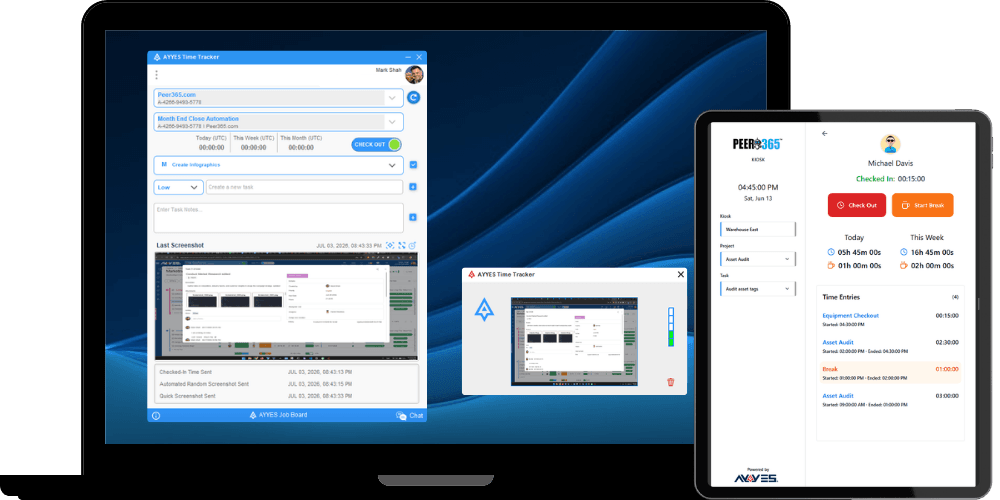
AYYES combines time tracking with project, task, team, and work-management features. Users can record time through a web timer, a desktop tracker for Windows, macOS, and Linux, or a kiosk for on-site clock-ins. That flexibility makes it useful when one business has freelancers, remote employees, and location-based workers using different tracking methods.
AYYES also connects tracked hours with projects and tasks. Managers can review timesheets, activity, billable hours, labor cost, and reports instead of transferring data between a basic timer and a separate project-management tool. Desktop options include idle detection, app usage, and configurable screen monitoring, including screenshot blur controls for sensitive work.
- Best for: Freelancers, micro-businesses, agencies, remote teams, and mixed office/field workforces.
- Key strengths: Web, desktop, and kiosk tracking; unlimited projects and tasks; team timesheets; reporting; project management; and a free plan for up to two members.
- Potential limitation: Teams using detailed monitoring features should create a clear, transparent workplace policy before enabling them.
For users searching for the best free time tracking app that can grow into a broader work-management system, AYYES provides a strong balance of individual simplicity and team control. Review the current AYYES pricing and free-plan features, or create a free AYYES account to test the workflow without a credit card.
2. Clockify — Best Free Time Tracking App for Larger Teams
Clockify is a popular choice for freelancers and teams that want to track projects and hours without paying for every user at the entry level. Its core experience includes a timer, manual timesheets, calendar-style entry, billable-hour tracking, reports, and exports.
The generous free tier is the main reason Clockify appears near the top of many comparison lists. It can work well for a company that needs a time tracking app free for basic adoption before deciding whether advanced controls, scheduling, budgeting, or analytics justify an upgrade.
- Best for: Freelancers, nonprofits, and teams prioritizing a broad free tier.
- Key strengths: Straightforward timer, project organization, billable hours, timesheets, and useful reports.
- Potential limitation: Advanced administration and reporting features may require paid plans, and some teams may prefer a more integrated work-management experience.
3. Toggl Track — Best Time Tracking App for Freelancers
Toggl Track is designed around quick time capture. Freelancers can start a timer with minimal setup, organize entries by client or project, and review reports without navigating a complex workforce-management dashboard. Calendar views, manual entries, browser extensions, and integrations help it fit into established workflows.
It is a strong candidate for the best time tracking app for freelancers who value speed, clean design, and reporting more than employee-monitoring or kiosk features.
- Best for: Solo professionals, consultants, creative teams, and knowledge workers.
- Key strengths: Easy timer, cross-device access, reporting, and many integrations.
- Potential limitation: Users who forget to start manual timers can create gaps, while advanced planning and profitability features may require higher plans or additional tools.
4. Harvest — Best Time Tracking Software for Client Invoicing
Harvest connects tracked hours to client billing. It is particularly useful for agencies, consultants, designers, and professional-service businesses that want timesheets, project budgets, expenses, invoices, and payment workflows in a familiar interface.
Reports help managers compare estimated and actual effort, spot projects approaching their time budgets, and turn approved work into invoices. This direct time-to-billing path can reduce duplicate entry for service businesses.
- Best for: Agencies and consultants billing clients by time.
- Key strengths: Billable-hour tracking, project budgets, invoices, expenses, and business-focused reporting.
- Potential limitation: Teams seeking detailed activity monitoring, kiosk clock-ins, or extensive workforce controls may need another solution.
5. Everhour — Best Time Tracker for Project Management Integrations
Everhour is built for teams that already manage work in platforms such as Asana, Trello, ClickUp, Jira, or Notion. Instead of forcing users into a separate time-tracking environment, it places timers and estimates close to the tasks they already use.
It also supports billable and non-billable time, project budgets, team capacity, reporting, and invoicing. That makes it appealing to agencies and software teams that want time data connected directly to delivery workflows.
- Best for: Teams with established project-management systems.
- Key strengths: Embedded integrations, budgeting, estimates, reporting, and billing support.
- Potential limitation: Value depends heavily on the integrations you use, and some plans or capabilities may not suit very small teams.
6. Apploye — Best Time Tracking App for Independent Contractors
Apploye brings together manual and automatic tracking, tasks, billable and non-billable hours, project budgets, timesheets, reports, payroll, and invoicing. Its combination of freelancer-facing billing tools and team oversight makes it relevant to contractors who expect to grow into a small distributed team.
The platform also offers activity and screenshot options. These may provide proof of work for certain client relationships, but they should be used with clear consent and privacy rules.
- Best for: Independent contractors, outsourcing teams, and service businesses.
- Key strengths: Time and task tracking, project budgets, invoices, reports, and optional productivity monitoring.
- Potential limitation: Monitoring can feel intrusive when poorly implemented, and integration requirements should be checked before adoption.
7. Hubstaff — Best Employee Time Tracking Software for Remote and Field Teams
Hubstaff combines time tracking with workforce features such as activity levels, optional screenshots, GPS, geofencing, scheduling, and payroll-related workflows. These tools make it a practical option for organizations managing distributed employees or people moving between job sites.
Managers can connect hours to projects and tasks, while mobile and desktop apps support different work settings. Its deeper visibility is useful when operational proof is necessary, but the same controls require thoughtful communication.
- Best for: Remote teams, field service businesses, and mobile workforces.
- Key strengths: GPS and geofencing, timesheets, activity insights, scheduling, and integrations.
- Potential limitation: The interface and monitoring options may be more than a solo freelancer or trust-based creative team needs.
8. Time Doctor — Best Productivity Time Tracker for Remote Teams
Time Doctor focuses on understanding how working time is used. Its toolkit includes time tracking, idle detection, website and application usage, productivity reports, alerts, and optional screenshots. It is often considered by remote businesses, agencies, and outsourcing companies that need more accountability than a basic stopwatch provides.
- Best for: Remote organizations that need detailed productivity data.
- Key strengths: Activity insights, distraction alerts, reports, payroll-related workflows, and integrations.
- Potential limitation: Detailed monitoring may not fit every company culture, and the product is less attractive to people only seeking a simple free timer.
9. DeskTime — Best Automatic Time Tracking Software
DeskTime automatically records time spent in applications and on websites, then categorizes activity to help users understand productive and unproductive patterns. Automatic capture reduces the risk of forgotten timers and can produce a more complete workday record.
Team features may include attendance, shifts, projects, absence planning, invoicing, and reports, depending on the chosen plan.
- Best for: Hybrid teams and users who regularly forget manual timers.
- Key strengths: Automatic tracking, productivity analysis, attendance, and project reports.
- Potential limitation: Automatic monitoring requires clear employee expectations, and feature depth varies by plan.
10. My Hours — Best Time Tracking App for Consultants
My Hours emphasizes project-based time tracking, budgets, billable rates, approvals, and reporting. It suits consultants and small service businesses that want to see how labor affects project cost without adopting a full employee-monitoring platform.
- Best for: Consultants, professional services, and small project teams.
- Key strengths: Project budgets, rates, timesheet approvals, expenses, and client-ready reports.
- Potential limitation: Companies needing kiosk, GPS, or detailed app-activity tracking should compare other options.
11. RescueTime — Best Time Tracking App for Personal Use
RescueTime is less focused on payroll and team timesheets and more focused on helping individuals understand attention. It automatically analyzes application and website use, highlights distractions, and supports focus sessions and goals.
If you need a time tracking app for personal use, RescueTime can reveal habits that a manual timer misses. It is also a contender for the best time tracking app for personal use when your priority is focus rather than client invoicing or employee scheduling.
- Best for: Individuals, students, writers, and knowledge workers improving focus.
- Key strengths: Automatic activity analysis, goals, focus tools, and distraction insights.
- Potential limitation: It is not a complete replacement for team timesheets, payroll exports, or project billing software.
12. wAnywhere — Best Time Tracking Software for Workforce Analytics
wAnywhere combines employee time tracking with attendance, productivity monitoring, dashboards, compliance-oriented reporting, and AI-assisted workforce insights. It is positioned for remote, hybrid, and office teams that want a broad view of work patterns.
- Best for: Businesses prioritizing workforce analytics and administrative oversight.
- Key strengths: Time and attendance, productivity dashboards, offline and mobile support, and configurable reporting.
- Potential limitation: Advanced features may require onboarding and can be unnecessary for freelancers needing only a lightweight timer.
How to Choose Time Tracking Software for Teams and Freelancers
For Freelancers
Prioritize a fast timer, manual corrections, client and project labels, billable hours, exports, and invoicing support. A free plan is valuable, but also check what happens when you add a collaborator or need more reporting. AYYES, Clockify, Toggl Track, Harvest, Apploye, and My Hours are all relevant starting points.
For Small and Growing Teams
Look beyond the timer. The right time tracking software for employees should support permissions, approvals, consistent project naming, payroll-ready reports, and more than one tracking method. AYYES is particularly useful when a team wants web, desktop, and kiosk tracking plus centralized team-member management inside one system.
For Remote Teams
Check desktop support, offline syncing, idle handling, app usage, activity reports, and privacy controls. Employee monitoring software should be proportionate to a legitimate business need and clearly explained to workers. Optional controls are usually better than an inflexible all-or-nothing approach.
For Personal Use
Choose automatic activity analysis if your goal is focus and habit improvement; choose a manual project timer if you need to understand how long specific tasks take. RescueTime fits attention analysis, while AYYES, Clockify, and Toggl Track can suit structured project tracking.
Common Mistakes When Choosing Time Tracker Software
- Choosing only by price: A free time tracking app is not valuable if employees find it confusing or avoid using it. Compare ease of use, essential features, support, and future upgrade costs before making a decision.
- Ignoring privacy: Screenshots, application usage, activity levels, and location tracking can affect employee trust. Define what will be collected, why it is required, who can access it, and how long the information will be stored.
- Skipping a pilot: Test the software with one real project or a small group before a company-wide rollout. A short pilot reveals problems with timers, permissions, reporting, integrations, and employee adoption while they are still easy to correct.
- Collecting data without using it: Time reports should support a clear business decision. Choose the weekly metrics that will improve project estimates, workload planning, payroll accuracy, client billing, or profitability instead of collecting activity data without a purpose.
- Forgetting mobile or offline work: Field employees, contractors, and frequent travelers need reliable tracking away from a desk. Check mobile access, kiosk clock-ins, offline recording, syncing, and manual corrections before selecting software for a flexible workforce.
- Not checking exports: Confirm that approved hours and reports can move cleanly into your accounting, payroll, invoicing, or client-billing process. Test the required export format during the trial so you do not create extra administrative work later.
Start Smarter Time Tracking with AYYES AI Work Manager
AYYES AI Work Manager and Time Tracker brings automatic time tracking, timesheets, projects, tasks, team management, and reporting into one connected platform. Desktop tracking can capture apps and websites, activity levels, idle time, and optional proof-of-work screenshots.
Use AYYES to understand where work time goes, manage billable hours, improve project visibility, and generate useful reports for teams or clients. The flexible web, desktop, and kiosk options support freelancers, remote employees, and office or field teams.
Start using AYYES AI Time Tracker for free — no credit card required.
FAQs About the Best Time Tracker Software
What is the best free time tracking app for freelancers?
AYYES is a strong option for solo professionals and two-person teams because its free plan includes unlimited tracking, projects, and tasks. Clockify is also attractive for teams prioritizing a broad free tier, while Toggl Track suits freelancers who want a particularly simple timer.
Is there a free app to record my work hours?
Yes. If you search for a record my work hours app free, focus on timer reliability, manual editing, project labels, reports, and data export—not only the $0 price. AYYES, Clockify, Toggl Track, My Hours, and several other products offer free or limited-free access.
Can one time tracking app work for freelancers and employees?
Yes. A flexible platform should let freelancers track billable projects while giving managers timesheets, roles, approvals, and team reports. AYYES supports individual tracking as well as web, desktop, and kiosk workflows for teams.
Should employers use screenshots and activity monitoring?
Only when the feature serves a clear and lawful business need. Explain what is collected, why it is collected, who can view it, and how long it is stored. Use privacy controls such as screenshot blurring where appropriate, and check local employment and privacy requirements.
What should I test during a free trial?
Run a real project. Ask users to start and stop timers, correct an entry, switch tasks, work offline if relevant, submit a timesheet, and generate the reports needed for billing or payroll. The best software is the one your team can use consistently.
Final Verdict: Best Time Tracking Software for 2026
There is no universal winner for every workflow, but AYYES offers the most balanced option in this comparison for users who need more than a basic stopwatch. It brings together time tracking, projects, tasks, teams, timesheets, web and desktop timers, kiosk clock-ins, activity reporting, and scalable paid options.
Clockify is a compelling free-first alternative, Toggl Track is excellent for low-friction manual tracking, Harvest is strong for invoicing, Everhour fits integrated project workflows, and RescueTime is better suited to personal focus. Before committing, shortlist two or three options and test them with real work.
Start tracking time with AYYES for free — no credit card required.
Research note: This comparison was informed by AYYES product pages and publicly available competitor research, including Apploye’s 2026 independent-contractor time-tracking comparison and wAnywhere’s 2026 employee time-tracking roundup. Vendor claims and plan details were checked on August 21, 2026, but may change. This content is for general informational purposes and does not constitute legal, HR, payroll, or compliance advice.