
HR Teams: Pilot Time and Attendance Software on AYYES’ Free Plan
This time and attendance software suits HR teams that need payroll-ready data without sacrificing flexibility across remote and in-house staff. Its combination of automated time capture, AI-driven automations, and privacy-conscious monitoring gives HR and operations leaders a single, scalable system rather than a patchwork of clock-in tools and spreadsheets. It suits organizations of most sizes, from lean startups to growing mid-market teams managing distributed staff.
TL;DR:
- The software supports diverse clock-in methods, including kiosk, GPS mobile check-ins, and desktop timers, to suit different workforce needs and locations.
- Verification features such as photo capture and screenshot logs reduce time theft but require privacy controls to maintain employee trust and compliance.
- Native payroll integration with export formats compatible with your payroll system is critical to avoid manual re-entry and reduce errors.
- Implementation varies from a few days for small teams to several months for complex, multi-location organizations, affecting rollout timelines and costs.
- A controlled trial should test clock-in, overtime, PTO workflows, and payroll exports to identify integration issues before full deployment.
Table of Contents
- 1. Shortlist: AYYES and the alternative solution categories
- 2. Key features and verification points HR teams must evaluate
- 3. Integrations, payroll flow, and compliance: what to check before you buy
- 4. Implementation timeline, total cost of ownership, and pricing shapes
- 5. Tactical evaluation framework and trial script HR can run during demos
- 6. Methodology, author note, and AYYES proof points
- 7. What practical trade-offs HR buyers should weigh
- 8. Why AYYES fits your attendance tracking needs
- 9. Primary sources used for feature, pricing, and market claims
- Sources
- FAQ
1. Shortlist: AYYES and the alternative solution categories
Most HR teams evaluating time and attendance software land on one of four paths, depending on how payroll is handled, where employees work, and how granular the reporting needs to be. This software fits a wide range of these scenarios by pairing standard attendance tracking with AI automations and screenshot-based verification, a combination not commonly bundled together in this category. AYYES works best for teams that want one platform to handle clock-in, scheduling, PTO, and productivity insight without stitching together separate tools. Its AI automation agents reduce manual review of timesheets, and its screenshot capture with adjustable privacy settings gives managers visibility into work patterns without constant oversight. Remote-first companies and hybrid teams get the most value here, since the platform was built around distributed work from the start. AYYES is free for teams of up to 12 members. Paid plans start at $0.88 per seat/month with annual billing or $0.99 per seat/month with monthly billing, giving growing teams a low-cost path to additional monitoring and workforce-management features. Three other categories are worth knowing before you commit: AYYES offers a free plan for up to 12 team members. Screenshot tracking and activity/app monitoring are paid features and are not included on the Free plan.
- Payroll-first HR suites: chosen when payroll must run natively inside the same system that tracks hours, useful for organizations that already centralize benefits, onboarding, and payroll in one HR platform.
- Mobile-first deskless or field solutions: built around GPS verification, kiosk clock-in, and offline functionality for construction crews, retail staff, or home health workers who rarely sit at a desk.
- Lightweight project or time trackers: focused on billable hours and invoicing rather than shift-based attendance, a better fit for agencies and freelancers than for hourly workforce management.
Free plans are common across this market and tend to work well for small, remote, or project-based teams that do not yet need payroll integration or advanced scheduling. AYYES offers a free plan for up to 12 team members alongside paid tiers, so teams can start without payment and upgrade as their tracking needs grow. Whichever path you take, run a short trial before signing an annual contract. A demo login rarely surfaces the payroll mapping issues or mobile coverage gaps that show up once real employees start clocking in. AYYES offers a free plan for up to 12 team members. Screenshot tracking and activity/app monitoring are paid features and are not included on the Free plan.
2. Key features and verification points HR teams must evaluate
Not every attendance tool solves the same problem, and matching features to your actual workforce matters more than picking the product with the longest feature list. Before you shortlist a vendor, check each of these against how your teams actually clock in and get paid.
- Clock-in methods: confirm the tool supports the mix your workforce needs, whether that is a shared kiosk for a warehouse floor, mobile GPS check-in for field staff, or simple desktop time capture for office and remote employees.
- Verification and anti-buddy-punch controls: look for photo capture, biometric options, or screenshot-based activity logs that confirm the person clocking in is the person actually working, while weighing how intrusive each method feels to your staff.
- Scheduling and overtime rule support: the system should let managers build shift schedules and flag approaching overtime thresholds automatically, rather than relying on someone manually watching hours accumulate.
- PTO and leave management: paid time off requests, approvals, and balances should live in the same system as attendance data, so managers are not reconciling two separate records.
- Reporting and audit trails: exportable reports need to match the format your payroll provider expects, and every edit to a timesheet should be logged with who made the change and when.
- APIs and integration depth: a documented API matters less than whether the vendor already has a pre-built connector to your payroll or HR system.
Verification features deserve particular attention because they sit at the intersection of accuracy and employee trust. Photo-based clock-in and screenshot capture reduce time theft risk, but they also raise privacy questions that HR needs to answer before rollout, not after an employee complains. Some platforms address this directly by giving managers the option to blur or limit screenshot detail, helping keep oversight in place without turning monitoring into surveillance. Pro Tip: During any demo, ask the vendor to show you an edited timesheet’s audit trail in real time, not just describe it. If they cannot pull one up on the spot, the feature is probably thinner than the sales deck suggests. Overtime and scheduling logic is where many otherwise solid tools fall short. A system that tracks hours accurately but cannot flag a shift that will push an employee into overtime forces managers back into manual monitoring, which defeats the purpose of buying software in the first place. Ask vendors to walk through how their system handles a multi-state or multi-jurisdiction overtime rule, since this is a common gap even among established products. Reporting formats matter more than they seem at first glance. A report that looks clean on screen but exports as a PDF instead of a CSV or a payroll-ready file adds manual re-entry work that erases much of the time savings the software promised. Confirm the export format before you buy, not after your first pay period.
3. Integrations, payroll flow, and compliance: what to check before you buy
The single biggest risk in adopting new attendance software is not the clock-in experience; it is what happens when hours move into payroll. A tool that tracks time beautifully but exports data your payroll system cannot ingest cleanly creates more work than it saves. Start with the payroll integration checklist:
- Confirm whether the vendor offers a native, pre-built connector to your payroll provider or only a generic API that your team would need to configure.
- Ask for a sample export file and have your payroll administrator review the field mapping before signing a contract.
- Check whether overtime, PTO, and shift differentials export as separate line items or require manual splitting after the fact.
- Verify how corrections and retroactive edits flow through to payroll once a pay period has closed.
Practitioners generally recommend using a built-in time module when a core HR or payroll platform already offers one, since native integrations reduce sync errors and cut the cost of building custom connections. When payroll is already handled in-house, the same guidance holds: a time product with native, pre-built payroll exports tends to deliver more value than one that only offers an API and expects your team to build the bridge. Manual timesheet processing and time theft remain measurable cost drivers for many businesses, according to review data compiled by ThriveOnz360, which is part of why buyers weigh verification and automated exports so heavily during evaluation. Compliance checks belong on the same list. Look for automated overtime rule application by jurisdiction, audit logs that timestamp every timesheet edit, and retention settings that match your industry’s record-keeping requirements. A vendor that cannot explain how their system handles a state-specific overtime rule or a local scheduling ordinance is not ready for a multi-location rollout. Data privacy deserves its own line item, especially for any tool that includes screenshot capture or activity monitoring. Document what is captured, how long it is retained, who can view it, and whether employees are notified before monitoring begins. Some platforms build privacy controls into screenshot features, including blur settings, providing HR teams a documented, adjustable policy to point to rather than an all-or-nothing monitoring switch. Whatever platform you choose, put the monitoring policy in writing and share it with employees before launch, not after someone notices the software running.
4. Implementation timeline, total cost of ownership, and pricing shapes
Rollout speed depends heavily on company size and how much payroll mapping work is involved, not just how quickly employees can log into the app. A small team of under 20 people can typically be up and running within a few days to a week, since there is little scheduling complexity and payroll mapping is straightforward. Mid-market organizations with multiple departments or locations should plan for two to four weeks, largely to account for scheduling rule configuration and a payroll dry run. Enterprise rollouts with multiple business units or union rules often stretch to several months, driven by change management and system integration rather than the software itself. 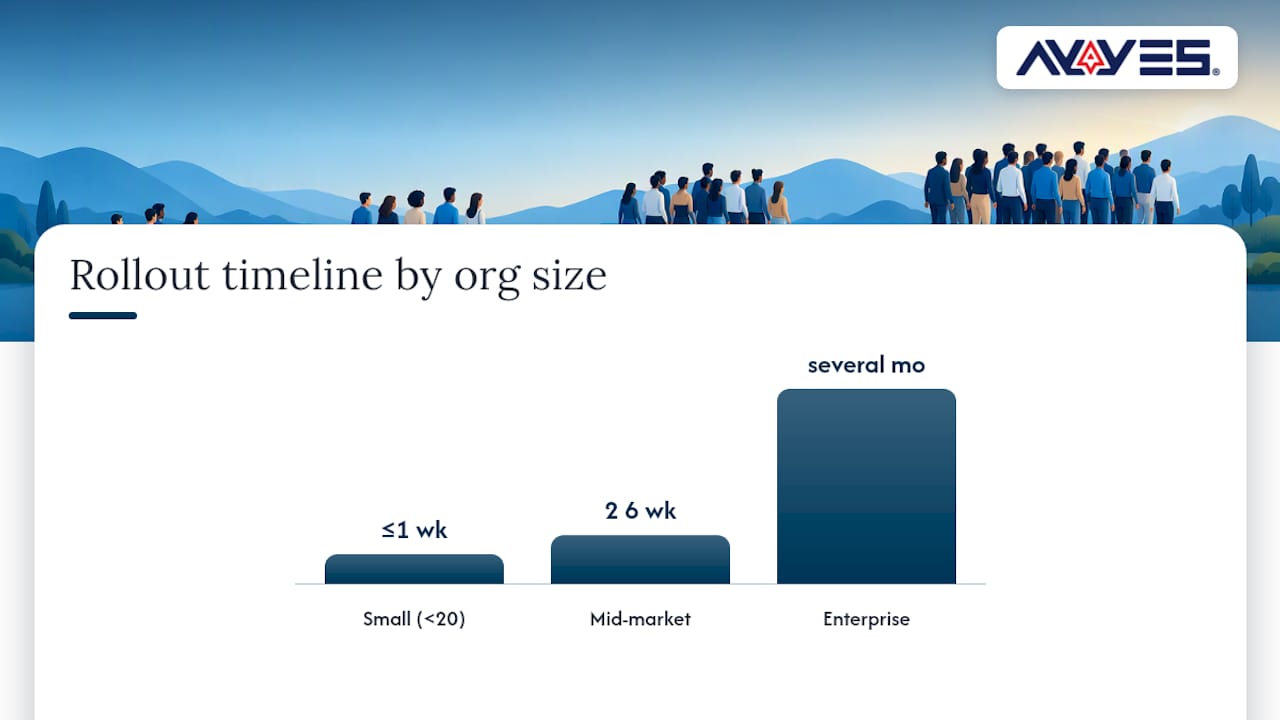 Pricing in this category generally follows one of three shapes: per-seat monthly pricing, per-location fees for kiosk-heavy deployments, or tiered plans that gate features like advanced scheduling or facial recognition behind higher tiers. Independent reviews of established products like TimeClock Plus show that advanced features such as facial recognition and advanced scheduling frequently carry additional fees on top of the base subscription, a pattern worth checking for any vendor you shortlist. AYYES prices per seat rather than per location, with three tiers: Free at $0 per month for up to 12 team members, Monthly at $0.99 per month per seat, and Annual at $0.88 per month per seat, all listed on the AYYES pricing page. The Free plan for up to 12 team members gives small teams a genuine no-cost entry point rather than a time-limited trial. Beyond the sticker price, budget for a few costs that rarely show up in a sales conversation: AYYES offers a free plan for up to 12 team members. Screenshot tracking and activity/app monitoring are paid features and are not included on the Free plan.
- Payroll field mapping: time spent aligning your payroll system’s fields with the new software’s export format, often the single biggest hidden line item.
- Training time: even intuitive tools need a short onboarding session for managers who will approve timesheets and resolve exceptions.
- Hardware: kiosk-based clock-in requires a tablet or dedicated device per location if you do not already have one.
- Premium support tiers: some vendors gate faster response times or dedicated account management behind an add-on fee.
The return on investment tends to show up fastest in reduced manual reconciliation. Deep payroll integrations and one-click export formats can save HR teams meaningful hours per pay period compared with manually re-entering timesheet data, and that time saving compounds every pay cycle for the life of the contract.
5. Tactical evaluation framework and trial script HR can run during demos
A demo call will always look good. The real test happens when your own employees, your own schedules, and your own payroll file run through the system. Use a structured, time-boxed trial instead of relying on a sales presentation. The three-step framework:
- Shortlist: narrow candidates to two or three vendors based on the feature checklist above, eliminating anything that lacks a native payroll connector to your system.
- Controlled trial: run the software with a small group of real employees, ideally one that includes a mix of desk-based and field or shift staff, for seven to fourteen days.
- Payroll dry run: export a sample pay period into your actual payroll system before go-live, since a short pilot that includes this step exposes mapping issues that otherwise surface only at payroll close.
During the trial window, run these specific tasks rather than just letting the software sit idle:
- Have employees clock in and out through every method you plan to use, including mobile, kiosk, and desktop.
- Simulate an overtime scenario and confirm the system flags it correctly for the relevant jurisdiction.
- Submit and approve a PTO request through the same workflow managers will use in production.
- Test mobile coverage in the actual locations your field or remote staff work from, not just your office Wi-Fi.
- Export a sample pay period and hand it to your payroll administrator for review before trusting it in production.
Pro Tip: Ask each vendor these four questions before signing: What is the guaranteed support response time in your SLA? Who handles onboarding, an account manager or a help center? How long is data retained after a plan cancellation? Can we export our full historical data if we leave? A few red flags should end the evaluation immediately. If the exported payroll file requires manual reformatting every time, the integration is not as native as advertised. If mobile clock-in fails or lags in the locations your staff actually work from, that gap will not fix itself after purchase. If the vendor cannot produce a documented data retention and privacy policy on request, treat that as a compliance risk rather than an oversight.
6. Methodology, author note, and AYYES proof points
This roundup was built by comparing feature checklists against buyer guidance from Learn by G2, G2’s evaluation of time tracking software, and vendor documentation, then cross-checking those findings against product pages and pricing listings directly from vendors. Selection weighed payroll integration depth, clock-in flexibility, compliance support, and pricing transparency over any single feature in isolation. Mark covers workforce management and HR technology, drawing on vendor documentation, published buyer guides, and pricing pages to evaluate attendance software from a practitioner’s viewpoint. This article recommends AYYES as its primary pick, and that recommendation should be read with the understanding that AYYES is the publisher’s own product. Where alternative solution categories are mentioned, they are described generically rather than as a competing vendor comparison, since the publisher has a direct commercial interest in AYYES rather than in any named competitor. Core proof points generally include time tracking integrated with AI automation agents, screenshot capture with adjustable privacy settings, flexible clock-in options across devices, and automated reporting designed to reduce micromanagement while adapting to remote and on-site teams. The platform offers a Free plan for up to 12 team members and scales into paid tiers as organizations grow, details confirmed on the AYYES pricing page. AYYES offers a free plan for up to 12 team members. Screenshot tracking and activity/app monitoring are paid features and are not included on the Free plan.
7. What practical trade-offs HR buyers should weigh
The honest answer to “which is best” depends less on feature checklists and more on where your organization already stores its systems of record. If payroll, benefits, and onboarding already live inside one HR suite, a native time module inside that same suite usually beats a best-of-breed tracker, even if the tracker has sharper reporting. The integration savings outweigh the feature gap in most cases. The calculation flips for organizations without a centralized HR suite, or for teams whose work does not map cleanly to shift schedules, such as agencies billing by project. There, a dedicated tracker built around AI automation and flexible reporting, like AYYES, tends to deliver more value than a payroll suite’s bolted-on time module, which is often the least developed part of a larger platform. Screenshot and activity monitoring is the trade-off HR teams underestimate most. It is tempting to treat monitoring depth as a pure security win, but excessive or undisclosed monitoring erodes trust faster than almost any other workplace policy change. The better approach is proportional: enough visibility to confirm work is happening, documented and disclosed to employees, with privacy controls like blur settings available rather than default full capture. For small HR teams with limited budget, the highest-impact move is usually starting on a free tier to validate clock-in accuracy and payroll export format before paying for anything. Get that foundation right, and every other feature becomes easier to justify later. AYYES offers a free plan for up to 12 team members. Screenshot tracking and activity/app monitoring are paid features and are not included on the Free plan.
— Mark
8. Why AYYES fits your attendance tracking needs
The discussed solution brings together features commonly recommended: flexible clock-in across devices, AI automations that reduce manual timesheet review, and screenshot-based verification with privacy controls that can be documented and shared with employees. For HR teams managing both remote and in-house staff, that combination solves the coordination problem that separate scheduling, PTO, and monitoring tools tend to create. 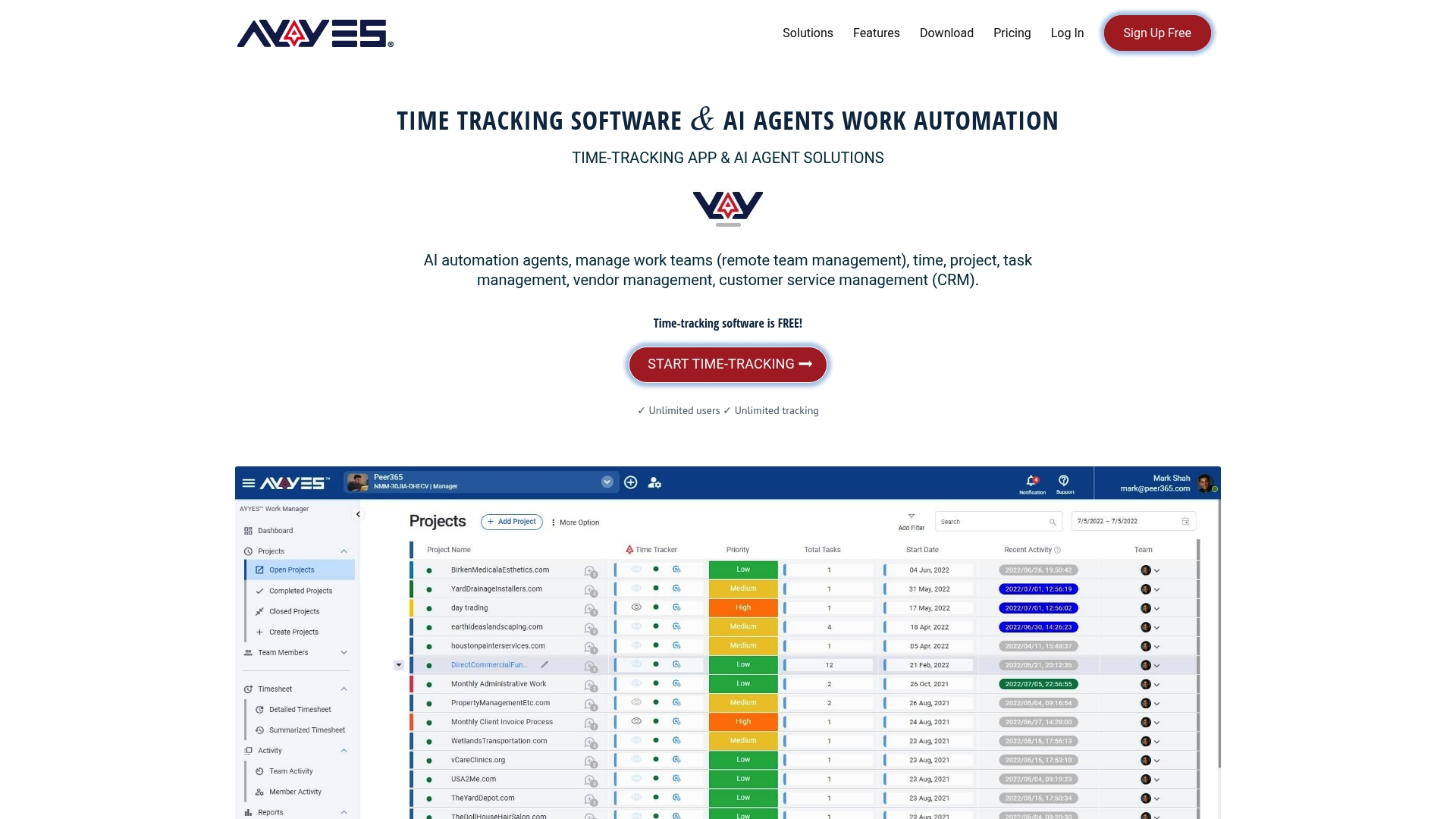 A demo or trial with AYYES will let you run the exact tests this guide recommends: export a sample pay period to check payroll formatting, see how the AI automation agents handle timesheet approvals, and review the screenshot privacy settings before deciding how much monitoring depth fits your culture. A genuine Free plan offered by some providers allows teams to validate features before committing to a paid seat. If the trial confirms fit, moving to a paid tier costs $0.99 per month per seat billed monthly, or $0.88 per month per seat billed annually, both listed on the AYYES pricing page. Start there to check current plan details and begin a trial with your team. AYYES offers a free plan for up to 12 team members. Screenshot tracking and activity/app monitoring are paid features and are not included on the Free plan.
9. Primary sources used for feature, pricing, and market claims
Claims in this guide were checked against the following sources, alongside AYYES’s own vendor documentation and pricing pages.
- Learn by G2’s guide to the best time and attendance software, for payroll integration and native-module guidance.
- G2’s evaluation of the best time tracking software, for use-case segmentation and payroll export value.
- PeopleManagingPeople’s review of employee time clock software, for clock-in method and free-tier trends.
- ITQlick’s review of TimeClock Plus v7, for pricing shape and add-on fee examples.
Reviews and vendor documentation were cross-checked against each other rather than relied on individually, to keep pricing and feature claims consistent throughout this guide.
Sources
- Best time and attendance software
- I evaluated the 6 best time and attendance software
- 10 Best Employee Time Clock Software Reviewed In 2026
- TimeClock Plus v7 2026: Honest Expert Review | ITQlick
FAQ
1. What is the best free software for time and attendance?
Free plans are common across this category and tend to suit small, remote, or project-based teams that do not yet need payroll integration or advanced scheduling. AYYES offers a free plan for up to 12 team members at $0. Paid plans are $0.99 per seat per month, or $0.88 per seat per month billed annually. Screenshot tracking and activity/app monitoring are paid features and are not included on the Free plan.
2. What is the best software for tracking attendance?
The right answer depends on your workforce type and whether payroll integration must be native. This type of platform suits remote and hybrid teams that want AI-assisted tracking with payroll-ready exports and privacy-conscious monitoring in one platform.
3. What is the most popular timesheet software?
Popularity varies by workforce type: enterprise buyers often prioritize compliance features, project-based teams favor billable-hours trackers, and deskless teams lean toward mobile and kiosk options, a pattern reflected across major review roundups. Instead of one universal answer, match the tool to your specific use case using the evaluation checklist above.
4. What is the best attendance tracking method?
The most reliable method combines flexible clock-in options, mobile GPS or kiosk verification for onsite work, with real-time reporting. Feature emphasis across multiple product roundups shows mobile and GPS verification as a common differentiator for deskless and multi-location teams specifically.



