
Harvest Alternatives: AYYES for Teams (Free plan, $0.88/seat)
AYYES stands out as a strong Harvest alternative for teams that want simple timers, predictable per-seat pricing, project visibility, and reporting that goes deeper than basic time summaries. For a genuinely free, unlimited-user option, Clockify leads the pack. For a low-cost, near-identical timer experience, Toggl Track is the closest match. For hands-off, automatic tracking without a timer button at all, Timely’s AI-driven capture is the pick. AYYES offers a free plan for up to 12 team members.
TL;DR:
- Clockify provides an unlimited free plan suitable for growing teams, avoiding per-seat costs and supporting unlimited projects and users.
- AYYES offers time tracking, project management, and enhanced reporting at predictable, transparent prices, making it useful for teams seeking deeper visibility without enterprise costs.
- Toggl Track replicates Harvest’s interface and features closely, making it easy to onboard but with lighter invoicing and automation options.
- Larger organizations with complex compliance needs should consider Replicon or Scoro, as these platforms are built to handle multi-country regulations and layered approval processes.
- When switching, teams must export all data first, map project and client details carefully, run a parallel billing cycle, and avoid canceling Harvest until a successful invoice is generated in the new system.
Table of Contents
- Why Teams Look for Harvest Alternatives
- Top Harvest Alternatives Compared
- How Do You Choose the Right Harvest Replacement?
- Migration Checklist: Moving Off Harvest
- User Reviews and Reliability Ratings
- Customer Support Quality Across Alternatives
- Detailed Cost Comparison and Hidden Fees
- Why AYYES Is Our Recommended Pick
- Start Your Migration With a Free AYYES Trial
- Sources
- FAQ
Why Teams Look for Harvest Alternatives
Harvest earned its reputation as a dependable, no-frills time tracker, but that reputation has been tested. Recent pricing adjustments have pushed several vendor roundups to reevaluate whether Harvest still makes sense for growing teams, a shift documented across My Hours’ 2026 alternatives roundup and OneSuite’s competitive analysis. Both point to the same underlying issue: as headcount grows, Harvest’s per-seat costs climb in a way that catches finance teams off guard during annual renewal. Pricing isn’t the only friction point. Reviews aggregated on G2’s Harvest product page repeatedly flag two recurring complaints: reporting that feels shallow once you need cross-project profitability views, and integration gaps when connecting to newer project management or payroll systems. Freelancers tend to outgrow Harvest’s invoicing flexibility. Agencies tend to outgrow its resource-planning depth. Larger operations run into compliance and policy gaps that Harvest was never built to handle. That’s the real reason “Harvest alternatives” has become such a common search. It’s rarely about hating Harvest. It’s about a specific limitation, whether that’s cost at scale, reporting depth, or limited reporting and automatic time-capture options, that pushes a team to look elsewhere. The standard industry term for this category is time-tracking and productivity software, and it spans everything from single-purpose timers to full professional services automation (PSA) suites.
Top Harvest Alternatives Compared
Twelve buyer profiles, twelve different answers. Here’s how the leading options stack up, starting with the alternative built specifically to close Harvest’s most common gaps. AYYES combines Harvest-style manual timers with projects, tasks, timesheets, and detailed reporting. Paid plans add screenshot tracking, app and website monitoring, and advanced analytics for teams that need greater work visibility. Pricing is transparent: a Free plan for up to 12 team members at $0, a Monthly plan at $0.99 per seat per month, or an Annual plan at $0.88 per seat per month when billed yearly. Migrating from Harvest means setting up clients, projects, team members, and time-tracking workflows in AYYES.  Clockify offers a genuinely unlimited free plan covering unlimited users and unlimited projects, which makes it the default answer whenever “budget-conscious” comes up in a roundup. The standout is simply that there’s no seat cap holding back a growing team. Integrations cover the usual project management suspects, though invoicing support stays basic compared to purpose-built billing tools. Toggl Track is the alternative most likely to feel instantly familiar to a Harvest user. The timer interface, browser extensions, and reporting layout are close enough that onboarding takes days, not weeks. G2 reviewers consistently praise its simplicity, though it leans lighter on invoicing than Harvest does. My Hours targets teams that need clean, compliance-friendly timesheets more than flashy dashboards. Its alternatives comparison makes the case that straightforward timesheet approval workflows matter more to many small teams than advanced automation. Billing support covers basic invoice generation, adequate for firms with simple client structures. Paymo bundles time tracking with lightweight task and project management, so teams that found Harvest too narrow in scope get a fuller toolkit without jumping to an enterprise suite. The migration note here: expect to rebuild project structures, since Paymo’s task hierarchy works differently than Harvest’s flatter project model. QuickBooks Time makes the most sense for businesses already anchored to QuickBooks for accounting and payroll. The native integration removes a manual export/import step that plagues most other switches, which matters most for hourly-wage businesses reconciling payroll weekly. Replicon is built for larger organizations juggling multi-country compliance, complex overtime rules, and layered approval chains. It’s overkill for a five-person agency, but for a 200-person operation with regulatory exposure across jurisdictions, that complexity is the point. Scoro functions as a full professional services automation platform, folding time tracking into project financials, CRM, and forecasting. Scoro’s own comparison positions it against Harvest specifically for firms that outgrew simple tracking and need profitability visibility across an entire client roster. Bonsai speaks directly to solo freelancers who need contracts, proposals, and payments in one place, not just a timer. If your Harvest usage was really about invoicing clients cleanly, Bonsai often replaces more of your freelance stack than a pure tracker would. Wrike leads with project management and treats time tracking as a secondary feature layered on top. Teams choosing Wrike are usually solving a project complexity problem first and a tracking problem second. Productive is built for agencies that live and die by utilization rates and project margins. Its billing and utilization reporting goes deeper than Harvest’s, which is exactly the gap that pushes agency owners to switch. Timely eliminates the timer altogether. Its AI-backed memory timeline reconstructs your day automatically from app and calendar activity, appealing to anyone who forgot to hit “start” one too many times on Harvest. Time Tracker Premium, Float, FreshBooks, Memtime, Hubstaff, DeskTime, TimeCamp, Everhour, and OneSuite round out the broader field cataloged in GetApp’s Harvest alternatives listing. Float specializes in resource scheduling rather than time capture. FreshBooks pairs tracking with invoicing built for small-business accounting. Memtime, profiled in its own Harvest comparison, automatically captures desktop activity similarly to Timely. Hubstaff and DeskTime both lean toward workforce monitoring with GPS and activity levels layered on top of tracking. TimeCamp and Everhour sit closer to Toggl Track’s simplicity, differentiated mainly by their integration ecosystems. OneSuite, according to its own alternatives breakdown, bundles time tracking with broader business operations tools. Three quick badges cut through the noise for readers short on time: best free goes to Clockify for its unlimited-user model, best like-for-like low-cost swap goes to Toggl Track for matching Harvest’s interface almost feature-for-feature, and best automatic tracking goes to Timely for its AI-backed memory timeline, while AYYES is the stronger value choice for teams that want low-cost time tracking plus paid screenshot-backed reporting.
How Do You Choose the Right Harvest Replacement?
The right pick depends less on brand reputation and more on how your team actually bills, reports, and integrates. Work through these criteria before you commit to a trial:
- Billing model fit. Per-seat pricing punishes growing teams; flat or unlimited-user pricing (Clockify’s model) protects against surprise renewal costs.
- Integration depth. Confirm the tool connects to your actual accounting, payroll, and project management stack, not just a generic “integrations available” claim.
- Exportability. Insist on a full data export in a usable format (CSV or API access) before you sign anything. A vendor that makes exit difficult is a warning sign about how it treats data going in, too.
- Reporting granularity. Test whether the reporting layer can slice by client, project, and team member simultaneously, not just one dimension at a time.
- Invoicing and tax support. If you bill clients directly from the tool, confirm it handles your tax jurisdiction’s invoice requirements, not just generic line items.
- Automatic tracking needs. Decide honestly whether your team needs timer discipline (Toggl Track, My Hours) or automatic capture (Timely, AYYES) before you evaluate features you won’t use.
- Privacy and compliance posture. Look for granular screenshot or activity controls if the tool captures more than time entries, particularly if you operate across jurisdictions with different monitoring rules.
During any trial or demo, ask the vendor directly: Can I export every timesheet and invoice in a standard format on day one? Does the integration with my accounting software actually sync line items, or just totals? What’s the SLA for support response during a billing dispute? Is onboarding assistance included, or billed separately? Red flags worth walking away from: no visible export option, pricing that requires a sales call just to see a number, or missing payroll and accounting integrations for a tool that claims to serve professional services firms. Pro Tip: Calculate total cost of ownership across a full year, not a monthly rate. A $9 per-seat annual plan on a 15-person team runs a very different number than the same rate advertised for a single seat, and hidden add-ons for reporting or integrations can quietly double a quote.
Migration Checklist: Moving Off Harvest
Switching tools without a plan is how client invoices go missing. Follow this sequence instead:
- Audit and export everything first. Pull timesheets, invoices, client records, project structures, and any custom fields out of Harvest before touching a new system.
- Export client billing records before timesheets. A practical migration sequence protects client billing accuracy by moving invoices and client records over first, validating them in the new system, and only then importing historical timesheets.
- Map fields carefully. Project codes, client names, and billing rates rarely map one-to-one between systems; check for mismatches before bulk import.
- Run a test invoice. Generate one invoice in the new tool and reconcile it line-by-line against a known Harvest invoice before trusting the system with real client billing.
- Parallel-run for one full billing cycle. Keep both systems live for at least one cycle and reconcile totals manually before retiring Harvest completely.
- Train the team in stages. Admins first, then project managers, then general staff, so support questions don’t all hit at once.
A realistic timeline: allow one week for the audit and export phase, one to two weeks for import and validation (owned by IT or an admin), one full billing cycle for parallel-run reconciliation (owned by finance), and ongoing check-ins from project managers during the training rollout.
- IT/admin: exports, imports, integration setup
- Finance: invoice reconciliation, tax field verification
- Project managers: project structure mapping, team training
Pro Tip: Never cancel a Harvest subscription until you’ve generated and paid at least one real client invoice successfully in the new system. That single successful cycle catches problems a test environment never will.
User Reviews and Reliability Ratings
User sentiment across the alternatives varies more by use case than by overall quality. G2’s Toggl Track reviews skew heavily positive on ease of use and onboarding speed, echoing the same simplicity Harvest users valued in the first place. Reviews for Harvest itself, aggregated on G2’s product page, remain solid overall but cluster negative feedback around reporting flexibility and pricing at scale, exactly the gaps driving the switch. Reliability complaints tend to concentrate around two areas across the category: sync delays between time entries and integrated accounting tools, and mobile app inconsistencies compared to desktop versions. Full PSA platforms like Scoro and Replicon generally score well on uptime given their enterprise customer base, since larger clients demand contractual reliability guarantees that smaller vendors don’t always offer. Automatic trackers like Timely draw a mixed but instructive pattern in reviews: users love the hands-off capture until background tracking occasionally misses a task, a tradeoff worth weighing against manual timer reliability. The pattern worth remembering: a high star rating rarely tells you whether a tool fits your specific billing model. Read reviews filtered by your team size and industry, not the aggregate score alone.
Customer Support Quality Across Alternatives
Support quality splits sharply along company size lines. Larger vendors like QuickBooks Time and Replicon typically offer phone support and dedicated account managers for enterprise tiers, reflecting the compliance-heavy customers they serve. Smaller, product-led tools like Clockify and Toggl Track lean on email support and extensive help documentation, which works fine for straightforward setups but can leave a frustrated admin waiting during an active billing dispute. Response time matters more than channel availability. A live chat that takes 48 hours to respond isn’t meaningfully better than an email queue. Ask any vendor directly, during a trial, what their actual average first-response time is, not just what channels exist. Support is structured around the onboarding moments that matter most: initial setup, integration configuration, and the first billing cycle after migration, when questions are most likely to surface. Teams switching from Harvest tend to need the most support in exactly that window, not months later once the workflow has settled. Look for a knowledge base that documents integration setup in detail, since that’s where most support tickets originate during a migration. A thin help center is often the clearest early signal of what post-purchase support will feel like once you’re a paying customer rather than a prospect.
Detailed Cost Comparison and Hidden Fees
Sticker price rarely tells the full story. Per-seat pricing looks cheap at five users and expensive at fifty, which is precisely the dynamic that My Hours’ research points to when explaining differing billing shapes across the category. Clockify’s unlimited free tier avoids that scaling problem entirely, but its paid tiers still add per-seat costs once you need advanced reporting or admin controls. AYYES keeps the structure simple: a genuinely free plan for up to 12 team members at $0, a Monthly plan at $0.99 per seat per month, or an Annual plan at $0.88 per seat per month when billed yearly. Screenshot tracking, app and website monitoring, and advanced analytics are paid features. 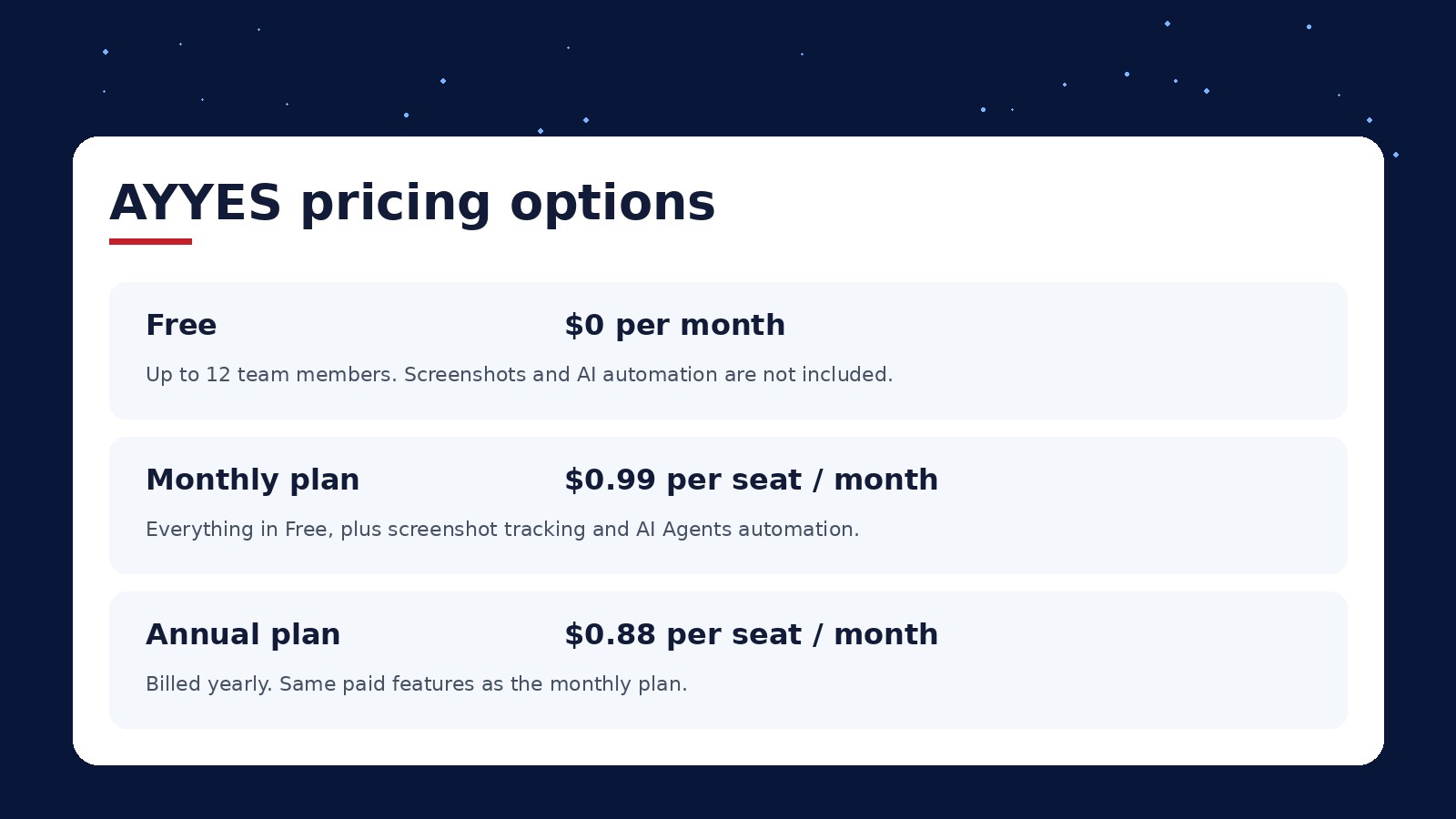 Watch for hidden costs that don’t appear on the pricing page: integration add-ons billed separately, storage limits on screenshot or attachment features that trigger overage charges, and “premium support” tiers that turn basic help into a paid upgrade. Enterprise-tier tools like Replicon and Scoro often require a custom quote, which usually means the advertised entry price isn’t what a mid-sized team will actually pay once seats and modules are added. The safest cost comparison method: request a quote for your actual team size and required feature set, then divide by twelve to get a real monthly number, rather than trusting a marketing page’s lowest advertised tier.
Why AYYES Is Our Recommended Pick
Mark has spent years evaluating time-tracking and productivity tools that promise more than they deliver. What makes AYYES worth recommending here is its predictable pricing, straightforward time tracking, project organization, and reporting for teams that have outgrown basic time summaries. That said, AYYES isn’t the right fit for every switcher. A 300-person organization juggling multi-country labor compliance is better served evaluating Replicon or Scoro first, since those platforms were built around exactly that complexity. AYYES earns its recommendation for the much larger group in the middle: freelancers, small agencies, and professional services firms that want simple time tracking, project visibility, and useful reporting without paying enterprise-tier prices. AYYES offers a free plan for up to 12 team members.
— Mark
Start Your Migration With a Free AYYES Trial
AYYES gives teams a straightforward timer, projects, tasks, timesheets, and reporting at predictable per-seat pricing. Paid plans also provide screenshot tracking, app and website monitoring, and advanced analytics for organizations that need additional work visibility. 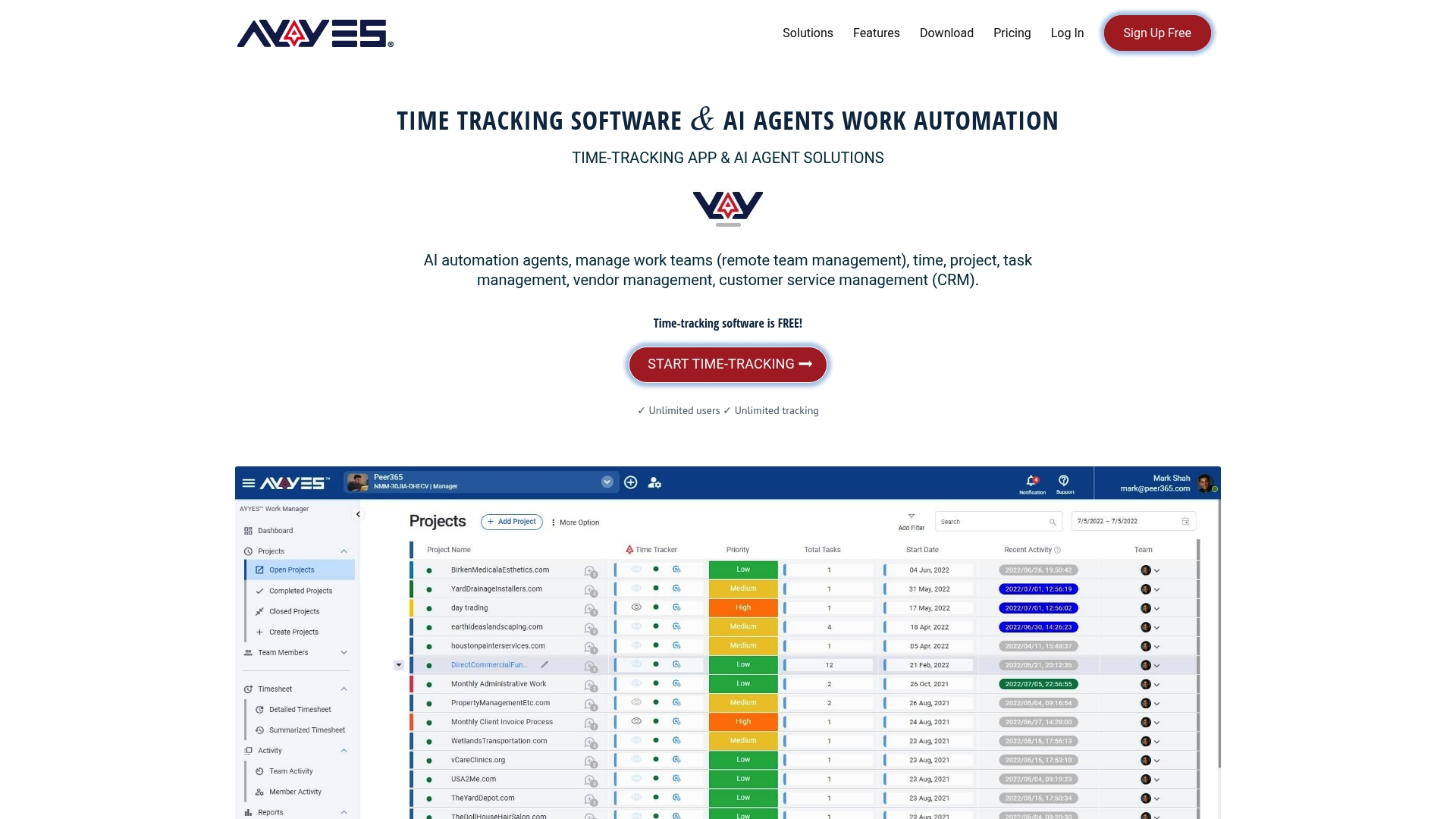 Ready to move off Harvest without the guesswork? Start on the Free plan for up to 12 team members at $0, upgrade to Monthly at $0.99 per seat per month, or choose Annual at $0.88 per seat per month when billed yearly once you’ve confirmed the fit. Reach out through the pricing page for migration assistance with timesheets and client data, or to arrange enterprise onboarding if you’re bringing over a larger team.
Sources
- G2 — Harvest reviews
- GetApp — Harvest Alternatives & Competitors (2026)
- My Hours — 6 Harvest Alternatives (Free & Paid) for 2026
- Scoro — 8 Best Harvest Time Tracking Alternatives
Pricing and feature sets change often across this category. Confirm current details directly on each vendor’s site before making a final decision.
FAQ
Is There a Free Version of Harvest?
Harvest offers a limited free tier for very small teams, but most reviewers note it caps out quickly on users and projects. If you need a genuinely unlimited free plan, Clockify covers unlimited users and projects at no cost. AYYES offers a Free plan for up to 12 team members at $0; screenshot tracking, app and website monitoring, and advanced analytics require a paid plan.
What Is the Best Alternative to the Harvest App?
The best alternative depends on what you need most: AYYES for low-cost team time tracking and reporting, Toggl Track for a familiar simple timer experience, or Timely for automatic tracking without a timer. AYYES is a practical choice for buyers prioritizing cost predictability, projects, timesheets, and stronger reporting.
Is the Harvest App Legit?
Yes, Harvest is a legitimate, established time-tracking product used widely by freelancers and agencies. The switching conversation isn’t about trust, it’s about pricing at scale and reporting depth once a team outgrows Harvest’s original feature set, as reflected in Harvest’s own G2 reviews.
What Is the Difference Between Toggl and Harvest?
Toggl Track focuses tightly on simple, timer-based tracking with minimal invoicing features, while Harvest bundles basic invoicing alongside its tracker. Teams that need billing built in tend to stay closer to Harvest’s model or move to a tool like AYYES that combines time tracking, projects, tasks, timesheets, and reporting in one place.



