
Payroll Time Tracking Software: A Practical Guide for SMBs
Payroll errors often start before payroll is processed. Missing hours, incorrect overtime, late timesheets, manual data entry, and unapproved changes can all create problems when employee time reaches payroll. Payroll time tracking software helps businesses create a more reliable connection between hours worked and wages paid. Instead of collecting time from spreadsheets, paper records, messages, or separate systems, teams can record working hours in one place, review timesheets, approve entries, and prepare payroll-ready reports. For small and midsize businesses, the goal is simple: collect accurate time, review it consistently, and transfer approved information into payroll with as little manual re-entry as possible.
What Is Payroll Time Tracking and Why Does It Matter?
Payroll time tracking is the process of recording employee working hours and using those records to support payroll calculations. Depending on the workforce, this can include regular hours, overtime, breaks, paid time off, projects, shifts, and other information needed before payroll is finalized. Accurate payroll tracking matters because even small timekeeping errors can affect employee pay, labor costs, project budgets, and payroll administration.
A structured system can help businesses:
- Reduce manually reconstructed hours
- Create more accurate timesheets
- Review overtime before payroll
- Improve manager approvals
- Reduce duplicate data entry
- Maintain clearer historical records
- Prepare payroll reports faster
For covered nonexempt workers in the U.S., employers subject to the FLSA must maintain accurate records of hours worked and wages earned. The law does not require one particular timekeeping method, but the records must be complete and accurate.
Key Features of Payroll and Time Tracking Software
The best payroll and time tracking software should make it easier to move from employee time entry to reviewed, payroll-ready records.
Payroll and time tracking software should help businesses record employee hours, review timesheets, monitor activity, and prepare accurate records for payroll processing.
1. Centralised Dashboard for Employee Time Tracking
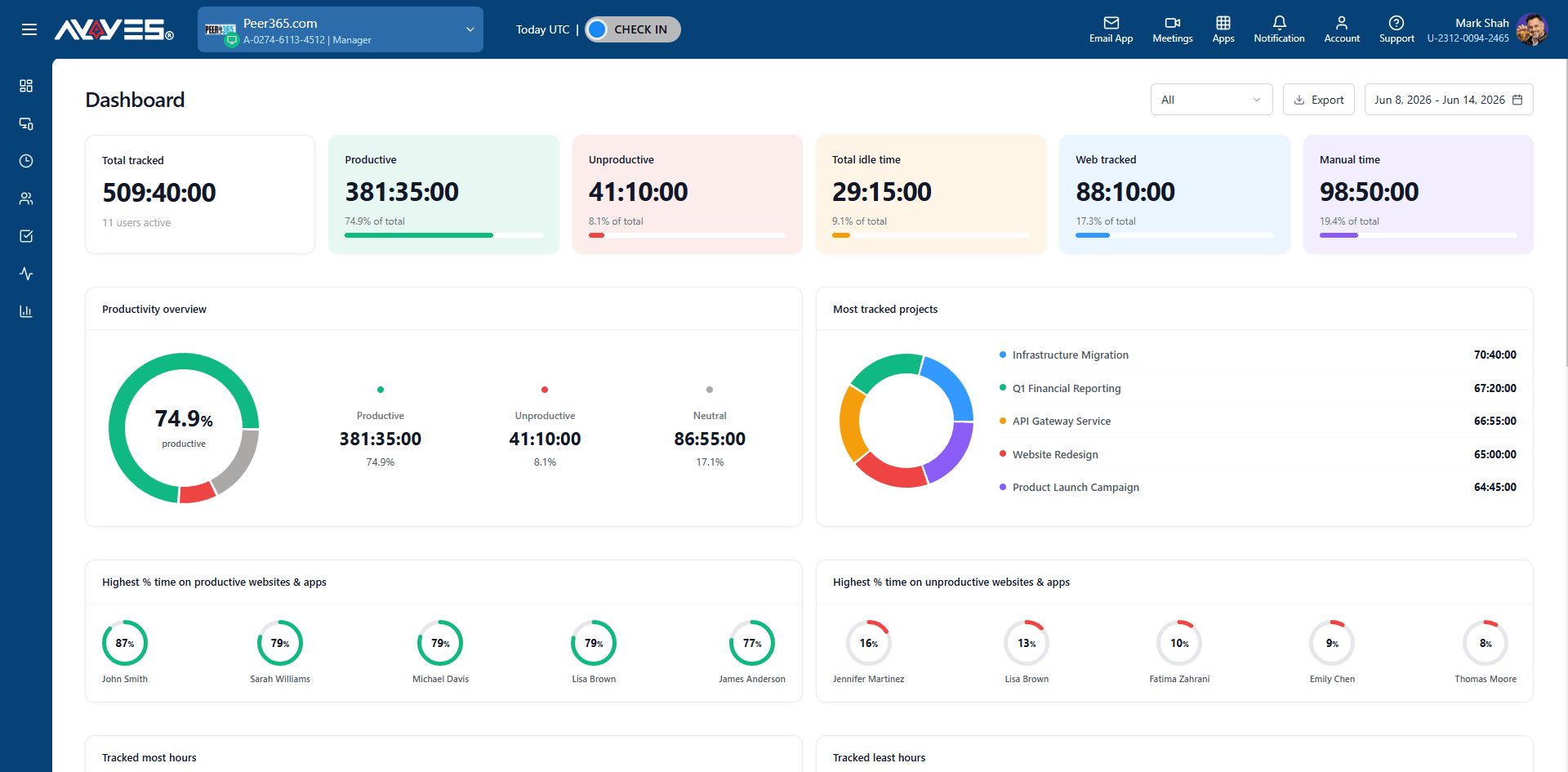
A centralised dashboard gives managers an overview of employee time tracking and team activity. It can help them access team members, online team members, member licensing information, and time tracking records from one place. This makes it easier to monitor workforce activity and manage employee time data without switching between multiple sections.
2. Detailed and Summarised Timesheets
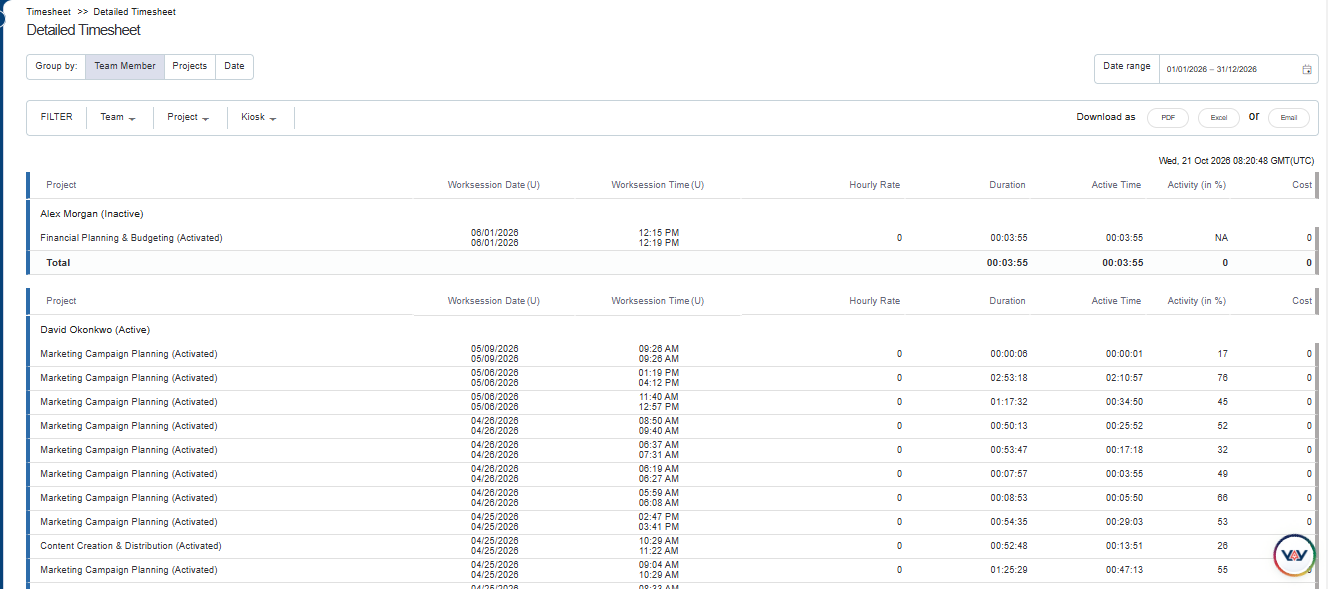
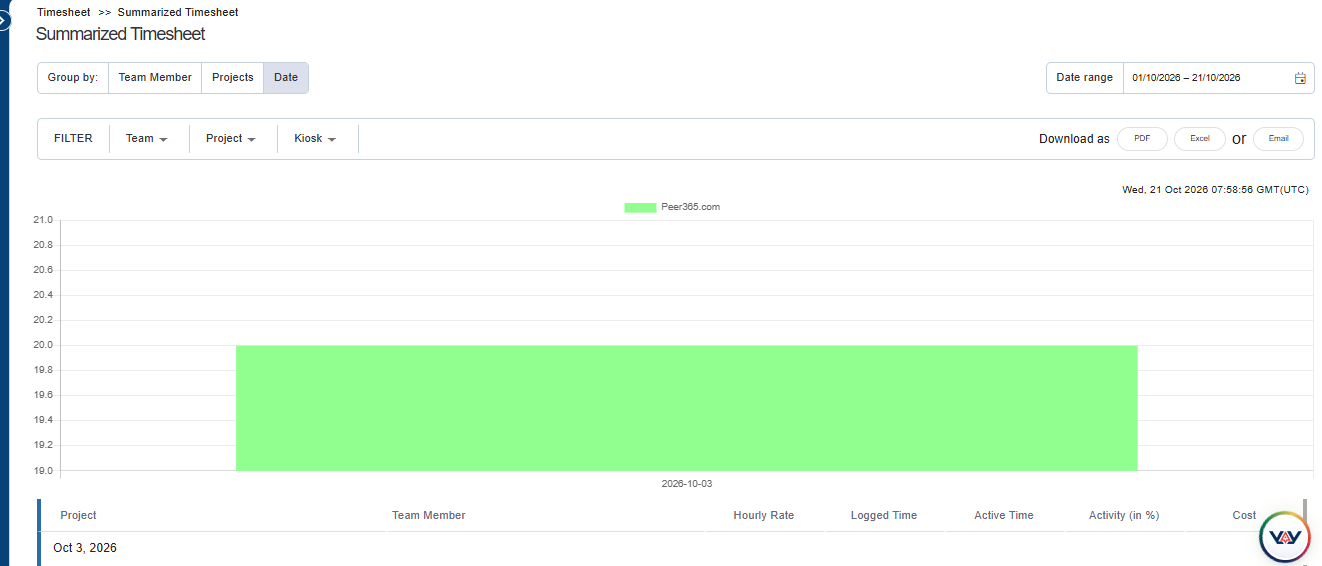
Detailed and summarised timesheets help businesses review employee working hours at different levels. Detailed timesheets provide individual time entries, while summarised timesheets make it easier to compare total hours across employees and reporting periods. These records help managers identify missing entries, review working hours, and prepare information for payroll processing.
3. Kiosk-Based Employee Clock-Ins

Kiosk functionality allows employees to record their attendance through a shared device. This can be useful for offices, retail businesses, and other workplaces where employees clock in from a common location. Maintaining consistent clock-in records helps businesses review attendance and verify employee working hours before payroll is finalised.
4. Project and Team Member Management
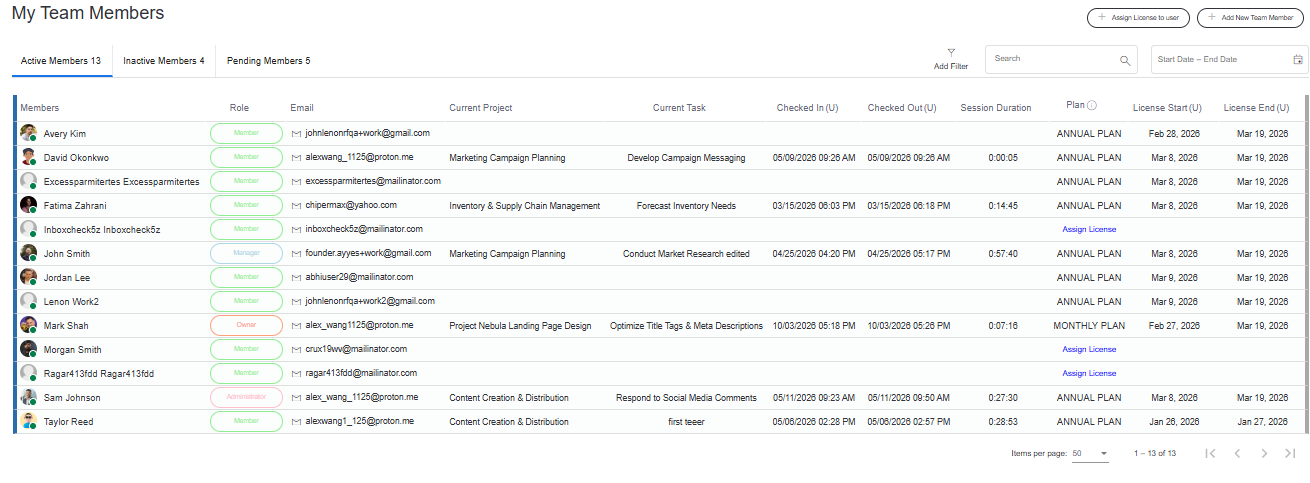
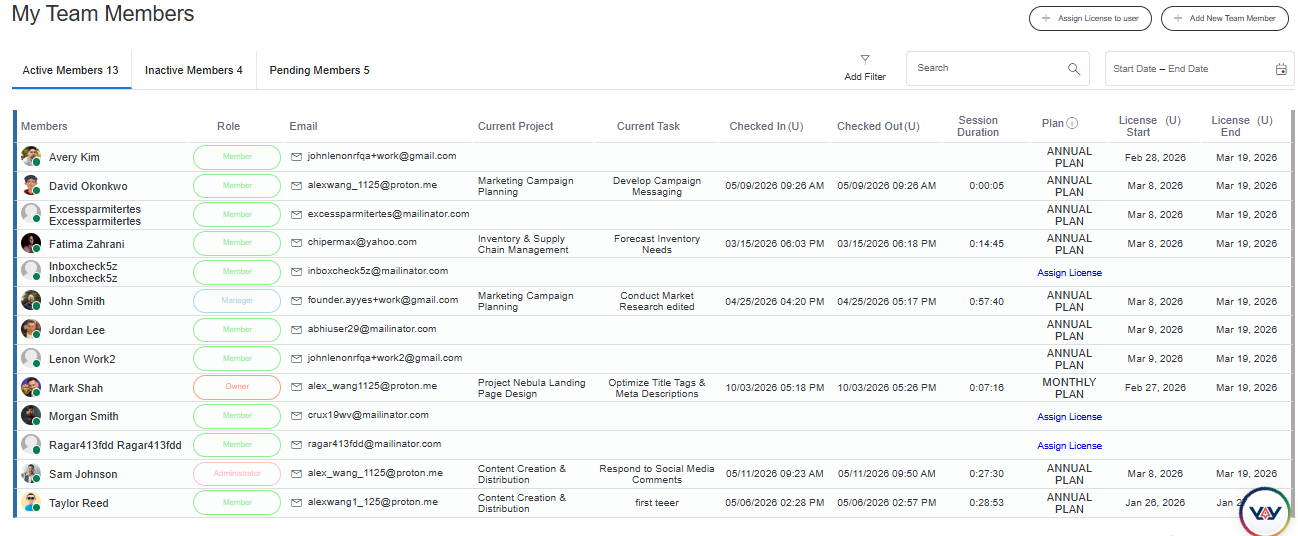
Project and team member management features help businesses organise employees and associate their recorded hours with the appropriate projects. Managers can review individual team members, check online team members, and manage member access or licensing. These features support workforce planning and help businesses understand how employee time is distributed across projects.
5. Activity Monitoring and Employee Reports
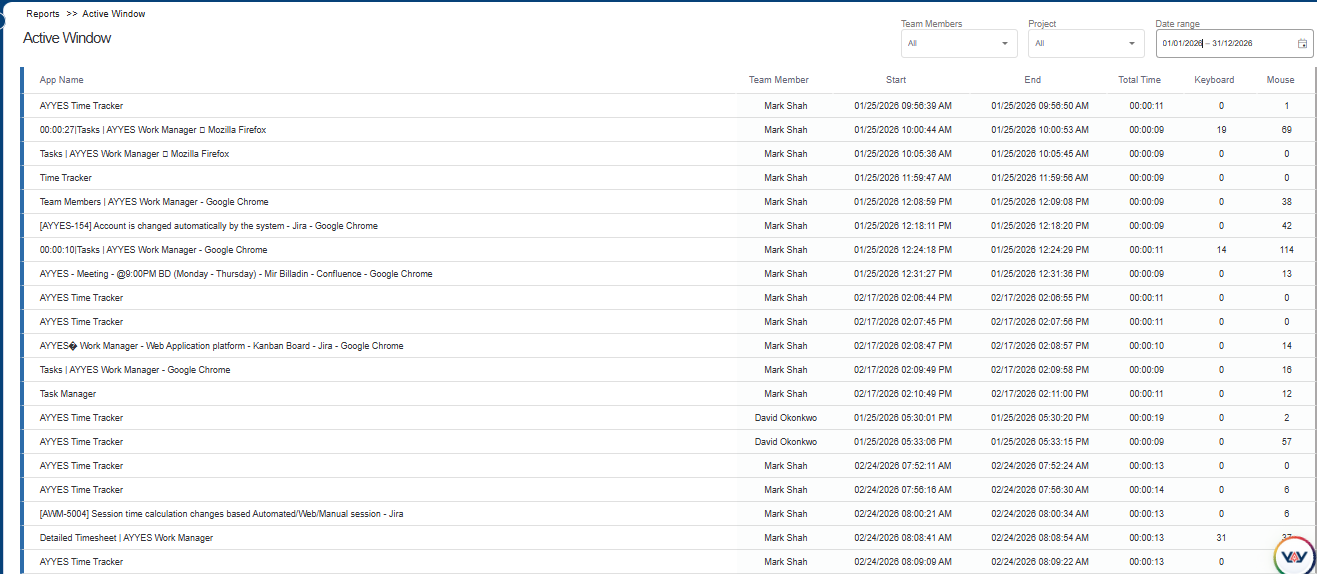
Activity monitoring features provide additional visibility into how employees use their work devices during tracked periods. Depending on the software and configuration, managers may be able to review team activity, individual member activity, time tracker user activity, screenshots, and active application windows. These insights can help managers investigate time records and understand work patterns, subject to appropriate employee notice and privacy requirements.
6. Payroll Reporting and Time Data Review
Reporting tools help businesses turn recorded time and activity data into information that managers can review. Employee-level reports, team activity records, and timesheet summaries can support payroll preparation by making working hours easier to verify. Before processing wages, businesses should check that their chosen software supports the required payroll exports or integration, overtime calculations, and applicable tax and statutory requirements.
Also Suggest this : Best Contractor Time Tracking App
How Payroll and Time Tracking Integrations Reduce Errors
One of the biggest sources of payroll friction is entering the same information more than once. For example, an employee may submit hours in a spreadsheet, a manager may review them manually, and payroll staff may then type the same numbers into payroll software.
Every manual transfer creates another opportunity for:
- Typing mistakes
- Missing entries
- Duplicate hours
- Incorrect employee records
- Outdated corrections
- Payroll delays
Connecting time tracking with payroll can shorten this process. A stronger workflow looks like this:
Employee tracks time → Manager reviews timesheet → Corrections are completed → Timesheet is approved → Approved hours are exported or transferred to payroll
This makes the approved timesheet the source of payroll time data instead of requiring payroll staff to rebuild employee hours from several systems. AYYES, for example, provides employee time entry, manager approvals, payroll-ready reporting, and export functionality designed to support this type of workflow.
Steps to Implement Payroll Time Tracking
A successful payroll tracking system needs more than software. Businesses should define the process before asking employees to use it.
1. Define Time Tracking Rules
Create clear rules explaining when employees should record time, how breaks are handled, which tracking methods are allowed, how missed entries are corrected, and when timesheets must be submitted. Employees should understand the process before the first payroll cycle begins.
2. Set Up Employees and Pay Periods
Make sure employee profiles, work schedules, projects, rates where applicable, and payroll periods are configured correctly. Incorrect setup can create payroll problems even when employees record their time accurately.
3. Configure Timesheet Approvals
Decide who reviews each employee’s timesheet and when approval must occur. Managers should know what they are expected to check, including missing hours, corrections, unusual overtime, or project allocations. Avoid making approval a routine click with no meaningful review.
4. Test the Payroll Workflow
Run a test before using the system for a full payroll cycle. Track sample hours, make a correction, approve a timesheet, generate the payroll report, and confirm that the exported data matches what payroll needs. Testing helps identify configuration issues before they affect employee pay.
Payroll Time Tracking Compliance Basics
Time tracking also supports payroll recordkeeping and compliance. For U.S. employers covered by the Fair Labor Standards Act, records for covered nonexempt employees generally need to include hours worked each day, total hours worked each workweek, the basis on which wages are paid, regular rates where applicable, overtime earnings, total wages, and the pay period covered. The U.S. Department of Labor does not require employers to use a specific timekeeping system. Employers can use a time clock, employee-entered records, or another method as long as the records are complete and accurate.
For SMBs, useful timekeeping controls include:
- Accurate daily and weekly hour records
- Clear correction procedures
- Manager review
- Consistent overtime handling
- Historical timesheet retention
- Controlled permissions
- Payroll reconciliation
Federal requirements are only one part of compliance. State, local, industry, contract, union, or country-specific requirements may also apply.
Legal note: This guide provides general information and is not legal or payroll advice.
How to Choose the Best Payroll and Time Tracking Software
1. Match the Software to Your Workforce
Choose software based on how employees work. Office teams may prefer web or desktop tracking, while on-site staff may need kiosk clock-ins and remote teams may need flexible online tracking.
2. Compare Tracking Methods
Look for web timers, desktop apps, manual entries, mobile tracking, kiosks, or automatic tracking. Simple options help employees record accurate hours consistently.
3. Check Payroll Integrations
Check how approved hours move into payroll. Look for direct integrations, syncing, CSV or Excel exports, accounting connections, and payroll-ready reports.
4. Review Reporting and Approval
Managers should be able to review timesheets, identify missing entries, approve hours, and generate payroll reports quickly without relying on manual spreadsheets.
5. Compare Pricing and Scalability
Compare user limits, approvals, reports, exports, integrations, support, and upgrade costs. Choose software that fits today’s payroll needs and can scale with your team.
How AYYES Supports Payroll Time Tracking
AYYES connects time tracking, timesheets, approvals, projects, and reporting in one workflow, helping businesses prepare cleaner payroll records without relying on manual spreadsheets.
1. Automated Employee Time Tracking
AYYES supports desktop tracking, web timers, and manual entries. Managers can also review active and idle time for additional context when checking employee work sessions.
2. Payroll-Ready Timesheets
Tracked hours flow into centralized timesheets that managers can review by employee, project, or date before preparing records for payroll processing.
3. Manager Review and Approvals
Managers can review and approve timesheets before payroll, helping identify missing hours, incorrect entries, or project allocation issues before processing begins.
4. Project and Task-Based Time
Employees can link tracked hours to projects and tasks, helping businesses understand labor use, separate internal and client work, and improve cost visibility.
5. Payroll Reports and Exports
AYYES reports can be grouped by employee, project, or date and exported in PDF or Excel formats, helping payroll teams prepare records without rebuilding time data manually.
Common Payroll Time Tracking Mistakes to Avoid
1. Relying on end-of-week memory: Employees reconstructing several days of work from memory can create inaccurate timesheets.
2. Skipping manager review: Automatically sending every submitted hour to payroll removes an important opportunity to catch mistakes.
3. Entering the same data twice: Manually transferring hours from spreadsheets into payroll increases the risk of errors.
4. Ignoring corrections: Changes should be reviewed before payroll is finalized so the latest approved time reaches the payroll system.
5. Using one tracking method for every employee: Office, remote, field, and on-site workers may require different ways to record time.
6. Waiting until payroll day to fix problems: Review missing entries and exceptions throughout the pay period instead of resolving everything at the last minute.
7. Choosing software without testing exports: Always confirm that the final payroll report contains the fields and format your payroll process requires.
Payroll Timesheet App: What Should Teams Look For?
A good payroll timesheet app should make recording hours simple for employees and reviewing them simple for managers. Important capabilities include easy time entry, clear pay-period views, corrections, manager approvals, employee permissions, reporting, and payroll exports. Mobile, desktop, web, or kiosk access may also be important depending on where employees work. The most useful app is one employees can use consistently and payroll teams can trust without spending hours correcting or rebuilding timesheets.
Why Choose AYYES for Payroll and Time Tracking?
AYYES brings time tracking, timesheets, approvals, projects, and reporting into one workspace, helping SMBs build a clearer path from employee hours to payroll.
1. Flexible Time Tracking
Employees can record time using different methods depending on how they work, reducing the need to manage separate timekeeping tools for different teams.
2. Accurate Payroll Timesheets
All tracked work can flow into centralized timesheets, giving managers a clearer record of employee hours before payroll processing.
3. Approval Workflows
Managers can review and approve timesheets before payroll, adding an important control between employee time entry and final wage calculations.
4. Payroll-Ready Reports
AYYES allows teams to filter, group, review, and export tracked-time reports for payroll and other business workflows. PDF and Excel exports are currently supported.
5. One Workspace for Time, Projects and Teams
Instead of maintaining separate systems for time tracking, projects, timesheets, and employee reporting, AYYES brings these functions into one work-management platform. This can reduce administrative steps and give managers greater visibility into how employee hours connect with actual work.
6. Affordable Pricing for Growing Teams
The AYYES Free plan includes support for up to 12 team members, along with unlimited time tracking, projects, tasks, kiosk access, and timesheets. Paid access begins at $0.88 per user/month on annual billing or $0.99 per user/month on monthly billing. Screenshot tracking and activity/app monitoring are paid features and are not included on the Free plan.
Simplify Payroll Time Tracking With AYYES
Payroll should not begin with managers chasing missing timesheets or payroll staff rebuilding employee hours from multiple spreadsheets. AYYES helps teams record working hours, review timesheets, approve entries, organize time by projects, and export payroll-ready records from one connected system. Use AYYES to create a simpler time-to-payroll workflow with clearer employee records and fewer manual steps.
FAQs About Payroll Time Tracking
1. What Is Payroll Time Tracking?
Payroll time tracking is the process of recording employee working hours and using approved time records to support payroll calculations, overtime review, attendance, and wage processing.
2. What Is Payroll and Time Tracking Software?
Payroll and time tracking software records employee hours, organizes them into timesheets, supports manager review and approvals, and helps transfer approved time information into the payroll process.
3. How Does Time Tracking for Payroll Work?
Employees record their hours, managers review and correct timesheets, approved records are finalized for the pay period, and the resulting hours are exported or transferred into payroll for wage calculations.
4. What Is a Payroll Timesheet App?
A payroll timesheet app lets employees record working hours while giving managers tools to review, correct, approve, and report those hours before payroll is processed.
5. Can Time Tracking Software Reduce Payroll Errors?
Yes. Accurate tracking, approval workflows, clear corrections, and payroll-ready exports can reduce errors caused by manual entry or missing timesheets. Businesses should still review records before final payroll processing.
6. How Do Timesheet Approvals Help Payroll?
Timesheet approvals create a review step before payroll. Managers can identify missing hours, corrections, unusual entries, or project-allocation issues before the employee’s time is finalized.
7. What Features Should Payroll Tracking Software Have?
Useful features include flexible time tracking, employee timesheets, manager approvals, overtime visibility, correction controls, payroll-period reporting, exports, permissions, and integration with existing payroll workflows.
8. Can Small Businesses Use Payroll Time Tracking Software?
Yes. Small businesses can use payroll time tracking software to replace manual spreadsheets, improve timesheet accuracy, organize approvals, and prepare employee hours more efficiently for payroll.



