
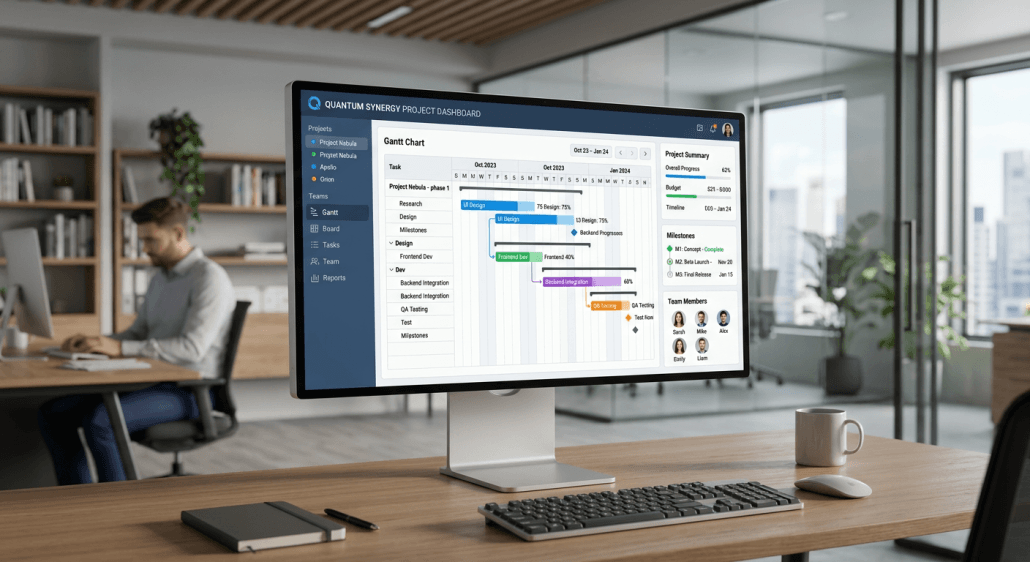
Mastering Your Project Schedule: A Definitive Guide to Effective Resource Allocation
Developing a robust project schedule is the cornerstone of operational success for any team or business. By mapping out tasks, dependencies, and milestones, managers ensure that resources are aligned with project goals, effectively preventing the common pitfalls of scope creep and missed deadlines. Establishing a clear timeline allows for the precise tracking of progress against initial projections, enabling data-driven adjustments throughout the project lifecycle.
Quick Summary
A project schedule is a dynamic document that outlines the timeline, task sequences, and resource assignments required to complete a project successfully. It serves as the master guide for project execution.
- Define project scope and deliverables.
- Identify task dependencies and durations.
- Allocate human and material resources.
- Monitor progress using charts.
Table of Contents
- Defining the Project Schedule
- Core Project Management Scheduling Methods
- Strategic Project Management Scheduling Techniques
- Building Your Project Timeline Planner
- Common Pitfalls and Troubleshooting
- FAQ
- Recommended Reads
Defining the Project Schedule
What is a project schedule? At its core, it is the calendar-based representation of your project plan. It integrates tasks, start and end dates, and resource dependencies to provide a visual narrative of how a project moves from inception to completion. Without this structure, teams often struggle with bottlenecks, conflicting priorities, and a lack of accountability regarding who is responsible for specific outcomes. Effective scheduling goes beyond merely setting dates; it requires a realistic assessment of how much time each sub-task truly demands. By breaking projects down into manageable segments, you can apply project management software to gain granular visibility into daily operations. This visibility is essential for ensuring that every team member understands their role and the deadlines associated with their specific contributions.
Core Project Management Scheduling Methods
Choosing the right methodology dictates how your team handles complexity. The Critical Path Method (CPM) is perhaps the most widely used approach; it identifies the longest sequence of dependent tasks that must be completed to finish the project on time. By focusing on the critical path, project managers can identify which tasks have “slack” or “float” – meaning they can be delayed slightly without jeopardizing the final deadline. Another effective method is the Program Evaluation and Review Technique (PERT), which is particularly useful for projects with high uncertainty. PERT involves calculating a weighted average of three time estimates for each task: optimistic, pessimistic, and most likely. This statistical approach helps account for risks and variability, providing a more reliable timeline than a single-point estimation, especially in industries prone to supply chain disruptions or technical unknowns.
Strategic Project Management Scheduling Techniques
One powerful technique for resource-heavy environments is resource leveling. This process adjusts start and end dates based on resource availability constraints. If one team member is assigned to too many concurrent tasks, the schedule must be recalculated to ensure that they are not overloaded, which otherwise leads to burnout and decreased output. Proper resource allocation ensures that your workforce is utilized efficiently without exceeding their actual capacity. Another technique involves time blocking. By dedicating specific hours of the day to focused work on a particular project phase, teams reduce the efficiency loss caused by constant task-switching. When combined with an automated time tracker, this method allows managers to compare planned time versus actual time spent, providing the necessary data to refine future estimates and improve accuracy for subsequent projects.
Building Your Project Timeline Planner
Creating a functional project timeline planner involves a systematic five-step approach that transforms high-level goals into actionable work logs:
- Define Deliverables: List every output required. If you are launching a product, this includes research, design, development, and QA testing.
- Determine Task Order: Identify dependencies. For example, you cannot conduct QA testing until development is at least partially complete. Use a project management timeline chart to visualize these relationships.
- Estimate Durations: Consult with the team members who will perform the work. Their “on the ground” insight is always more accurate than a top-down management estimate.
- Assign Resources: Delegate tasks based on skill sets and availability. Ensure that your scheduling software or document reflects who is responsible for each line item.
- Establish Milestones: Set checkpoints at critical intervals. These act as markers to evaluate performance and provide stakeholders with updates on progress.
Pro Tip: When drafting your timeline, always build in a “buffer” for critical path tasks. Murphy’s Law often applies to project management, and having an extra 10-15% of time allocated for unforeseen challenges can be the difference between a successful delivery and a costly delay.
Common Pitfalls and Troubleshooting
One of the most frequent errors is over-optimism. Managers often assume that if a task can be finished in two days under perfect conditions, it will consistently take two days. In reality, meetings, technical debt, and administrative overhead consume significant portions of the day. To troubleshoot this, look at historical data from past projects to see the average deviation between planned and actual time. Another common pitfall is failing to maintain the schedule as a living document. A project timeline chart that is created at the start and never updated is a liability. Teams should review the schedule at least weekly to adjust for delays. If a task runs over, use that information to recalibrate the remaining timeline immediately rather than waiting for the project to reach an emergency state.
How AYYES Supports Better Project Scheduling
AYYES helps teams connect project planning with actual time data by bringing projects, tasks, scheduling, timesheets, and reporting into one workspace. This makes it easier to compare planned work with real hours spent and adjust timelines when tasks take longer than expected. Key Features:
- Project and task management
- Team scheduling
- Automated and manual time tracking
- Timesheets
- Project-based time records
- Progress and productivity reporting
- Workload visibility
- Activity monitoring on paid plans
Best For: Agencies, consultants, professional services, remote teams, project-based businesses, and growing teams managing multiple deadlines. Pricing: AYYES offers a free plan for up to 12 team members at $0. Paid plans cost $0.99 per seat/month or $0.88 per seat/month when billed annually. Screenshot tracking and app and website monitoring are available on paid plans.
FAQ
1. What is the difference between a project plan and a project schedule?
A project plan is the comprehensive document outlining the “how” (strategy, scope, risks), while the schedule is the specific, time-bound “when” (dates, deadlines, and task sequences).
2. How do I handle delays in a project schedule?
First, determine if the delayed task is on the critical path. If it is, you must either add resources to recover time, reallocate resources from non-critical tasks, or adjust the final project deadline.
3. What should a basic project timeline example include?
A basic timeline should clearly list the project phases, specific tasks within those phases, assigned team members, start/end dates, and major milestones.



