
Top 7 Best Free Time Tracking Invoice Software for Businesses in 2027
Managing invoices, tracking payments and handling business expenses can become time-consuming without the right tools. Free invoice software helps freelancers, startups and small businesses create professional invoices, organize customer details and manage billing without paying for an expensive subscription.
Modern invoicing software also offers features such as recurring invoices, payment reminders, online payment processing, expense tracking and invoice automation. Some platforms go further by connecting project management and time tracking with client billing. Time tracking software helps businesses record employee working hours, monitor project activities and calculate billable hours, making it easier to prepare accurate client invoices.
In this guide, we compare the best free invoice software in 2027, explore their features, advantages and limitations, and explain how to choose the right solution for your business. We also look at AYYES for businesses that want to combine employee time tracking, project management and billable-hour management.
What Makes the Best Free Invoice Software?
The best free invoice software should help businesses create, send and manage invoices without unnecessary complexity. However, not every free invoicing service offers the same capabilities. Some focus on invoice generation, while others provide payment processing, accounting, project management or time tracking.
Before selecting an online invoice platform, consider these important features.
1. Easy Invoice Creation and Customization
Good invoicing software should make it easy to create professional invoices with business details, customer information, product descriptions, taxes, payment terms and due dates.
Look for customizable invoice templates, logo options, PDF downloads and email delivery.
2. Free Plan Features and Usage Limits
Check what the free plan actually includes. Some invoice apps free of charge offer unlimited invoices, while others restrict the number of documents, clients, users or projects.
Compare these limitations before choosing software for long-term business use.
3. Invoice Automation Software
Invoice automation software reduces repetitive billing tasks through features such as:
- Automatic invoice generation.
- Recurring invoices.
- Scheduled payment reminders.
- Automatic invoice status updates.
- Customer billing notifications.
- Payment tracking and reporting.
These capabilities help businesses spend less time on administrative work.
4. Online Payment Processing
The best free invoice app should make it convenient for customers to pay invoices. Check whether the software supports credit cards, debit cards, bank transfers, UPI or other relevant payment methods.
Also review transaction fees because creating an invoice for free does not necessarily mean collecting payments is free.
5. Time Tracking and Billable Hours
Businesses that charge clients based on working hours should consider time tracking invoice software that connects employee timesheets with project billing. The best invoicing app with time tracking should make it easier to record billable hours, organize project activities and prepare accurate client invoices.
Some businesses use separate time tracking tools alongside their invoicing applications. This approach allows teams to manage employee productivity, review project hours and use recorded working time when preparing customer bills. Choosing the right time tracking invoice software can simplify these activities and reduce manual recordkeeping.
6. Customer and Invoice Management
An effective invoice management software solution should help businesses organize customer information, review previous invoices, monitor outstanding payments and maintain billing records.
7. Security, Reporting and Integrations
Check whether the platform offers secure data storage, user permissions, financial reports, accounting integrations and data export options.
These features become increasingly important as your business grows.
Also Suggest this : Time Clock Kiosk
7 Best Time Tracking Invoice Software: A Detailed Comparison for 2027
Different invoicing applications serve different business requirements. Some are designed for straightforward invoice creation, while others combine accounting, project management, payment collection and time tracking.
Here are seven tools worth considering.
Free Invoice Software Comparison Table
| Software | Best For | Key Features | Advantages |
| AYYES | Employee time tracking and project management | Time tracking, timesheets, projects, tasks, kiosk and reporting | Free plan for 12 users, unlimited projects and tasks |
| Zoho Invoice | Freelancers and small businesses | Invoice creation, recurring billing, reminders, expenses and client portal | Free invoicing, GST support and payment options |
| Wave | Small business invoicing and accounting | Invoices, estimates, bookkeeping and payment processing | Unlimited invoices and estimates on Starter |
| PayPal Invoicing | Online payment collection | Invoice creation, payment links and payment tracking | No fee to create or send invoices |
| Square Invoices | Retail and service businesses | Invoices, estimates, recurring billing and project tracking | Free plan with unlimited invoices |
| Bookipi | Mobile invoicing | Invoice templates, client management and payment tracking | Free version with three documents per month |
| Paymo | Project-based billing | Time tracking, invoices, tasks and project management | Unlimited invoices and time tracking on its free plan |
Pricing and availability can vary by country. Payment processing fees may apply even when software has no monthly subscription. AYYES is included as a time-tracking and project-management solution, not as a standalone invoice generator.
1. AYYES – Best for Time Tracking and Team Management
AYYES is a workforce management and time-tracking platform designed to help businesses manage employee working hours, projects, tasks and productivity.
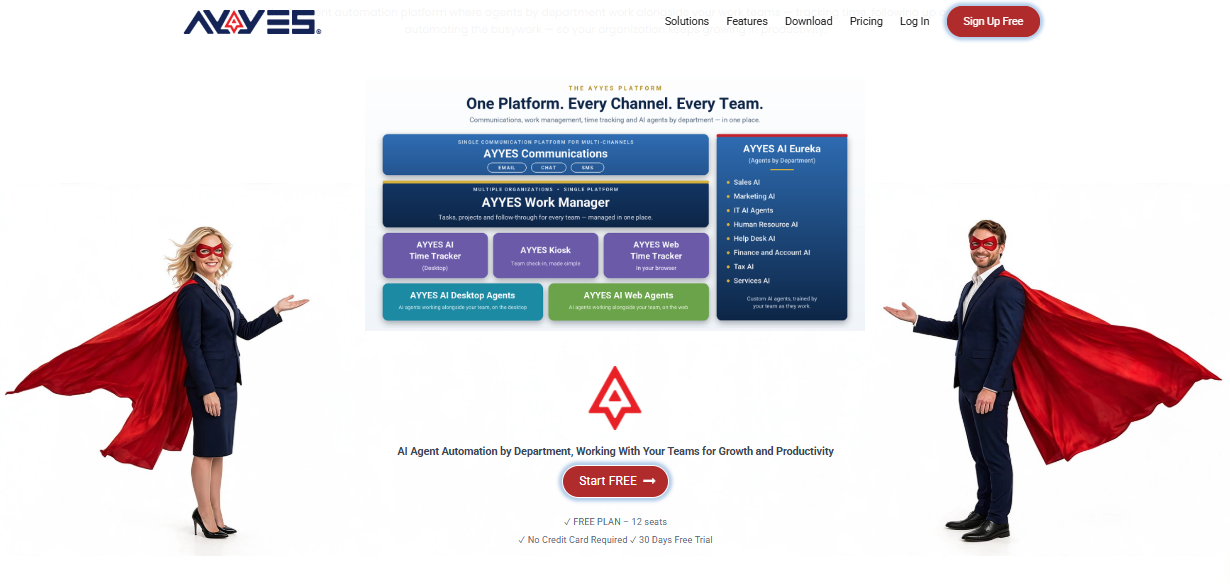
Unlike traditional invoice apps, AYYES focuses on recording working time and organizing project activities. These records can support businesses that calculate client charges using employee hours or project-based billing.
Key Features:
- Employee time tracking.
- Unlimited projects and tasks.
- Employee timesheet management.
- Time clock kiosk.
- Project and task management.
- Activity logs and reporting.
- Team management.
- PDF and CSV reporting options on supported plans.
Advantages:
- Free plan for up to 12 team members.
- Unlimited projects and tasks.
- Helps organize employee working hours.
- Supports office, remote and field-based teams.
- Makes it easier to review project-related working hours.
- Provides a centralized view of employee timesheets.
Free Plan: $0/month for up to 12 seats. Includes time tracking, unlimited projects and tasks, kiosk access and 500 MB of storage.
Best For: Small businesses, agencies and service-based teams that need employee time tracking, project management and billable-hour visibility.
Why consider AYYES?
Businesses that bill clients based on working hours need accurate time records. AYYES helps organize those records through employee time tracking, projects and timesheets. Teams can use this information to support their client billing and invoice preparation processes.
It is particularly useful when businesses want to manage workforce activity and project hours instead of relying on separate spreadsheets.
2. Zoho Invoice – Best for Freelancers and Small Businesses
Zoho Invoice is a dedicated invoicing application that helps freelancers and small businesses create invoices, manage customers and collect payments.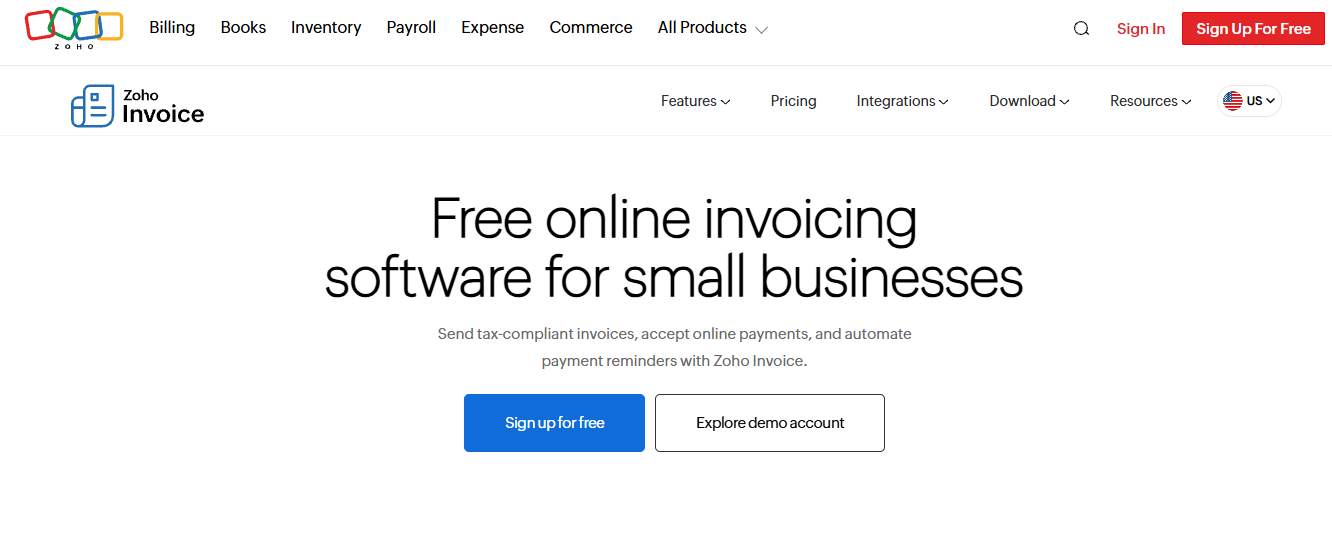
It offers several billing features without requiring a monthly subscription, making it a strong option for businesses looking for free software for invoicing.
Key Features:
- Customizable invoice templates.
- Recurring invoices.
- Automated payment reminders.
- Customer portal.
- Expense tracking.
- Estimates and credit notes.
- Time tracking and project billing.
- GST-compliant invoices in India.
- Multiple payment options.
Advantages:
- Free invoicing solution.
- Supports online and offline payments.
- Allows businesses to record working hours.
- Helps organize customer and billing information.
- Offers mobile and desktop access.
Free Plan: Zoho Invoice offers a free plan for eligible businesses. Its Indian pricing page lists limits of two users, three projects and 500 invoices per year.
Best For: Freelancers, consultants and small businesses looking for dedicated invoice creation, customer management and payment tracking.
3. Wave – Best for Small Business Invoicing and Accounting
Wave combines invoicing and basic accounting features to help small businesses manage their financial activities.
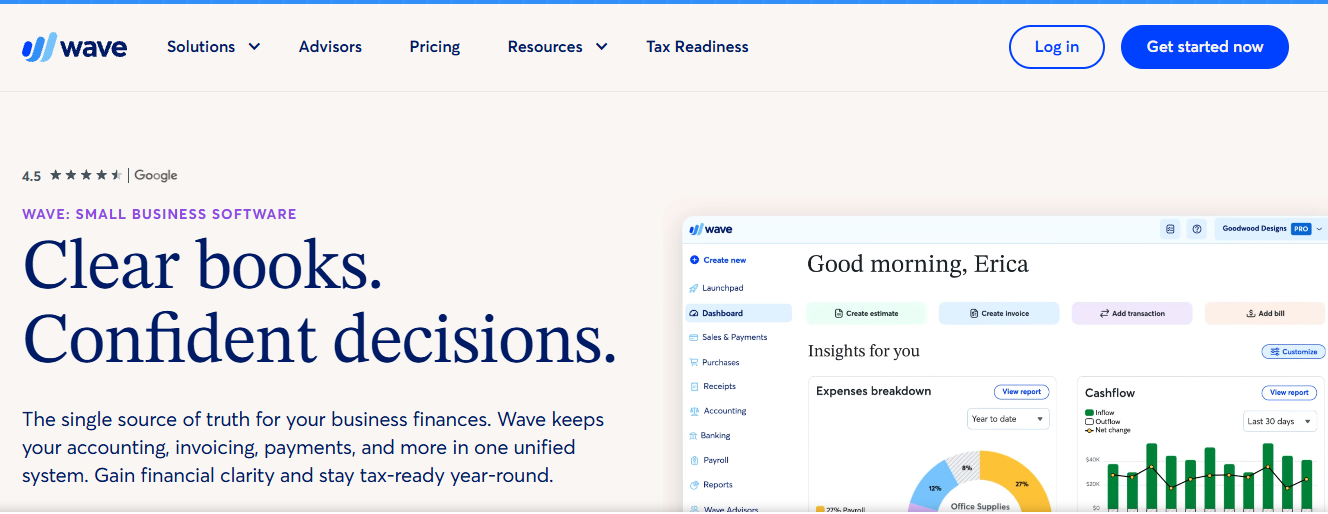
Its Starter plan provides free invoicing and bookkeeping features, while additional services are available through paid plans or optional charges.
Key Features:
- Invoice creation.
- Unlimited estimates.
- Bookkeeping records.
- Customer management.
- Online payment acceptance.
- Mobile invoicing.
- Financial record management.
Advantages:
- Free Starter plan.
- Unlimited invoices and estimates.
- Combines invoicing and basic bookkeeping.
- Helps organize customer and cash-flow information.
- Offers optional online payment processing.
Free Plan: The Starter plan costs $0 per month. Online payment processing fees apply when customers pay electronically.
Best For: Small businesses that want invoicing and basic bookkeeping in one platform.
4. PayPal Invoicing – Best for Online Payment Collection
PayPal Invoicing allows businesses to create and send invoices directly to customers and collect payments through PayPal.

It is particularly useful for freelancers and businesses that regularly receive online payments from customers.
Key Features:
- Online invoice creation.
- Invoice sharing through email and links.
- Payment tracking.
- Customer payment notifications.
- International payment support.
- Mobile invoice management.
Advantages:
- No fee to create or send invoices.
- Convenient online payment collection.
- Customers can receive invoices through shareable links.
- Supports multiple currencies and international markets.
- Provides payment notifications.
Free Plan: No monthly invoicing subscription is required. Standard commercial transaction fees apply when customers pay.
Best For: Freelancers, online sellers and businesses that want to collect customer payments through PayPal.
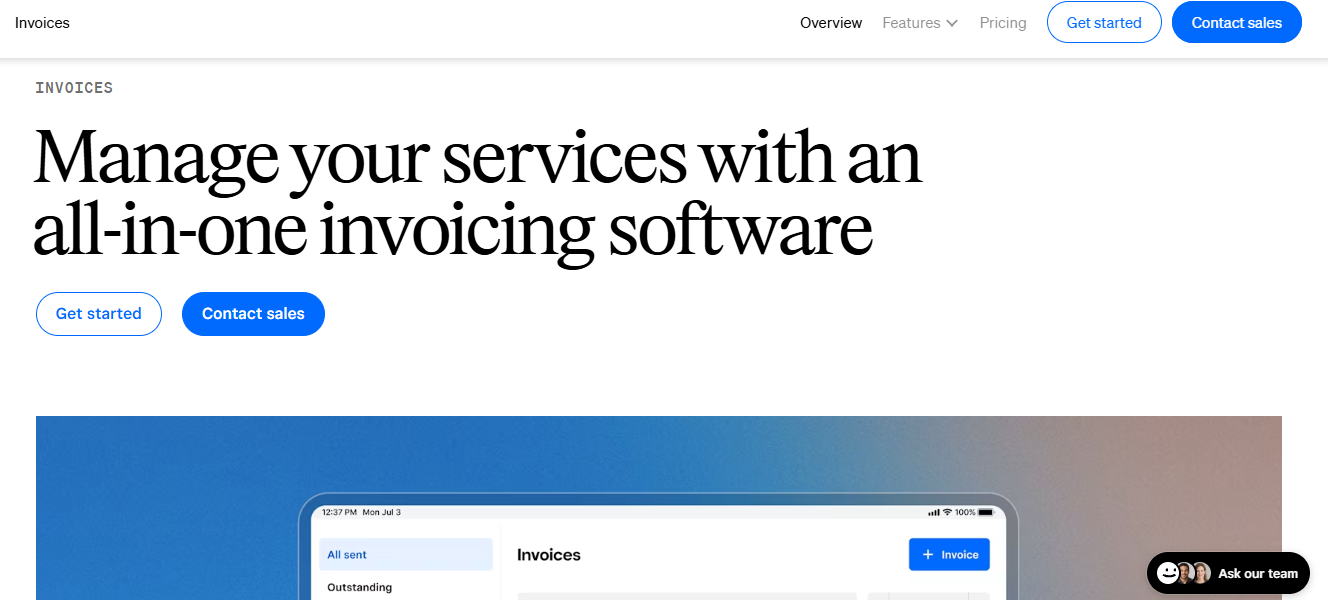
5. Square Invoices – Best for Retail and Service Businesses
Square Invoices helps businesses create invoices, send payment requests and manage customer billing. It also offers features for estimates, recurring invoices and project tracking.
Key Features:
- Digital invoice creation.
- Recurring invoices.
- Estimates and contracts.
- Customer management.
- Project tracking.
- Payment links.
- Invoice status tracking.
Advantages:
- Free monthly subscription option.
- Supports unlimited invoices on its Free plan.
- Allows businesses to manage estimates and projects.
- Supports online and in-person payment collection.
- Provides recurring billing options.
Free Plan: Square Free costs $0 per month per location. Payment processing fees apply to eligible transactions.
Best For: Retailers, contractors and service businesses that need invoicing alongside payment collection.
6. Bookipi – Best for Mobile Invoicing
Bookipi is an invoicing application designed to help freelancers and small business owners manage billing from web and mobile devices.
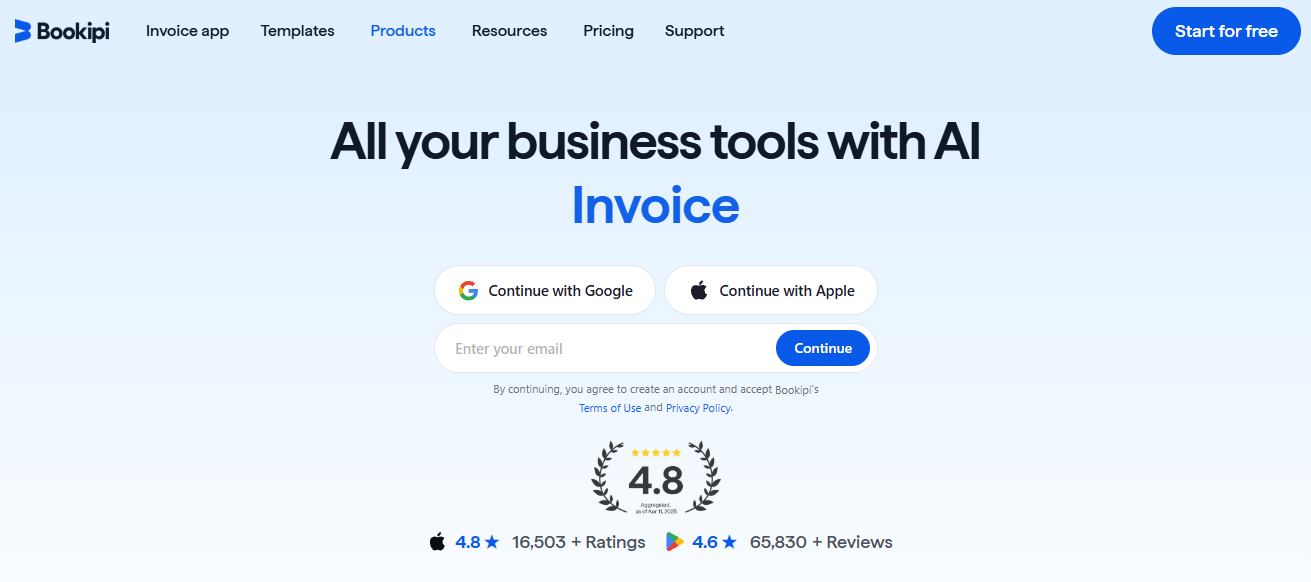
It offers invoice creation, customer management and payment tracking features.
Key Features:
- Invoice creation.
- Professional invoice templates.
- Customer management.
- Proposal creation.
- Payment tracking.
- Mobile invoicing.
- Document management.
Advantages:
- Easy invoice creation.
- Supports mobile and web access.
- Helps manage customer details.
- Offers payment tracking.
- Useful for freelancers and independent professionals.
Free Plan: Bookipi offers a free version with a maximum of three documents per month. The limit applies to invoices, proposals and contracts.
Best For: Freelancers and independent professionals who want a simple mobile-friendly invoice app.
7. Paymo – Best for Project-Based Billing
Paymo combines project management, time tracking and invoicing to help businesses organize work and bill customers based on project activities.
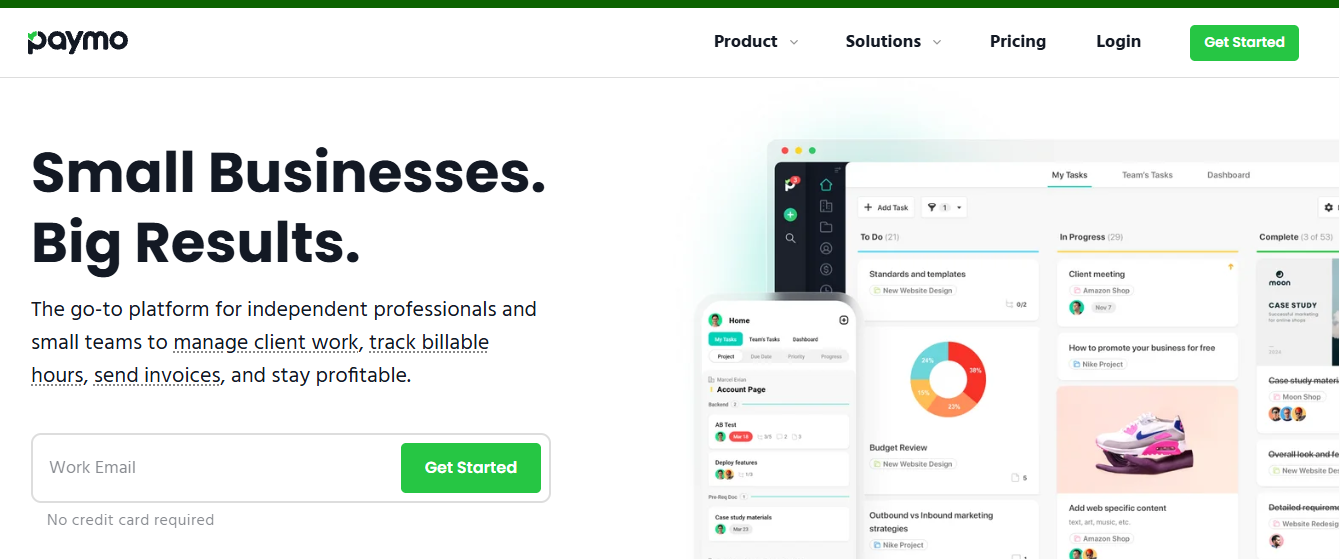
It is useful for agencies, consultants and freelancers who need to monitor working hours alongside billing.
Key Features:
- Time tracking.
- Invoice creation.
- Project management.
- Task management.
- Client management.
- Expense tracking.
- Project reporting.
Advantages:
- Unlimited time tracking on its free plan.
- Unlimited invoice creation.
- Connects project activities with billing.
- Helps monitor project working hours.
- Supports task and client management.
Free Plan: Paymo offers a free plan for one user, one client and up to two projects. It includes unlimited invoices and time tracking.
Best For: Freelancers and small project-based businesses that want to connect time tracking with invoicing.
Essential Features to Look for in Free Invoicing Software
Before selecting free invoicing software, compare the features that support your daily billing activities, reduce manual work and help you manage customer payments. The best free invoice software should offer essential billing tools while making it easier to track invoices, organize customer information and monitor business finances.
1. Customizable Invoice Templates
Choose invoicing software that lets you customize invoice templates with your business logo, company details, customer information, invoice numbers, payment terms and tax details. Professional invoice templates help maintain consistent branding and make invoices easier for customers to understand.
Some free invoice apps also provide ready-made templates for different business types, allowing you to create professional invoices without designing them from scratch.
2. Automatic Invoice Generation
Automatic invoice generation helps reduce repetitive data entry and supports consistent billing. Look for invoice automation software that can automatically populate customer details, product descriptions, quantities, rates and payment information.
This feature saves time, reduces manual errors and helps businesses prepare invoices more efficiently. It is especially useful for freelancers and small businesses that handle multiple customer transactions.
3. Online Payment Processing
Look for an online invoice platform that supports convenient payment options, such as credit cards, debit cards, bank transfers and other supported payment methods.
Online payment processing allows customers to pay invoices without unnecessary delays. Before choosing a free invoicing service, check whether payment processing is included in the free plan or whether transaction fees apply.
4. Recurring Invoices and Payment Reminders
Recurring invoices help businesses manage regular billing for subscriptions, monthly services and ongoing client projects. Instead of creating the same invoice manually every month, businesses can schedule invoices to be generated automatically.
Payment reminders are equally important. They help notify customers about upcoming due dates and overdue payments, reducing the need for repeated manual follow-ups.
5. Invoice Tracking and Management
An invoice tracker app should help you identify paid, unpaid, overdue and pending invoices from one dashboard. This makes it easier to monitor payment status and understand which customers still have outstanding balances.
Good invoice management software should also allow users to search, filter and organize invoices by customer, date, amount or payment status. These features help businesses maintain accurate billing records and avoid missing important payments.
6. Tax Calculation and Multi-Currency Support
Businesses working with different customers may need automatic tax calculations, GST-compliant invoices and support for multiple currencies.
Check whether the software allows you to configure applicable tax rates and display tax information clearly on invoices. Multi-currency support is particularly useful for freelancers and companies working with international clients.
7. Time Tracking and Billable Hours
Time tracking is an important feature for consultants, agencies, freelancers and service-based businesses that charge clients based on working hours.
The best invoicing app with time tracking should help users record project hours, create timesheets and identify billable time. These records can then support accurate invoice preparation.
For example, AYYES helps businesses track employee working hours, manage projects and review timesheets. This provides useful information for calculating billable hours and preparing client invoices.
8. Customer Management and Reporting
Customer management tools help businesses store important client information, including names, contact details, billing addresses and transaction history.
Reporting features provide an overview of total invoiced amounts, received payments, outstanding balances and monthly billing activity. These insights help business owners understand their financial position and make better business decisions.
9. Data Security and Software Integrations
Invoice software stores important business and customer information, so data security should be a priority. Look for secure data storage, user access controls, regular backups and reliable data protection practices.
Integrations with accounting, project management and payment platforms can also simplify daily operations. Before choosing software for billing and invoicing free, check which integrations are included in the free plan and whether additional charges apply.
10. Free Plan Limitations and Scalability
Not every free invoice program offers the same features. Some limit the number of invoices, customers or users, while others charge extra for advanced reporting, integrations or automation.
Review the free plan carefully before making a decision. Consider whether it supports your current business requirements and whether paid upgrades are available as your business grows.
A suitable free invoice billing software solution should provide the essential tools you need today without making it difficult to upgrade later.
How to Choose the Best Free Invoice Software for Your Business?
When comparing different invoice apps free plans, consider the number of invoices, customers and users supported by each platform. The best free invoice app should provide essential billing features, payment tracking and customer management without unnecessary restrictions. Businesses looking for free software for invoicing should also compare recurring billing, invoice customization and available payment options.
If you need invoice software for free, check whether the provider offers unlimited invoice creation or restricts monthly usage. Some platforms also provide free online invoice software with payment links, automatic reminders and downloadable PDF invoices. Before choosing the best free invoice program, evaluate its features, transaction fees and upgrade options to find a suitable solution for your business.
1. Identify Your Business Size and Invoicing Needs
Start by understanding how many invoices you create each month, how many clients you manage and whether multiple employees need access.
Freelancers may only need basic invoice generation, while agencies and service businesses may require project tracking and employee timesheets.
2. Compare Free Features and Usage Limits
Check the limitations of every free plan before signing up.
Consider:
- Monthly or yearly invoice limits.
- Number of supported users.
- Customer or client limits.
- Project restrictions.
- Available invoice templates.
- Payment tracking features.
- Storage and document restrictions.
A free invoicing service should provide enough functionality for your regular billing activities.
3. Look for Invoice Automation Capabilities
If your business sends invoices regularly, look for invoice automation software with recurring billing, automatic reminders and invoice status tracking.
These features can reduce manual administrative tasks and help businesses follow up on unpaid invoices.
4. Check Payment Methods and Processing Fees
Review the payment options supported by each application.
Some platforms offer integrated payment processing, while others require external payment gateways. Compare transaction charges, supported currencies and regional availability before selecting a tool.
5. Evaluate Time Tracking and Project Management
Businesses that bill customers by the hour should consider time tracking invoice software.
Look for features such as:
- Employee time tracking.
- Project-based timesheets.
- Billable-hour reports.
- Task management.
- Client-based time records.
- Exportable reports.
AYYES and Paymo are relevant options for businesses that want to connect time records with project-based billing.
6. Consider Data Security and Future Scalability
Choose software that protects customer and financial information and offers appropriate access permissions.
Also check whether the software can support additional users, projects, clients and reporting requirements as your business expands.
Who Should Choose Free Invoice Software?
Free invoicing applications can be useful for businesses that want to manage customer billing without adding another monthly subscription.
However, different business types need different features.
1. Freelancers and Independent Professionals
Freelancers often create invoices for individual projects, hourly work and completed assignments.
A free invoice app can help them prepare professional invoices, manage customer information and track outstanding payments.
Zoho Invoice and Bookipi are useful options for this audience.
2. Startups and New Businesses
Startups usually need affordable tools to manage their initial business operations.
Free software for invoicing helps them create customer invoices, monitor payments and organize basic financial records while keeping expenses under control.
3. Small Businesses and Local Service Providers
Small businesses need reliable billing systems to manage customer payments and maintain invoice records.
Wave, Zoho Invoice and Square Invoices offer different options depending on whether the business prioritizes accounting, online billing or payment collection.
4. Agencies and Project-Based Teams
Agencies often charge customers according to project milestones, completed tasks or employee working hours.
They should consider invoice management software that supports project records, time tracking and billable-hour calculations.
AYYES can help agencies manage employee hours, projects and timesheets, while dedicated invoicing software can handle invoice creation and payment collection.
5. Remote and Distributed Teams
Remote businesses need visibility into working hours and project activities across different locations.
AYYES helps teams centralize time tracking, timesheet reporting and project management, making it useful for businesses that need accurate working-hour records.
Free vs Paid Invoice Software: Which Is Better for Your Business?
Both free and paid invoicing applications can simplify business billing. The right option depends on the number of invoices you create, the level of automation you need and your business growth requirements.
Free Invoice Software: Features and Benefits
Free invoice software is useful for businesses that need basic billing features without a monthly subscription.
Common benefits include:
- No monthly subscription cost.
- Basic invoice creation and customization.
- Customer information management.
- Invoice sharing through email or PDF.
- Basic payment tracking.
- Suitable for freelancers and startups.
- Lower initial software expenses.
However, some free plans restrict the number of users, clients, documents or invoices.
Paid Invoice Software: Features and Benefits
Paid invoicing software generally provides more advanced billing and business management capabilities.
Common benefits include:
- Higher invoice and document limits.
- Advanced invoice automation.
- Recurring billing and payment reminders.
- More integrations with accounting platforms.
- Advanced financial reporting.
- Additional team members and user permissions.
- Enhanced customer support.
- More customization options.
Paid software can be useful for businesses with higher invoice volumes or more complex billing requirements.
Free vs Paid Invoice Software Comparison
| Feature | Free Invoice Software | Paid Invoice Software |
| Monthly subscription | $0 | Monthly or annual fee |
| Invoice creation | Basic or advanced, depending on provider | Usually more advanced |
| Invoice limits | May have restrictions | Usually higher limits |
| Customer management | Basic features | Advanced options |
| Payment tracking | Basic or included | More detailed reporting |
| Invoice automation | Limited or plan-dependent | More automation options |
| Recurring billing | May be included or restricted | Commonly available |
| Integrations | Limited options | More integration choices |
| Team management | May have user restrictions | More users and permissions |
| Reporting | Basic reports | Advanced reporting |
| Customer support | Standard or self-service | Additional support options |
When Should You Choose Free Invoice Software?
Choose a free plan when:
- You are a freelancer or startup.
- Your business creates a limited number of invoices.
- Basic invoice creation meets your requirements.
- You do not need advanced automation.
- You want to reduce monthly operating costs.
When Should You Upgrade to Paid Invoice Software?
Consider upgrading when:
- Your invoice volume increases.
- You need advanced billing automation.
- You manage multiple employees or business locations.
- You require additional accounting integrations.
- You need advanced reporting and financial management.
- Your free plan’s user or document limits affect daily operations.
Common Mistakes to Avoid When Choosing Free Invoice Software
Selecting an invoicing tool based only on its free price can create problems later. Some platforms have limited features, hidden charges or restrictions that may affect your daily billing activities. Review these common mistakes and learn how to avoid them before choosing the best free invoice software for your business.
1. Choosing Software Without Checking Free Plan Limits
Some tools restrict the number of invoices, users, clients or projects you can manage. These limitations can become a problem as your business grows or your billing requirements increase.
How to Avoid It: Review the free plan details before signing up. Check invoice limits, user access, customer capacity, storage and available features. Choose free invoicing software that covers your current requirements and offers flexible upgrade options.
2. Ignoring Payment Processing Fees
A free invoice generator may still charge transaction fees when customers pay online. These additional costs can increase your business expenses, especially if you process a high volume of payments.
How to Avoid It: Check the payment processing charges for each supported payment method. Compare transaction fees, withdrawal charges and any additional costs before selecting an online invoice platform. Make sure you understand which services are free and which require payment.
3. Overlooking Invoice Automation Features
Manually creating every invoice, entering customer details and following up on payments can consume valuable time. Without automation, businesses may also experience repetitive work and avoidable billing errors.
How to Avoid It: Look for invoice automation software that supports recurring invoices, automatic reminders and reusable customer information. These features can reduce manual tasks and make your billing process more consistent.
4. Not Checking Time Tracking Capabilities
Businesses that bill clients by the hour should not rely only on invoice creation tools. They also need accurate working-hour and project records to calculate billable time and prepare correct invoices.
How to Avoid It: Choose a solution that offers time tracking, timesheets, project management and billable-hour reporting. For example, AYYES helps businesses record employee working hours and manage project-related time data, which can support accurate invoice preparation alongside dedicated invoicing software.
5. Ignoring Data Security and Backup Options
Customer information, billing details and financial records should be protected. Choosing invoice management software without checking its security practices can put important business data at risk.
How to Avoid It: Review the platform’s security features, user access permissions, data protection practices and backup options. Also, check whether you can export invoices and customer records so you can maintain access to important information when switching platforms.
6. Choosing Software That Cannot Scale with Your Business
A tool that works for one freelancer may not be suitable for a growing agency or company. Limited user access, project capacity and integrations can make it difficult to manage increasing business requirements.
How to Avoid It: Consider your future needs before selecting a free invoice program. Check whether the platform offers paid upgrades, additional user access, advanced reporting and integrations. Choose software that can support your business as its customers, employees and projects increase.
Why Choose AYYES for Time Tracking and Invoice Management?
Choosing the right software depends on how your business handles working hours, projects and customer billing.
Dedicated invoicing applications focus on creating invoices and collecting payments. However, businesses that charge customers based on employee hours also need reliable time records and project information.
AYYES addresses this requirement through its employee time-tracking and project-management capabilities.
1. Track Employee Working Hours
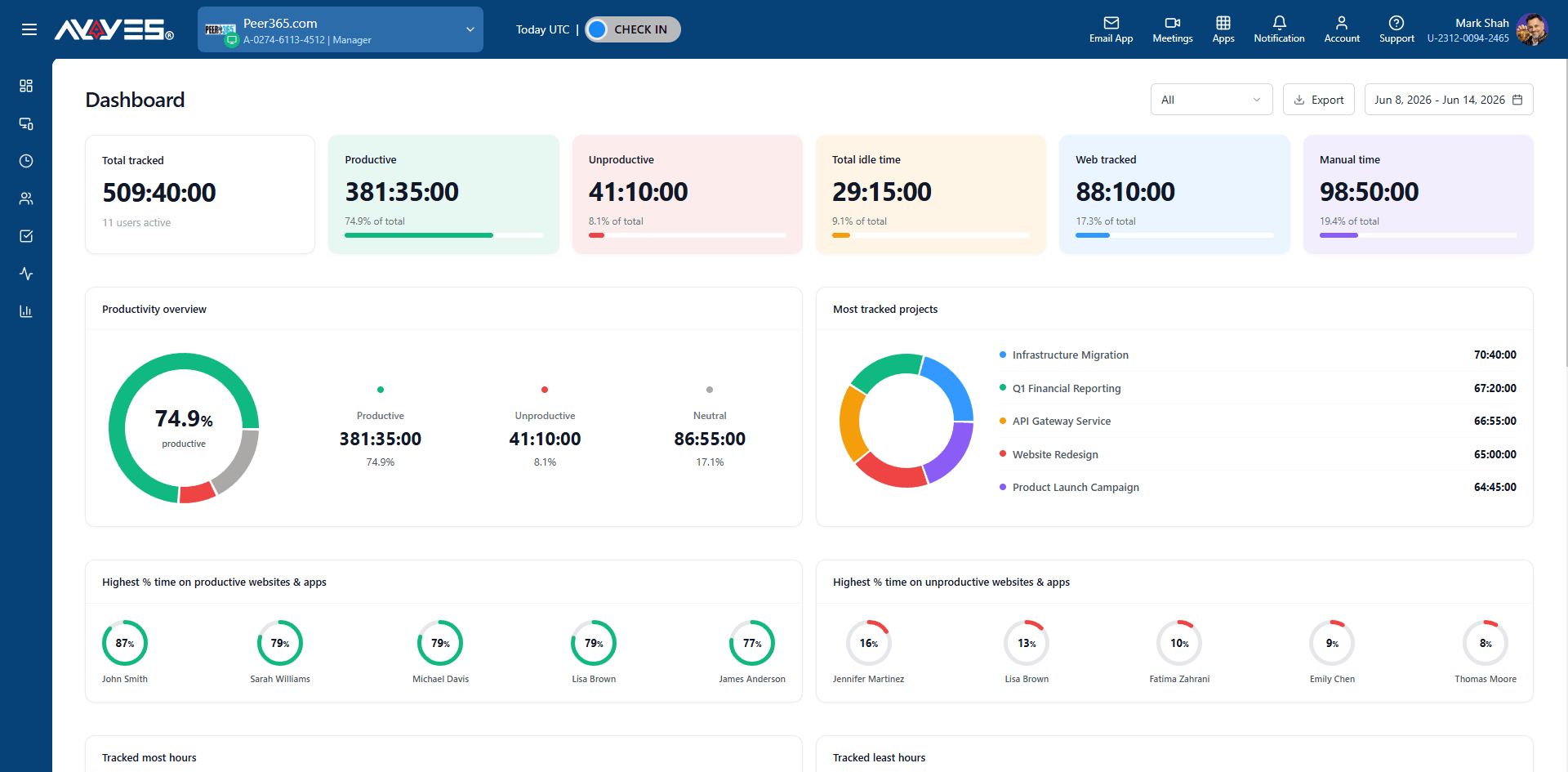
AYYES helps businesses record employee working hours through desktop and web-based timers, manual time entries and kiosk-based clock-ins.
This gives managers a centralized way to review working hours instead of collecting information from separate spreadsheets or paper timesheets.
2. Manage Projects and Tasks in One Platform
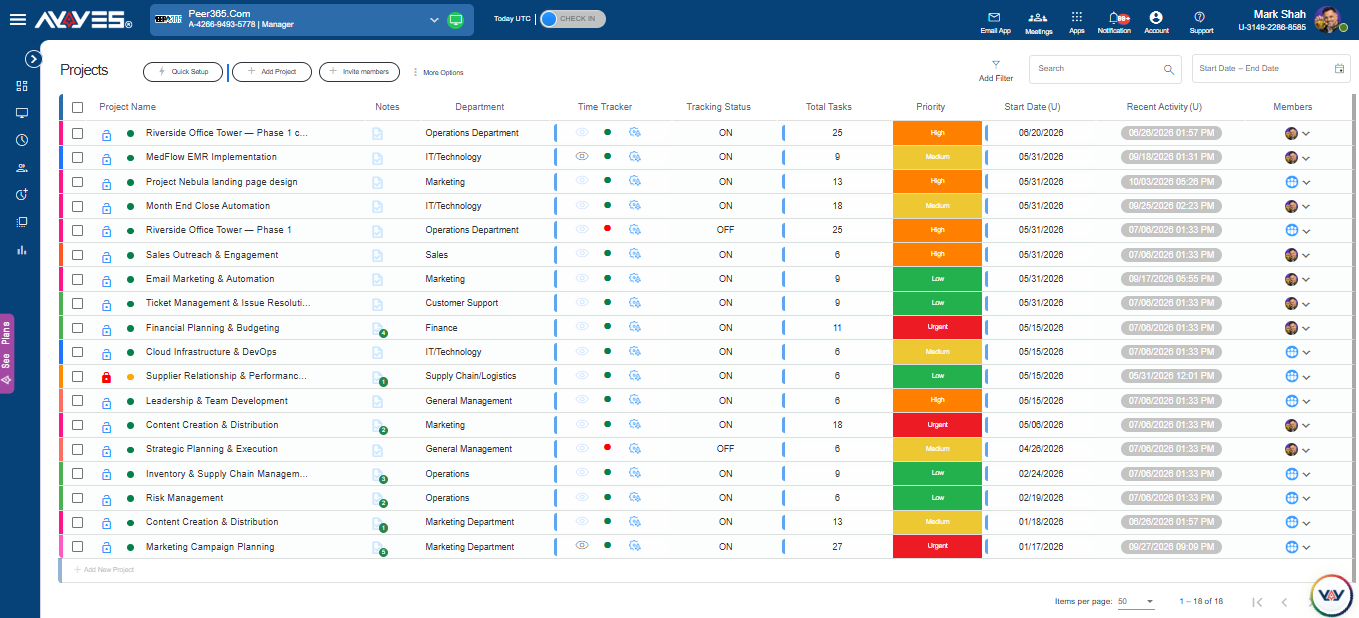
Businesses can create projects, organize tasks and monitor the time employees spend on different activities.
This makes it easier to understand how working hours are distributed across clients, projects and internal operations.
3. Maintain Accurate Employee Timesheets
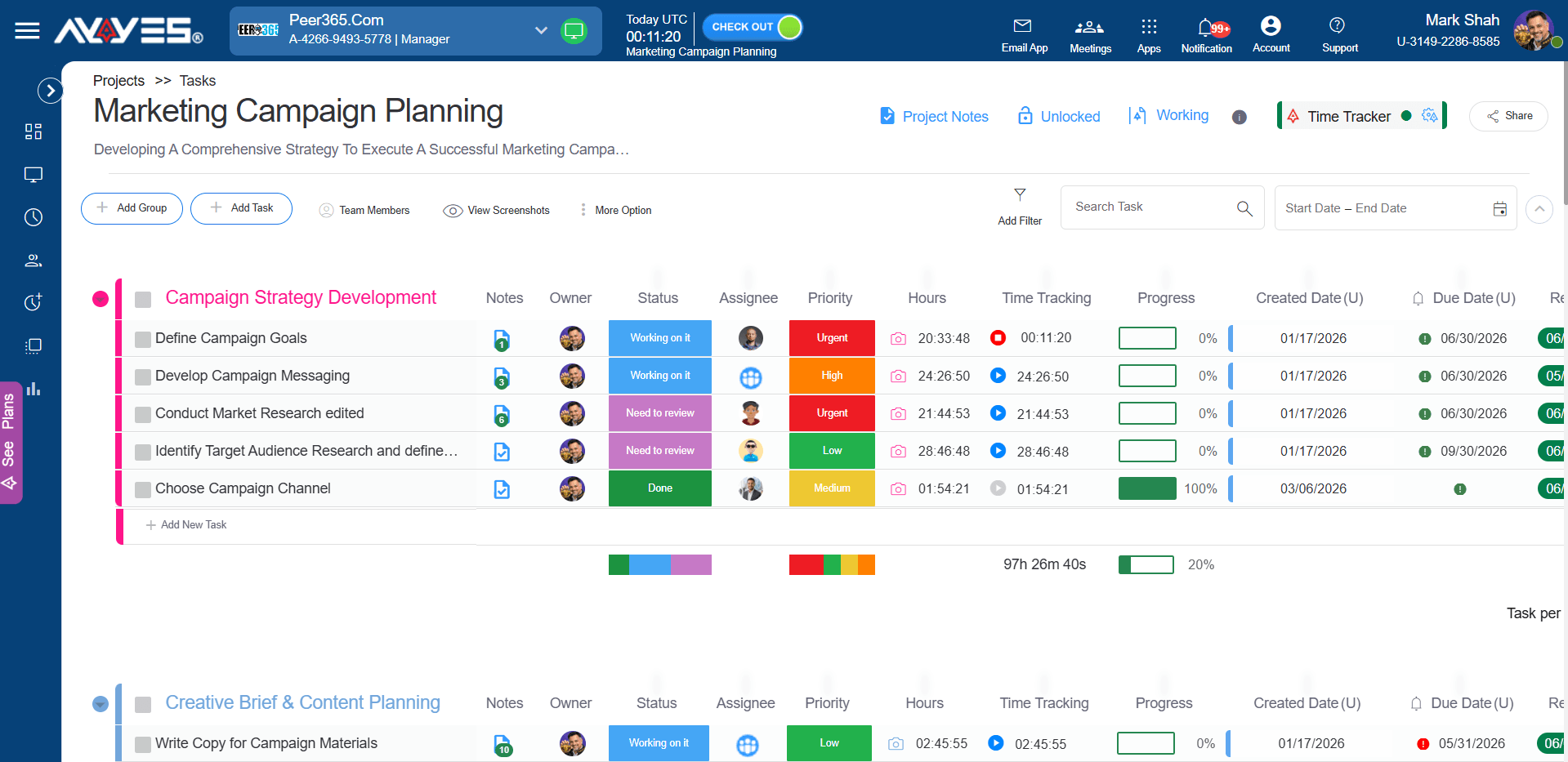
AYYES brings tracked working hours into a centralized timesheet system.
Managers can review time records by employee, project or date and export relevant information for reporting and payroll preparation.
4. Support Billable Hours and Client Billing
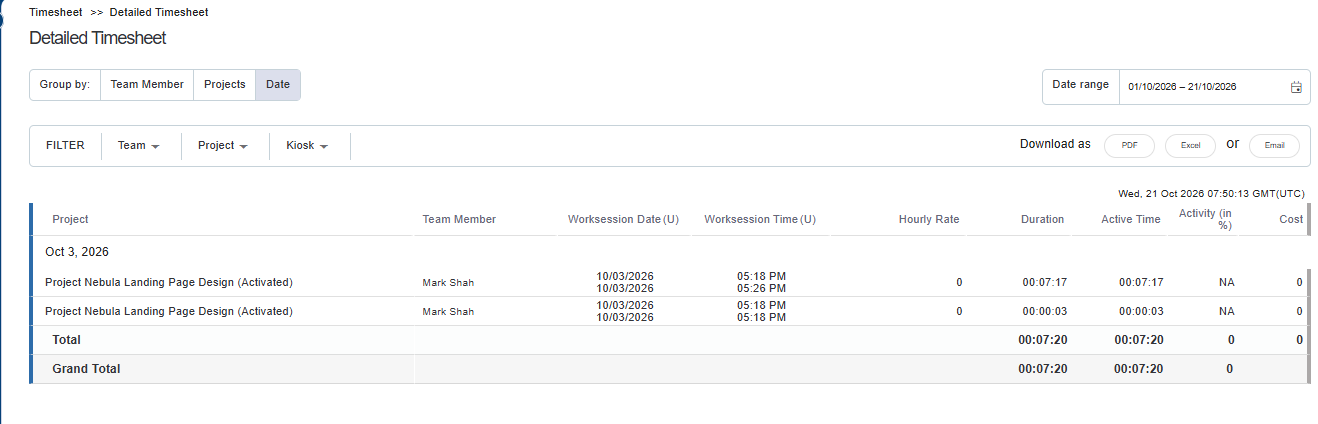
Timesheet Ayyes
For agencies, consultants and service-based businesses, billable hours are an important part of invoice preparation.
AYYES helps organize project-related working hours so businesses can review the time spent on client work and use those records when calculating billing amounts.
5. Manage Small Teams with a Free Plan
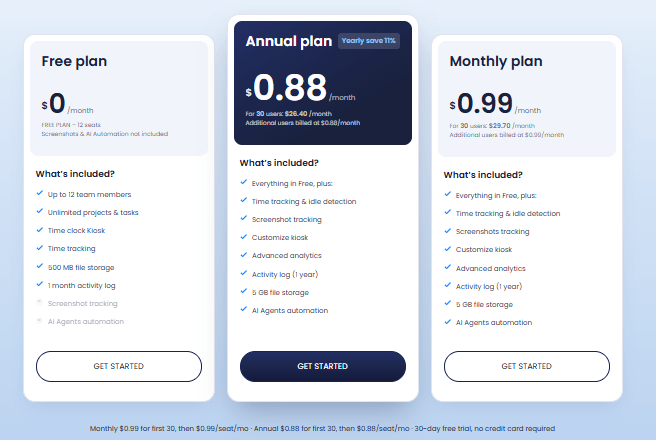
AYYES offers a free-forever plan for teams that need core time-tracking and project-management capabilities.
The free plan includes:
- $0 monthly subscription.
- Up to 12 team members.
- Unlimited projects and tasks.
- Time tracking.
- Time clock kiosk.
- 500 MB file storage.
- One-month activity log.
The paid plan adds features such as screenshot tracking, idle detection and advanced analytics.
6. Manage Remote and Office Teams
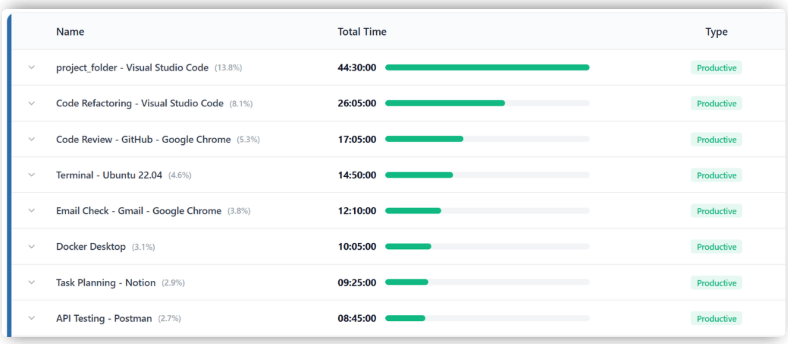
AYYES supports different working environments through desktop timers, web timers and kiosk access.
This makes it useful for businesses managing office employees, remote teams and on-site workers.
Who should choose AYYES?
- Agencies managing client projects.
- Businesses tracking employee working hours.
- Service teams that bill customers by time.
- Remote teams that need centralized timesheets.
- Small businesses that want project and task management.
AYYES is best considered alongside a dedicated invoicing application when your business needs both workforce time tracking and full invoice creation or payment processing.
Best Free Invoice Software: Which One Should You Choose?
The best free invoice software depends on your business model, billing frequency, team size and required features.
Here is a quick guide to choosing between the tools covered :
| Your Business Requirements | Recommended Software | Why Choose It? |
| Employee time tracking and team management | AYYES | Tracks working hours, projects and employee timesheets |
| Free invoicing for freelancers | Zoho Invoice | Offers invoice creation, reminders and client management |
| Invoicing with basic accounting | Wave | Combines billing and bookkeeping |
| Online payment collection | PayPal Invoicing | Supports invoice-based online payments |
| Retail and service payments | Square Invoices | Offers invoicing, payment links and project tracking |
| Mobile invoice creation | Bookipi | Supports mobile and web-based invoicing |
| Project-based billing | Paymo | Combines time tracking, project management and invoices |
If you mainly need to create and send invoices, Zoho Invoice, Wave or PayPal may be better starting points.
If your business manages employee hours, remote teams and billable projects, AYYES is worth considering. Paymo is another option when you want project-based time tracking and invoicing in one application.
Frequently Asked Questions About Free Invoice Software
1. What is the best free invoice software in 2027?
The best free invoice software depends on your business requirements. Zoho Invoice is a strong option for dedicated invoicing, Wave combines invoicing with basic accounting, and PayPal is useful for online payment collection. AYYES is worth considering when employee time tracking and project management are important.
2. Is there completely free software for invoicing?
Yes. Some platforms offer free-forever invoicing plans. Zoho Invoice provides a free invoicing solution, while Wave offers a free Starter plan. However, payment processing fees and usage restrictions may still apply.
3. Which free invoice app is best for small businesses?
Zoho Invoice is a useful choice for small businesses that need invoice creation, recurring billing, payment reminders and customer management. Wave is another option for businesses that also need basic bookkeeping.
4. Can I create and send invoices online for free?
Yes. Platforms such as Zoho Invoice, Wave, PayPal and Square allow eligible users to create and send invoices without a monthly invoicing subscription. Some services may charge fees for payment processing.
5. Does free invoicing software support time tracking?
Some applications include time tracking and project billing features. Zoho Invoice and Paymo provide time-related functionality, while AYYES focuses on employee time tracking, project management and timesheet reporting.
6. Can invoice software automatically track payments?
Many invoicing applications provide payment status tracking. Depending on the platform, you can review paid, unpaid and overdue invoices and receive payment notifications.
7. What is the difference between invoice software and accounting software?
Invoice software focuses on creating, sending and managing customer invoices. Accounting software provides broader financial management features, including expense tracking, bookkeeping, financial reports and account reconciliation.
8. Is free invoice software suitable for growing businesses?
Yes, provided the free plan supports your invoice volume, customer base and business requirements. Growing businesses should review user limits, integrations, automation features and paid upgrade options.
9. What is the best invoicing app with time tracking?
Paymo and Zoho Invoice are options for combining time-related records with invoicing. AYYES is particularly relevant for businesses that need employee time tracking, project management and timesheet reporting to support their client billing process.
10. What should I look for in an invoice tracker app?
Look for invoice status updates, payment reminders, customer records, due dates, outstanding balance reports and payment history.


