
What Is a Time Clock Kiosk and Is It Right for Your Business?
A time clock kiosk is a shared digital attendance system that allows employees to record their working hours using a designated device at the workplace. Instead of relying on paper timesheets or individual mobile phones, employees can clock in, clock out, and record breaks through a centralized kiosk.
A modern kiosk time clock helps businesses simplify attendance management, maintain organized work-hour records, and reduce manual data entry. With the AYYES time clock kiosk app, employees can check in using a personal PIN or QR code, while managers can access recorded work sessions and timesheets from one dashboard.
Whether you manage a small office, retail store, warehouse, or a team across multiple locations, a time clock kiosk can provide a consistent way to track employee attendance. But is it the right solution for your business? Understanding how it works, its features, and its benefits can help you make the right decision.
What Is a Time Clock Kiosk?
A time clock kiosk is a shared digital device that employees use to record their attendance at a workplace. It replaces traditional punch clocks and manual attendance sheets with a convenient digital check-in and check-out process.
Employees can identify themselves using supported methods such as a personal PIN or QR code. The system records their work sessions, making attendance information easier for managers to organize, access, and review.
Unlike individual mobile time tracking, a kiosk time clock provides a centralized attendance point where multiple employees can record their working hours using the same device. It is particularly useful for businesses that want a consistent way to manage on-site employee attendance.
Also Suggest this : Resource Management Tools
Who Should Use a Time Clock Kiosk?
A time clock kiosk is suitable for businesses that manage on-site employees, scheduled shifts, or teams working from shared locations. It provides a simple way to record attendance without requiring every employee to use a personal device.
Different types of businesses can benefit from using a kiosk time app:
1. Retail Stores and Restaurants
Retail stores and restaurants often have employees working different shifts throughout the day. A shared kiosk gives staff a designated place to record their arrival, departure, and breaks, helping managers maintain organized attendance records.
2. Offices and Small Businesses
Small businesses can use a kiosk time clock to replace paper attendance registers and simplify employee time tracking. It provides a centralized check-in point and helps managers review employee work hours more efficiently.
3. Warehouses and Manufacturing Facilities
Warehouses and manufacturing facilities often manage large teams with fixed shift schedules. A shared attendance device makes it easier for employees to record their working hours at designated entry points or staff areas.
4. Construction and Field-Based Teams
Construction businesses can use kiosks at offices, site entrances, or shared work locations where employees report before starting their shifts. For employees who regularly move between different job sites, mobile time tracking may be a more suitable option.
How Does a Kiosk Time Clock Work?
A kiosk time clock works through a shared device that displays an employee attendance interface. Employees access the kiosk, identify themselves, and record their working hours through a simple check-in process.
The AYYES kiosk time app can be accessed through a dedicated kiosk URL on a compatible shared device. Once configured, employees can use it to clock in, clock out, and record breaks.
1. Set Up the Kiosk on a Shared Tablet
Businesses can create a kiosk through the AYYES dashboard and open its dedicated URL on a compatible tablet or device. This allows employees to access the attendance interface without installing a separate kiosk application on the shared device.
2. Clock In Using a Personal PIN or QR Code
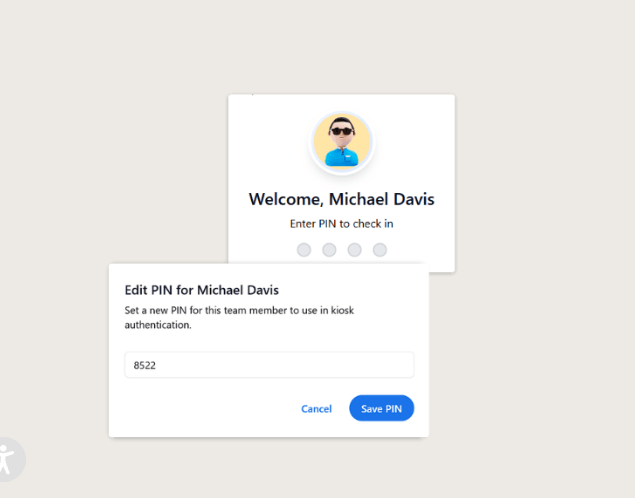
Employees select their names and use their personal PIN or assigned QR code to record their arrival. These identification options provide a straightforward way to associate attendance records with the correct employee.
3. Record Clock-Out and Break Times
Employees can return to the shared device to clock out when their shifts end. They can also record the beginning and end of their breaks, helping maintain more complete work-session information.
4. Sync Attendance Data with Timesheets
Once employees record their attendance, the work sessions are added to AYYES. Managers can review the recorded hours through employee timesheets and manage attendance information from one platform.
Key Features of the AYYES Time Clock Kiosk App
The AYYES time clock kiosk app provides attendance management tools designed to make employee check-ins easier and help businesses organize work-hour records.
1. PIN-Based Employee Clock-In
Employees can use their personal PIN to record their attendance through the shared kiosk. This adds an identification step to the check-in process and helps reduce situations where employees record time under another person’s name.
2. QR Code Attendance Tracking
AYYES supports QR code check-ins as an alternative to entering a PIN. Employees can scan their assigned QR codes to record their attendance through a quick and convenient process.
3. Employee Break Tracking
Employees can record break start and end times through the kiosk. This helps businesses maintain more complete work-session records and review employee attendance information.
4. Centralized Kiosk Management
Managers can create and manage kiosks through the AYYES dashboard. They can also control kiosk access and configuration permissions to support their workplace attendance requirements.
5. Multiple Kiosk Management
Businesses can set up multiple kiosks for different teams, departments, or locations. This makes it easier to provide shared attendance points across workplaces while managing them through one account.
6. Project-Based Time Tracking
Businesses can assign a project to a kiosk so that employee time entries are associated with the relevant project. This can help teams organize recorded work hours according to their project requirements.
Benefits of Using a Kiosk Time Clock for Employee Attendance
A digital kiosk can make attendance tracking more consistent by giving employees a shared place to record their work hours. It also helps managers reduce manual administrative tasks and maintain organized attendance information.
1. Reduce Manual Attendance Errors
Paper registers and manual timesheets can lead to missed entries, incorrect times, and inconsistent records. A digital kiosk records employee check-ins and check-outs electronically, reducing the need for manual attendance entry.
2. Improve Employee Clock-In Accuracy
Personal PINs and assigned QR codes help employees record attendance under their own profiles. This provides a more structured check-in process and supports better accountability.
3. Simplify Attendance Management for Managers
Managers can review recorded work sessions and employee timesheets through a centralized dashboard. This reduces the effort involved in collecting attendance information from separate registers or devices.
4. Save Time During Shift Changes
A shared time kiosk gives employees a consistent place to record attendance at the beginning and end of their shifts. This can make attendance procedures easier to follow during busy shift changes.
5. Maintain Organized Employee Timesheets
Digital attendance records help businesses maintain more organized employee work-hour information. Managers can review recorded sessions and use timesheets to support their time-tracking and administrative processes.
6. Manage Attendance Across Multiple Locations
Businesses with different departments or work locations can create multiple kiosks to support their attendance needs. Centralized management helps keep kiosk activity organized across locations.
How Does a Time Clock Kiosk Compare to Mobile Time Tracking?
A time clock kiosk and mobile time tracking both help businesses record employee working hours, but they serve different workplace requirements. A kiosk time app is useful when employees share a workplace and use one designated device, while mobile tracking provides flexibility for employees who work remotely or travel between job sites.
1. Shared Device vs. Personal Mobile Clock-In
A time clock kiosk allows several employees to record attendance using one shared device. Mobile time tracking allows employees to use their own supported devices to record their working hours.
The right option depends on where employees work and how they are expected to record attendance.
2. When to Choose a Time Clock Kiosk
A kiosk is a practical choice for businesses where employees report to a common location. Retail stores, offices, warehouses, and manufacturing facilities can benefit from a shared attendance point.
3. When Mobile Time Tracking Works Better
Mobile time tracking is useful for remote employees, field workers, and teams that regularly move between job sites. It allows employees to record their working hours without returning to a fixed kiosk location.
4. Can Businesses Use Both Tracking Methods?
Yes. Businesses can use kiosks for on-site employees and mobile or desktop tracking for remote and field-based teams. A flexible time-tracking platform can help manage these different work arrangements while keeping attendance records organized.
Why Choose AYYES as Your Time Clock Kiosk App?
Choosing the right time clock kiosk app can make a difference in how easily employees record attendance and how efficiently managers handle timesheets. AYYES offers a shared-device kiosk solution alongside other time-tracking tools, allowing businesses to manage work sessions through one platform.
1. Free Time Clock Kiosk for Up to 12 Team Members
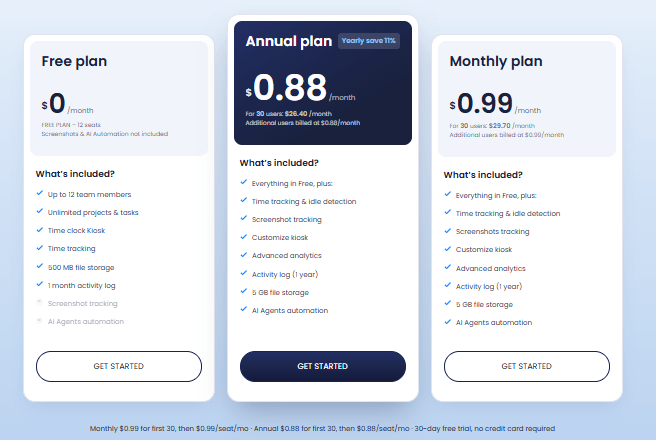
AYYES includes time clock kiosk functionality in its free plan for up to 12 seats. This gives small businesses an opportunity to start managing employee attendance digitally without immediately investing in a paid plan.
2. No Special Kiosk Hardware Required
Businesses can use an existing compatible tablet or device to access the kiosk through its dedicated URL. This removes the need for a dedicated kiosk terminal, provided the device meets the platform’s requirements.

3. Flexible PIN and QR Code Check-Ins
Employees can record their attendance using a personal PIN or assigned QR code. These options provide flexibility for different workplace check-in preferences.
4. Centralized Attendance and Timesheet Management
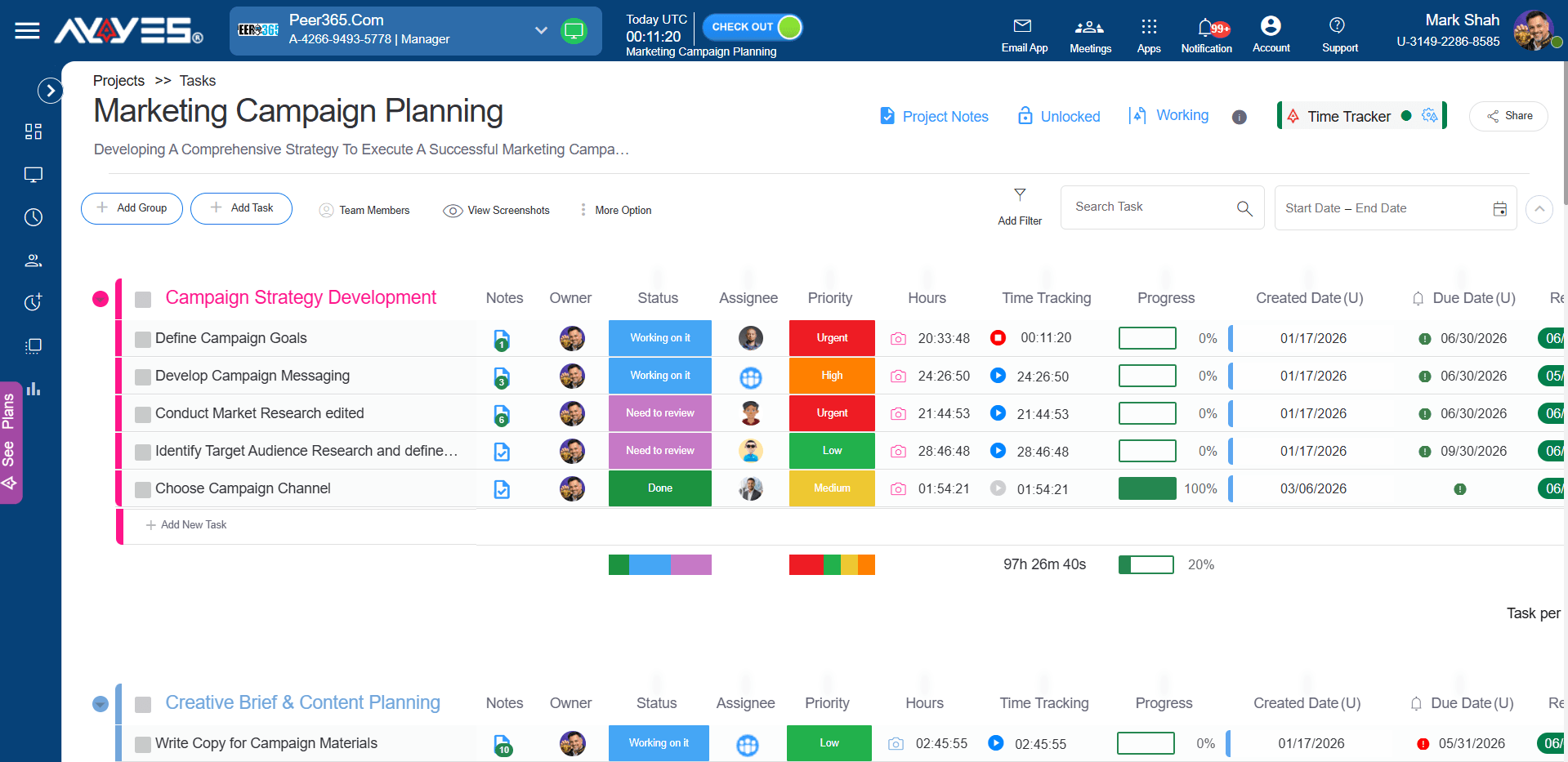
Managers can access recorded kiosk work sessions and employee timesheets through the AYYES dashboard. Keeping this information in one platform makes attendance review and time management more convenient.
5. Support for Multiple Work Locations
AYYES allows businesses to create and manage multiple kiosks. This can help organizations provide separate attendance points for different teams or locations while maintaining centralized control.
Get Started with the AYYES Kiosk Time Clock Today !
Make employee attendance easier with the AYYES kiosk time clock. Set up a shared device, allow employees to clock in using a personal PIN or QR code, and manage recorded work hours through one centralized platform.
Whether you run a small business or manage teams across multiple locations, AYYES provides a convenient way to organize employee time tracking. Start with the free plan for up to 12 seats and simplify attendance management for your team.
Get started with AYYES today and make employee time tracking easier.
Frequently Asked Questions About Time Clock Kiosks
1. What Is a Kiosk Time Clock?
A kiosk time clock is a shared digital attendance system that allows employees to record their working hours using a designated device at their workplace. Employees can identify themselves using a personal PIN, QR code, or other supported verification methods to clock in and out.
Unlike traditional punch clocks or paper attendance registers, a digital kiosk records work sessions electronically, making attendance information easier for managers to access and review.
2. When Is a Time Clock Kiosk Better Than Mobile Clock-In?
A time clock kiosk is generally more suitable for businesses where employees work at a fixed location and share common attendance points. It provides a centralized check-in process without requiring every employee to use a personal smartphone.
Mobile clock-in is more convenient for remote employees and field workers who regularly travel between job sites. Businesses should choose the method that best matches their employees’ work arrangements.
3. Do Kiosk Time Clocks Reduce Attendance Fraud?
A kiosk time clock can help reduce certain attendance issues by requiring employees to identify themselves before recording their working hours. Personal PINs and assigned QR codes provide an additional verification step and help discourage employees from clocking in under another person’s name.
However, a kiosk alone cannot eliminate all forms of attendance fraud. Businesses should combine digital attendance tracking with clear policies and regular timesheet reviews.
4. Are Kiosk Time Clocks More Reliable Than Mobile Apps?
A shared kiosk can provide a consistent attendance option because employees use a designated workplace device instead of depending on their personal phones. This can reduce issues related to low phone batteries, incompatible devices, or employees forgetting to use their mobile apps.
However, reliability also depends on the device, internet connection, and software being used. A properly configured kiosk time app can make daily attendance tracking more convenient for on-site teams.
5. Can Organizations Use Kiosks and Mobile Clock-Ins Together?
Yes. Businesses can combine kiosk and mobile time tracking to support employees with different work arrangements.
For example, office and warehouse employees can use a shared kiosk, while remote employees and field workers can record their hours through supported mobile tracking options. This hybrid approach gives businesses more flexibility while keeping work-hour records organized.
6. How Does a Time Clock Kiosk Work?
A time clock kiosk works by displaying an attendance interface on a shared device. Employees select their names, verify their identity using an available method, and record their working hours.
With AYYES, employees can use a personal PIN or QR code to clock in and out. They can also record breaks, and their work sessions are added to the platform’s timesheets for managers to review.
7. Does a Kiosk Time Clock Require Special Hardware?
No, many digital kiosk systems can run on an existing compatible tablet or device. Businesses do not necessarily need to purchase a dedicated attendance terminal.
AYYES allows businesses to create a kiosk and open its dedicated URL on a compatible shared device. Employees can then access the kiosk without installing a separate kiosk application on that device.
8. Can Employees Clock In and Out Using a QR Code?
Yes. A QR code provides an alternative to manually entering a PIN. Employees scan their assigned QR code through the kiosk interface to record their attendance.
AYYES supports both personal PIN and QR code check-ins, allowing businesses to choose a convenient attendance method for their teams.
9. Can Employees Track Breaks Through a Time Clock Kiosk?
Yes. A digital time clock kiosk can allow employees to record when their breaks start and end. This helps businesses maintain more complete work-session records and review attendance information.
The AYYES kiosk supports break start and end tracking, helping employees record their break activity through the shared device.
10. Can Businesses Manage Multiple Time Clock Kiosks?
Yes. Businesses with multiple departments, branches, or work locations can create separate kiosks to support different teams. This allows employees to use a designated attendance point at their workplace.
AYYES supports multiple kiosk management through a centralized dashboard, making it easier for businesses to configure and manage their kiosks.


