
Manual vs Automated Time Tracking: What Works Best for Your Business?
Businesses need an effective way to record working hours, manage timesheets, organise projects and understand how employees spend their time. The right time tracking method depends on team workflows, task requirements and how managers use time records.
Manual Time Tracking vs Automated Time Tracking Software is an important comparison when choosing between employee-entered hours and software-assisted time recording. Manual tracking gives employees direct control over time entries, while automated tracking can reduce the need to manage timers throughout the workday.
This guide compares the key features, benefits, limitations, costs and practical uses of both methods. It also explains how to choose the right tracking approach and how AYYES combines time tracking with project management, timesheets and reporting.
Manual vs Automated Time Tracking Software at a Glance
Both methods help businesses record working hours, but they differ in how time is captured, categorised and reviewed.
| Feature | Manual Time Tracking Software | Automated Time Tracking Software |
| Time recording | Employees start timers or enter hours manually. | Software captures supported time or activity automatically. |
| Accuracy | Depends on consistent and correct time entries. | Can reduce missed entries but may require corrections. |
| Ease of use | Employees must remember to record their time. | Reduces the need to manage every timer manually. |
| Task allocation | Employees select the relevant project or task. | Captured activity may need to be categorised or reviewed. |
| Timesheets | Hours are compiled from manual entries. | Captured records may help populate timesheets where supported. |
| Administrative effort | Can involve more data entry and follow-up. | Can reduce repetitive entry but still requires review. |
| Employee control | Employees directly manage their entries. | Control depends on the available settings and editing options. |
| Privacy | Primarily concerns submitted time records. | Depends on the activity data collected and monitoring settings. |
| Best suited for | Teams that need direct control over time entries. | Teams that want to reduce manual tracking effort. |
The right option depends on the team’s workflow and the software’s actual capabilities. Some businesses may benefit from combining both methods.
Also Suggest this : Cloud-Based vs Desktop Time Tracking Software
Key Differences Between Manual and Automated Time Tracking
The main difference is how working time is recorded. Manual timekeeping relies on employees entering hours or operating timers, while automated timekeeping uses software to capture supported activities with less manual input.
Businesses should compare the following factors before choosing a solution:
- Time entry: Manual methods require employees to enter or control their recorded hours. Automated methods can capture supported activity without requiring every timer to be started manually.
- Accuracy: Manual entries can contain gaps when employees forget to record time. Automated capture can help reduce these gaps, although records may still need corrections.
- Task categorisation: Employees can explicitly select tasks during manual entry. Automatically captured activity may need to be assigned to the correct project or task.
- Administration: Manual tracking can require additional data entry and follow-up. Automation may reduce repetitive work, but managers still need to review records.
- Privacy: Businesses should understand what data their chosen software captures and explain monitoring practices to employees.
- Reporting: Both approaches can support reporting when the software organises recorded hours into useful timesheets and project records.
These differences matter most when a business has frequent task changes, distributed employees or specific requirements for project reporting and attendance management.
Key Features Comparison: Manual vs Automated Time Tracking Software
When evaluating time tracking software, businesses should consider more than the ability to record hours. The right solution may also need task allocation, timesheet management, reporting and appropriate employee access controls.
| Key feature | Manual tracking | Automated tracking |
| Timers | Employees start and stop timers. | Supported timers or activity capture can operate automatically. |
| Time corrections | Users edit manually entered hours. | Users review and correct captured records where supported. |
| Project tracking | Employees select projects and tasks. | Captured time may require project assignment. |
| Activity visibility | Depends on the information entered. | May include additional activity records, depending on the product. |
| Timesheet review | Managers check submitted entries. | Managers review captured hours and correct discrepancies. |
| Offline work | Employees can enter hours later if the system permits. | Activity capture depends on offline support and the application’s capabilities. |
| Reporting | Reports depend on complete and correctly categorised entries. | Reports depend on accurate capture and categorisation. |
Check the features included in each product and plan before making a decision. Automatic capture does not necessarily mean every task is identified correctly or every timesheet is ready for approval.
What Is Manual Time Tracking?
Manual Time Tracking is a method of recording working hours through employee input. Employees can start and stop timers, enter completed hours or record time in a timesheet.
Manual Time Tracking Software provides digital tools for recording hours, assigning work to projects and maintaining time records. It can replace paper records or spreadsheets with a more organised process.
Common manual timekeeping methods include:
- Starting a timer when beginning a task and stopping it when the task ends.
- Entering working hours into daily or weekly timesheets.
- Assigning time to particular projects, clients or activities.
- Reviewing and correcting entries before submitting timesheets.
Manual timers are useful when employees need to specify exactly what they worked on. However, this method depends on employees recording time consistently and accurately.
Key Benefits of Manual Time Tracking
Manual timekeeping offers several benefits for businesses that need direct control over how hours are recorded.
1. Direct Control Over Entries: Employees can record their working hours, start and stop timers, and review entries before submitting timesheets.
2. Clear Task Allocation: Employees can assign hours to specific projects, clients or tasks, helping managers understand how time is distributed across different responsibilities.
3. Flexible Time Recording: Manual tracking accommodates meetings, site visits, offline work and other activities that automated tools may not capture accurately.
4. Easy Corrections and Reviews: Employees and managers can review time entries, correct mistakes and update records to maintain more accurate timesheets.
5. Better Employee Awareness: Recording hours manually encourages employees to review how they spend their time, identify time-consuming tasks and organise their daily priorities.
Manual time tracking works well when businesses need direct employee input and flexible time allocation. However, consistent recording practices and regular reviews are essential to minimise missing entries and maintain reliable records.
Limitations of Manual Time Tracking
Manual tracking can become difficult to manage when employees handle many tasks or frequently switch between activities.
Common limitations include:
- Forgotten timers: Employees may forget to start or stop a timer.
- Inconsistent records: Entering hours from memory can produce inaccurate estimates.
- Additional administration: Managers may need to follow up on missing entries and incorrect timesheets.
- Frequent interruptions: Recording every task change manually can interrupt the workflow.
Manual Time Tracking Software can make the process more organised, but it cannot eliminate every error caused by inconsistent time entry.
What Is Automated Time Tracking?
Automated Time Tracking uses software to capture time or activity with less manual input. Depending on the product, this may involve automatic timers, background activity recording, idle detection or other automated tracking capabilities.
Automatic Time Tracking Software can help employees reduce repetitive timer management and give managers a clearer view of recorded activity. Some tools also support reviewing and organising captured time into projects or tasks.
Typical capabilities may include:
- Capturing supported activity automatically.
- Identifying idle periods or gaps in recorded activity.
- Helping employees organise recorded time into projects and tasks.
- Providing records for timesheet review and reporting.
Automated timekeeping can reduce reliance on manual entry, but it does not guarantee perfect records. Employees may still need to check activity, assign tasks and account for work that the software does not capture.
Key Benefits of Automated Time Tracking
Automated tracking can be useful for businesses that want to reduce repetitive time-entry tasks and improve visibility into recorded work activity.
1. Reduced Manual Input: Automated time tracking can reduce the need for employees to start and stop timers or enter working hours manually throughout the day.
2. Fewer Missed Activities: Software-assisted tracking can help capture work activity that employees might otherwise forget to record, depending on the tool’s features and settings.
3. Improved Time Visibility: Recorded activity and time reports help managers understand how working hours are distributed across projects, tasks and team responsibilities.
4. Connected Workflows: Automated tracking software can integrate time records with project management, timesheets and reporting, making it easier to review work hours in one place.
5. Less Repetitive Administration: Automation can reduce the time spent creating and organising time records, allowing employees and managers to focus more on reviewing results and managing workloads.
Automated time tracking is useful for businesses seeking greater visibility and less repetitive data entry. However, employees and managers should still review recorded hours, correct errors and ensure that tracking practices suit their workflows and privacy requirements.
Limitations of Automated Time Tracking
Automated tracking also has limitations that businesses should consider before adopting it.
- Incorrect categorisation: Captured activity may not identify the correct task or project.
- Incomplete context: Computer activity does not necessarily represent every working activity or measure productivity.
- Privacy considerations: Some products collect additional activity information, so businesses need to understand their monitoring settings.
- Review requirements: Employees and managers may need to correct records before using them for reporting.
- Feature limitations: Automatic tracking, idle detection and offline functionality vary between products.
Automated timers should support accurate timekeeping rather than replace employee judgement, clear policies or appropriate record review.
Factors to Consider When Selecting a Time Tracking Solution
Choosing the right time tracking setup depends on how employees work, what information the business needs and how recorded hours will be used. Consider these eight factors when comparing manual time tracking software and automated time tracking software.
1. Employee Work Patterns
Consider whether employees work remotely, in an office, on-site or across multiple locations. Choose a solution that accommodates different schedules and working environments, including desktop timers, web-based tracking and shared kiosk devices.
2. Manual and Automated Time Recording
Evaluate whether employees should start and stop timers themselves or use automated time tracking to reduce repetitive entries. Manual tracking offers direct control over time records, while automated tracking can reduce the need for manual input.
3. Timesheet Management
Look for daily or weekly timesheets, editing options and approval workflows. These features help employees and managers review recorded hours, correct mistakes and maintain organised records for payroll-related processes.
4. Project and Task Tracking
If employees handle multiple assignments, choose software that allows them to allocate working hours to specific projects and tasks. This helps managers understand how time is distributed and supports project planning and workload management.
5. Privacy and Employee Monitoring
Review what data the software collects, who can access it and which monitoring features are available. Choose settings that match your business requirements and maintain appropriate transparency around employee monitoring.
6. Reporting and Analytics
Check whether the software provides useful reports on working hours, attendance, projects and timesheets. Clear reporting can help managers review workloads, monitor project progress and make informed operational decisions.
7. Ease of Use and Flexibility
Choose a platform with a straightforward interface that employees can use consistently. Consider whether it supports different time recording methods and can accommodate your team’s changing needs as the business grows.
8. Pricing and Available Features
Compare subscription costs, user limits and included features before making a decision. Check whether advanced reporting, integrations or employee monitoring require a paid plan, and consider using a free trial to evaluate the software before committing.
Compare Your Priorities Before Making a Decision
Rank your requirements as essential, useful or optional. Test the software with a small team to evaluate time recording, project allocation, timesheets and reports.
Before choosing a plan, check its included features, integrations and pricing. The aim is to select a tracking method that meets current business needs without adding unnecessary administrative work.
How to Switch from Manual Time Tracking to Software
Switching from manual time tracking to software can help businesses reduce repetitive data entry, organise timesheets and improve visibility into employee working hours. Follow these steps to make the transition easier while keeping existing time records organised.
Step 1: Review Your Current Time Tracking Process
Identify how employees currently record working hours, manage timesheets and allocate time to projects. Review existing spreadsheets, paper records and common issues, such as forgotten timers, missing entries or calculation errors.
Step 2: Choose the Right Time Tracking Software
Select software that matches your team’s requirements, including time tracking, project management, timesheets, reporting and attendance management. Consider whether your business needs manual timers, automated tracking, web-based time recording or kiosk clock-ins.
Step 3: Set Up Employees, Projects and Tasks
Create employee accounts and organise projects, tasks and work categories within the software. Establish clear procedures for recording hours so employees understand how to allocate time and maintain accurate records.
Step 4: Transfer Existing Time Records
Import relevant employee, project and timesheet information where supported. Keep historical records accessible for reference, reporting and payroll-related workflows. Check transferred data for missing information or errors before relying on the new system.
Step 5: Train Employees on the New System
Explain how to record working hours, select tasks, review timesheets and correct mistakes. Provide clear instructions and allow employees to practise using the software before making it the primary time tracking method.
Step 6: Test the Software with a Small Team
Start with a pilot group to identify setup issues and gather employee feedback. Check the accuracy of time entries, project allocation and reports before rolling out the software across the business.
Step 7: Monitor Results and Improve the Process
Review timesheet accuracy, employee adoption and administrative workload after implementation. Use feedback to improve procedures, adjust settings and help employees maintain consistent time records.
AYYES combines time tracking with project management, timesheets, kiosk clock-ins and reporting to help businesses manage work hours in one platform. Explore the AYYES features to see how they can support your transition from manual records to software-based time tracking.
Pros and Cons of Manual vs Automated Time Tracking Software
Both approaches can support effective time management, but each has different strengths and limitations.
| Option | Pros | Cons |
| Manual Time Tracking Software | Direct control, explicit task selection, flexible entries and straightforward corrections. | Forgotten timers, inconsistent entries and additional administration. |
| Automated Time Tracking Software | Reduced manual input, activity visibility and potential for more complete records. | Categorisation errors, privacy considerations and continued review requirements. |
| Manual timers | Clear user control over start and stop times. | Depend on employees remembering to operate them. |
| Automated timers | Can reduce repetitive timer management. | May need corrections or context before records are useful. |
Neither approach is automatically better for every business. Compare the actual capabilities, employee workflows and reporting requirements before choosing a solution.
When Should You Choose Manual Time Tracking?
Manual time tracking may be suitable for businesses that need employees to decide precisely which activities their recorded hours relate to.
Consider this approach when:
- Employees need to assign hours explicitly to clients or projects.
- Work includes meetings, offline activities or tasks that are difficult to capture automatically.
- Employees prefer direct control over their time entries.
- The business uses a structured timesheet submission and approval process.
- The team can consistently record and review working hours.
Manual timekeeping is particularly useful when the context of a task matters as much as the number of hours recorded.
When Should You Choose Automated Time Tracking?
Automated tracking may suit businesses that want to reduce repetitive time-entry tasks and capture supported activity more consistently.
Consider this approach when:
- Employees frequently switch between tasks or applications.
- Remembering to start and stop timers is a recurring problem.
- The business needs greater visibility into computer-based work activity.
- Teams want to reduce manual data entry.
- The software can organise captured time into useful records and reports.
Before adopting an automated approach, confirm which activities the software captures and whether employees can review or correct the resulting records.
Can Manual and Automated Time Tracking Work Together?
Yes. A hybrid approach combines the flexibility of manual entry with the convenience of automatic capture.
For example, employees may use automated tracking for supported computer activity and add manual entries for meetings, offline work or activities that require additional context.
A practical workflow includes:
- Capture time: Record working hours using the appropriate tracking method.
- Review records: Check for missing entries, duplicate records and incorrect activity.
- Assign tasks: Ensure time is allocated to the correct projects and tasks.
- Complete timesheets: Add missing hours and correct entries where necessary.
- Review reports: Use the resulting records to understand project allocation and working hours.
This approach can help businesses accommodate different roles without relying entirely on manual entry or automatic capture.
Which Time Tracking Software Is Best for Your Business?
The right solution depends on team size, work patterns, reporting needs and how much manual input the business wants to retain.
1. Best for Teams Requiring Direct Control
Manual tracking can suit teams that need employees to select specific tasks, clients or projects when recording time. It is particularly relevant when the context of an entry needs to be recorded explicitly.
2. Best for Reducing Manual Time Entry
Automated tracking may suit teams that frequently switch tasks and want to reduce the effort involved in operating timers. Businesses should verify the available tracking and review features before selecting a platform.
3. Best for Remote and Office-Based Teams
Businesses with different work arrangements should consider whether the software supports their required desktop, web or shared-device workflows. Clear timesheets and accessible reporting can help managers maintain consistent records.
4. Best for Businesses Managing Attendance and Projects
Businesses managing multiple projects may need more than a basic timer. Project Time Tracking Software can help connect recorded hours with tasks and projects, making it easier to understand how time is allocated.
Combining time tracking with timesheets and reporting can also help managers review working hours and project workloads.
Why Choose AYYES for Manual and Automated Time Tracking?
AYYES combines time tracking, project management, timesheets, kiosk clock-ins and reporting to help businesses organise working hours and manage team workflows.
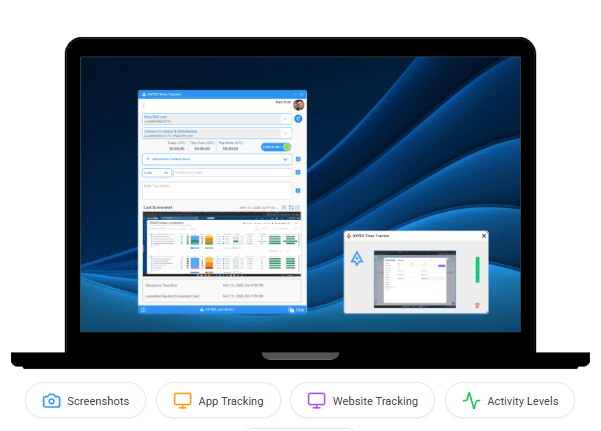
1. Time Tracking: AYYES supports desktop and web-based timers, helping employees record working hours and associate time entries with relevant activities throughout the workday.
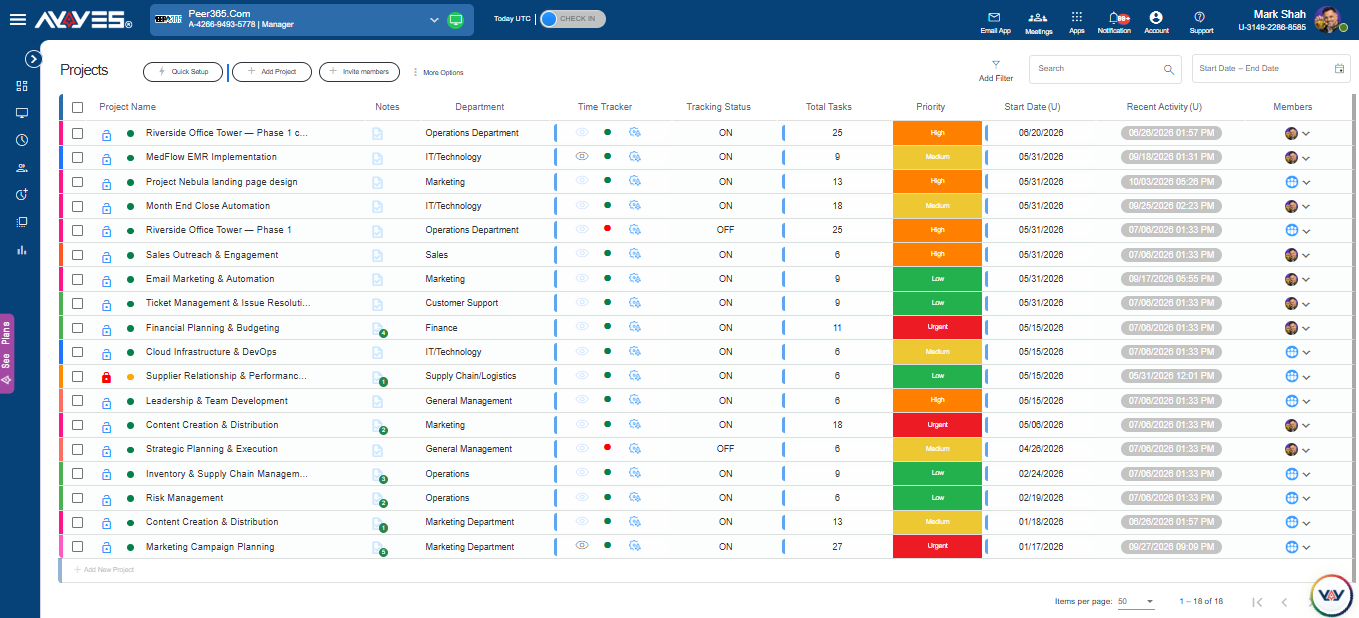
2. Project and Task Management: Organise projects and tasks while connecting recorded hours to specific activities, helping managers review time allocation and plan workloads more effectively.
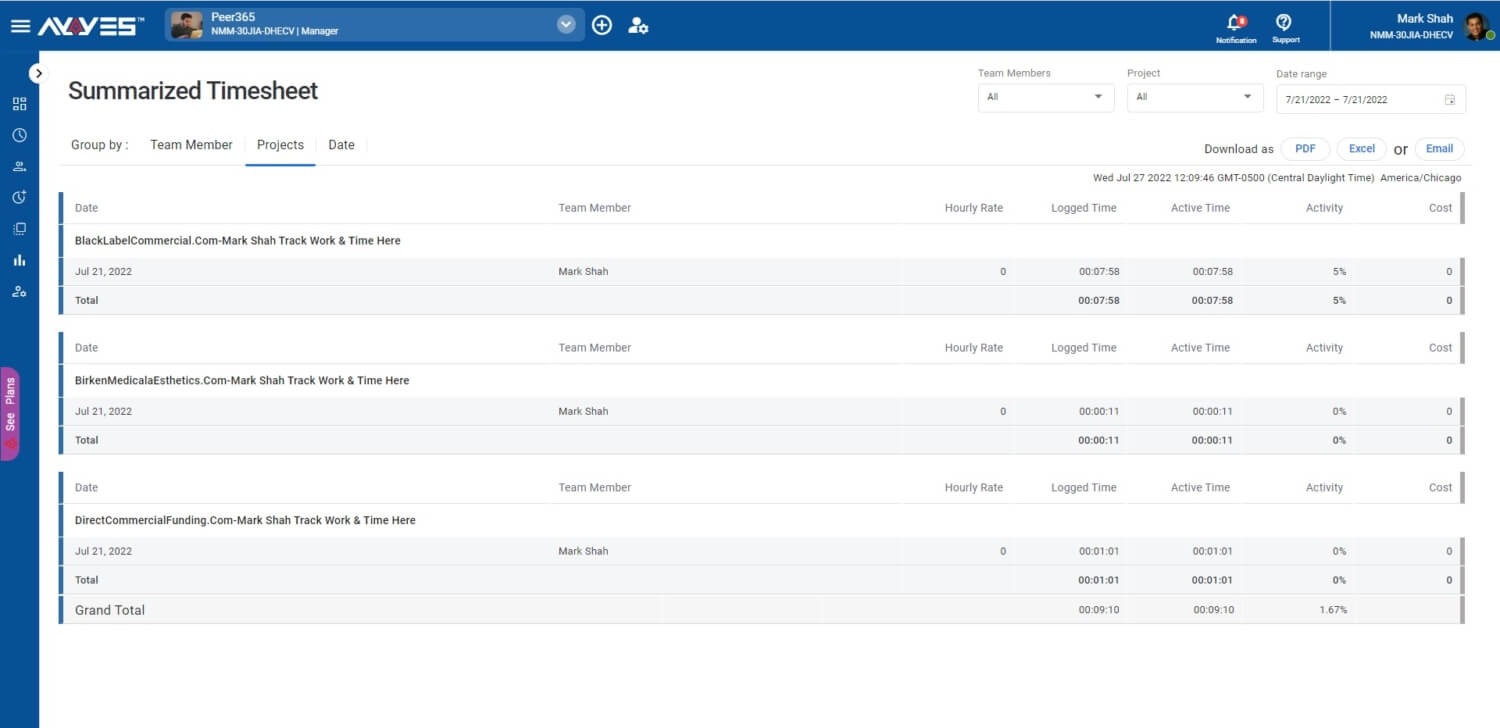
3. Timesheets: Review recorded working hours, maintain organised time records and identify missing entries or errors through regular timesheet checks.
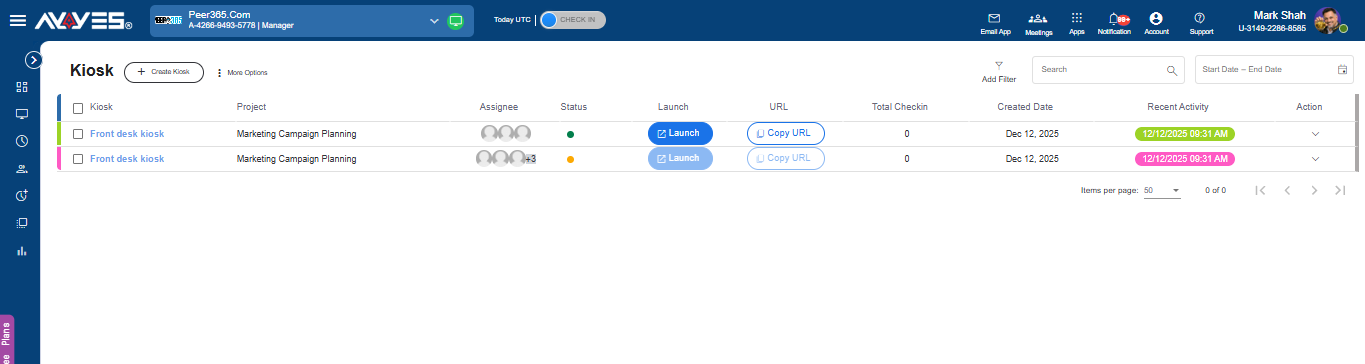
4. Kiosk Clock-Ins: Let employees record attendance through shared devices using PIN or QR access, providing a practical option for office-based and on-site teams.
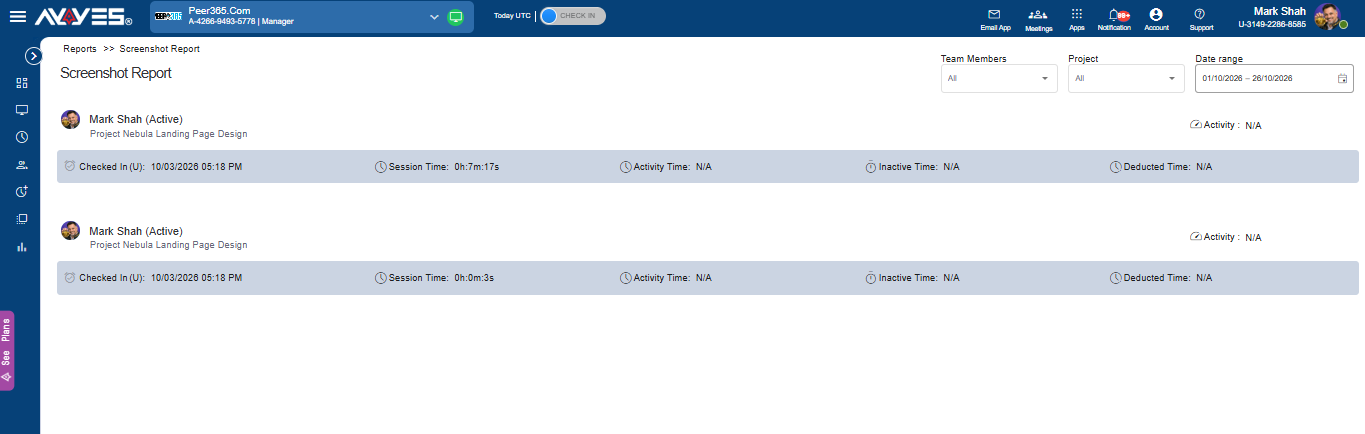
5. Reporting: Review available time and project data to understand working patterns, assess task allocation and support better workload planning and resource management.
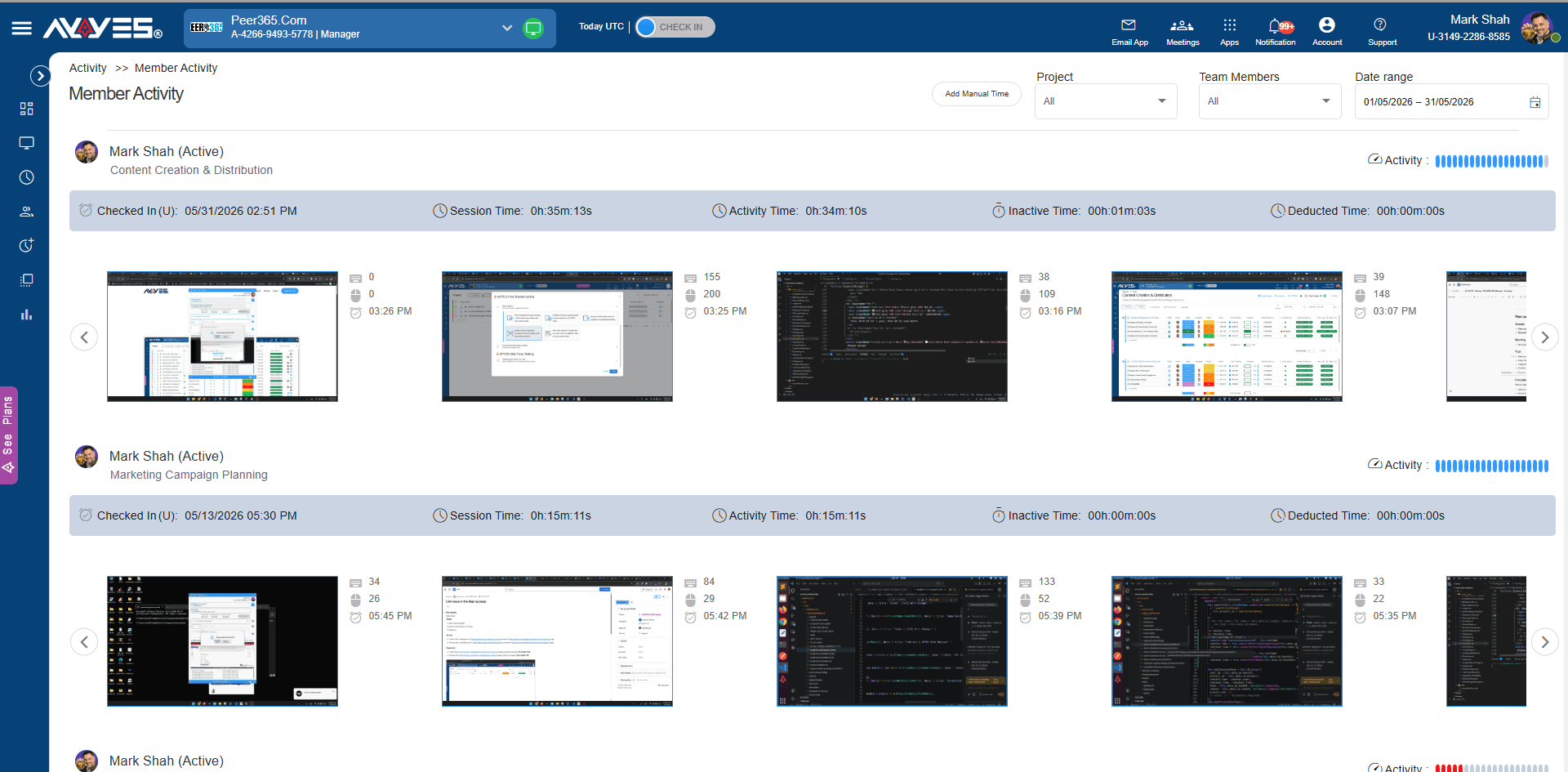
6. Employee Activity Visibility: Access supported monitoring features, including screenshots and application activity, on eligible plans to review computer-based activity according to business and privacy requirements.
Explore the AYYES features to find the right time tracking setup for your team.
AYYES Pricing Plans
AYYES offers plans for businesses looking to manage time tracking, projects, tasks and timesheets. Review the available features and pricing to determine which option suits your team.
AYYES Free Plan
The free plan supports up to 12 team members and includes time tracking, unlimited projects and tasks, and basic kiosk access.
AYYES Paid Plans
The published pricing options are:
- Annual plan: $0.88 per seat per month when billed annually. For 30 seats, the equivalent monthly cost is $26.40.
- Monthly plan: $0.99 per seat per month. For 30 seats, the monthly cost is $29.70.
Additional capabilities may include advanced reporting, screenshots and employee monitoring, depending on the selected plan.
AYYES 30-Day Free Trial
Businesses can explore paid features through a 30-day free trial without a credit card. This provides an opportunity to evaluate the available time tracking, project management and reporting capabilities before selecting a subscription.
Frequently Asked Questions About Manual and Automated Time Tracking
1. What is the difference between manual and automated time tracking?
Manual time tracking relies on employees entering hours or operating timers. Automated time tracking uses software to capture supported time or activity with less manual input. Both methods may require employees to review their records.
2. Is automated time tracking more accurate than manual tracking?
Not always. Automated capture can reduce missed entries, while manual tracking allows employees to specify what they worked on. Accuracy depends on the workflow, software capabilities and quality of record review.
3. Can manual timers work alongside automated timers?
Yes, when the software supports both methods. Employees can use automated capture for supported activities and add manual entries when additional context or corrections are needed.
4. Is automatic time tracking software suitable for remote teams?
It can be suitable for remote teams that need consistent time records and visibility into work activity. Businesses should evaluate privacy, transparency, task categorisation and employee access to records.
5. How do I choose the right time tracking software?
Compare tracking methods, timesheets, project management, reporting, privacy controls, ease of use and pricing. Test the available features against your team’s daily workflows before choosing a plan.
Start Tracking Work Hours Smarter with AYYES
The right time tracking software can help your business maintain accurate work-hour records, simplify timesheet management and improve visibility into project activity.
Manual tracking provides direct control over time entries, while automated tracking can reduce repetitive recording tasks. A hybrid approach can offer flexibility for teams with different working requirements.
AYYES brings time tracking together with project management, timesheets, kiosk clock-ins and reporting. Start your 30-day free trial with AYYES to explore its features and find the right tracking solution for your team.


