
Best Time Tracking Software for Productive Teams in 2027
Every team reaches a point where gut feelings about productivity are no longer enough. Whether employees work remotely, across multiple locations, or from the same office, understanding where working hours go can improve project planning, staffing, billing, and workload management. The right time tracking software turns assumptions into useful data.
It helps managers understand how much time projects require, where bottlenecks appear, and whether workloads are being distributed realistically. But not every time tracker software fits every team. Some tools focus on freelancers, others on remote workforces, field employees, project management, billing, or productivity insights. The best choice depends on your team size, working style, reporting needs, and how you plan to use the data.
Why Modern Teams Prioritize Time Tracking for Productivity
Modern teams increasingly rely on real work data instead of assumptions when planning workloads and estimating projects. Time tracking provides a clearer view of how employee hours are distributed across projects, tasks, meetings, client work, and internal activities. Consistent tracking can help teams improve estimates, identify inefficient processes, balance workloads, and make better decisions about staffing and project scope.
1. The Shift from Manual Logs to Automated Tracking
Manual timesheets rely heavily on employees remembering what they worked on throughout the day or week. This can result in missing entries, inaccurate estimates, and additional administrative work. Automated time tracking reduces this dependence on memory by recording working sessions and allowing employees to review their time before submission. The result is a more consistent record of where working hours are actually spent.
2. Identifying Bottlenecks in the Workflow
Raw time data becomes useful when managers can identify patterns. If a design team repeatedly spends large amounts of time on revision cycles, for example, the issue may be related to workflow, communication, or project scope rather than individual performance. Time tracking software that connects hours with projects, clients, tasks, or project phases makes these patterns easier to identify and address.
Also Suggest this : Best Time Management Calendar Tools
Best Time Tracking Software for Different Team Needs
There is no single time tracking tool that is best for every business. The right option depends on how your team works and what information managers need from tracked time.
1. Best for Remote and Distributed Teams
Remote teams need time tracking software that works across locations and does not require constant manager supervision. Tools such as Toggl Track, Hubstaff, Clockify, and AYYES provide different approaches to remote time tracking. Some focus on simple timers and reports, while others provide additional activity information, screenshots, projects, or workforce-management tools. For distributed teams, useful features include desktop and web tracking, offline support, clear reporting, project allocation, and controls that help employees understand what information is being collected.
2. Best for Freelancers and Agencies
Freelancers and agencies often need to connect working hours directly with projects, clients, budgets, and billing. Tools such as Harvest, Toggl Track, FreshBooks, and AYYES can support different parts of this workflow. Agencies should look for software that makes it easy to separate billable and non-billable work and show clients how hours were allocated across projects or deliverables. The strongest option is usually one that keeps time tracking close to the project-management and invoicing workflow instead of requiring repeated manual data transfers. Screenshot tracking and activity/app monitoring are paid features and are not included on the Free plan.
Time Tracking Software for Project Management
Running time tracking inside or alongside project management helps teams connect working hours with actual tasks and deliverables. When project and time data are connected, managers can understand not only how many hours were worked but also where those hours were used.
1. Benefits of Native Timers over Third-Party Add-ons
Native timers reduce friction because employees can start tracking from the same system where they already manage their tasks. Third-party integrations can add extra steps, sync delays, and data discrepancies. If employees need to open another application, select a project, and manually match entries later, tracking is more likely to be skipped or completed inaccurately. The easier the timer is to access, the more likely teams are to use it consistently.
2. Connect Tracked Time With Projects and Tasks
The real value of project-based tracking appears when working hours are connected directly with project progress. If a task estimated at four hours has already used six hours but remains unfinished, managers can identify the issue before it affects the entire project. Connecting tracked time with tasks also helps improve future estimates, project budgets, workload planning, and client reporting.
How Time Tracking Software Improves Team Accountability
Accountability should not mean surveillance. The best teams use time data as a way to understand workloads, project expectations, and workflow problems rather than simply measuring individual activity. Instead of asking, “Why did you only log six hours?” managers can use the data to ask, “What prevented this task from progressing as expected?”
1. Using Reporting Dashboards for Transparent Performance
Reporting is most useful when employees understand the information being collected and how it will be used. Team dashboards can show how time is distributed across projects, tasks, and clients, making it easier to identify workload imbalances or unrealistic estimates. If one employee spends significantly longer on a task than originally estimated, the discussion can focus on scope, complexity, training, or estimation accuracy rather than immediately treating the difference as a performance issue.
2. Setting Clear Expectations through Historical Benchmarks
After teams collect consistent time data over several months, historical records can improve future planning. Instead of guessing how long a type of project should take, managers can use previous project data to create more realistic estimates. Historical time records can also support client discussions about scope changes, additional work, and project budgets by showing how similar requests affected previous timelines.
Key Features to Look for in Time Tracking Software
Feature lists can become overwhelming, so teams should focus on capabilities that directly support their workflow.
1. Cross-Platform Compatibility and Mobile Access
Time tracking software should work wherever employees actually work. Remote employees may need desktop tracking, field teams may require mobile access, and office-based teams may use web or kiosk clock-ins. Useful capabilities include offline tracking, mobile timers, browser access, easy project selection, and reliable syncing between devices.
2. Advanced Billing and Invoicing Integrations
Teams that bill clients by the hour should connect tracked time with their invoicing process. Useful billing features include billable rates, client and project allocation, project budgets, expense tracking, invoice exports, and accounting integrations. Reducing manual data transfers between time tracking and billing software can save administrative time and reduce errors.
3. Automatic and Manual Time Tracking
Different roles may require different tracking methods. Manual timers work well when employees frequently switch between clients or tasks, while automatic tracking can help users who regularly forget to start or stop timers. The best systems provide enough flexibility for employees to record legitimate working time accurately while still allowing corrections where needed.
4. Team Timesheets and Reporting
Team timesheets give managers a structured way to review hours before using them for payroll, billing, project management, or internal reporting.
Useful reports may show:
- Employee hours
- Project time
- Task time
- Billable and non-billable hours
- Project budgets
- Labor costs
- Attendance
- Productivity patterns
The goal is not simply to collect more data. It is to produce information managers can actually use.
Time Tracking Software vs Employee Monitoring Software
Time tracking software and employee monitoring software can overlap, but they serve different purposes.
| Feature | Time Tracking Software | Employee Monitoring Software |
| Primary Purpose | Records working hours and time spent on projects, clients, or tasks | Provides deeper visibility into employee activity and work behavior |
| Time Tracking | Yes | Usually |
| Timesheets | Common | May be included |
| Project & Task Tracking | Common | Sometimes |
| Billing & Invoicing | Often included or integrated | Less common |
| Attendance Tracking | Often available | Often available |
| Screenshots | Optional in some tools | Common in many tools |
| App & Website Tracking | Sometimes | Common |
| Idle Time Tracking | Sometimes | Common |
| Activity Monitoring | Limited or optional | More detailed |
| Best For | Teams needing accurate hours, project tracking, billing, and reports | Businesses needing additional workforce visibility and activity insights |
Teams that mainly need accurate timesheets, project hours, billing, and reporting may prefer time tracking software. Businesses that require deeper workforce visibility may use employee monitoring features, but these should be introduced transparently with appropriate privacy controls.
How to Implement Time Tracking Without Hurting Team Morale
Many time tracking rollouts fail because of how the tool is introduced rather than because of the software itself. If employees believe tracking is being introduced only to watch them, adoption can quickly become difficult. Start by explaining why time tracking is needed. Focus on goals such as better project estimates, fairer workload distribution, accurate billing, and easier timesheet preparation rather than individual surveillance.
Managers should also explain:
- What information is collected
- When tracking occurs
- Who can see the data
- How the information will be used
- How employees can correct inaccurate entries
Leadership can improve adoption by following the same time tracking rules they expect employees to follow. Give the process enough time to become part of the normal workflow. The real measure of success is whether time data leads to better estimates, more balanced workloads, clearer client billing, and less manual administration.
Why Choose AYYES for Team Time Tracking?
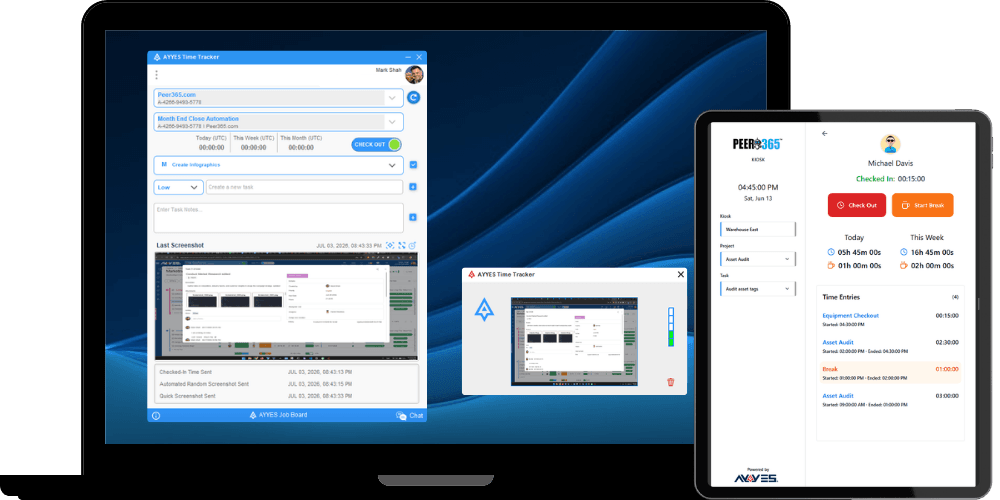
AYYES combines time tracking with projects, tasks, timesheets, kiosk tracking, and productivity information in one platform. It can support teams that need simple working-hour records as well as businesses that require more detailed visibility into projects and employee activity.
1. Flexible Time Tracking for Teams
Different employees can require different methods of recording time. AYYES supports multiple time tracking workflows, making it suitable for freelancers, office employees, remote teams, and teams using shared workplace clock-ins. Its free plan currently supports up to 12 team members with unlimited tracking, projects, tasks, kiosk access, and timesheets. Screenshot tracking and activity/app monitoring are paid features and are not included on the Free plan.
2. Projects and Task-Based Tracking
Tracked working hours can be connected with projects and tasks, helping managers understand where employee time is being spent. This can support project planning, workload management, client billing, and better estimates for future work.
3. Team Reports and Timesheets
AYYES timesheets and reporting features allow managers to review working hours from a central system instead of collecting information from separate spreadsheets or manual records. This helps teams maintain clearer records for projects, payroll preparation, billing, and productivity reviews.
4. Productivity Insights With Privacy Controls
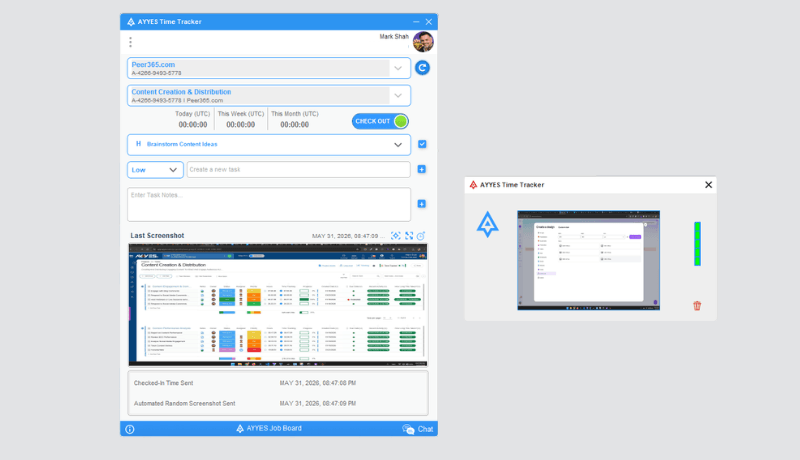
Teams that require more context can use features such as tracked apps and websites, activity information, idle detection, screenshots, and screenshot blurring. AYYES lists these capabilities within its current tracking feature set. These features should be introduced transparently and used only when they support a legitimate business need.
Start Tracking Team Time With AYYES
Time tracking should make team management easier, not create another layer of administration. AYYES brings time tracking, projects, tasks, timesheets, kiosk tracking, reports, and productivity insights into one connected workspace. Whether you manage a small office team, remote workforce, agency, or growing business, AYYES can help you understand where working hours go and turn time data into better project and workload decisions. AYYES paid plans start at $0.88 per user/month when billed annually or $0.99 per user/month with monthly billing. Start tracking team time with AYYES and build clearer, more accurate work records.
FAQs About Time Tracking Software for Teams
1. What Is the Best Time Tracking Software for Teams?
The best time tracking software depends on team size, workflow, reporting needs, and budget. AYYES, Clockify, Toggl Track, Hubstaff, Harvest, and other tools serve different team requirements.
2. Is There Free Time Tracking Software for Teams?
Yes. Several platforms offer free plans. AYYES currently offers a free plan for up to 12 team members. Paid plans are $0.99 per seat per month, or $0.88 per seat per month billed annually. Clockify currently supports up to five users on its free plan. Screenshot tracking and activity/app monitoring are paid features and are not included on the Free plan.
3. What Features Should Time Tracking Software for Teams Have?
Useful features include automatic and manual tracking, projects, tasks, team timesheets, reporting, approvals, mobile access, integrations, billable-hour tracking, and appropriate privacy controls.
4. Can Time Tracking Software Improve Team Productivity?
Time tracking can help teams identify workflow bottlenecks, improve project estimates, balance workloads, and understand where working hours are being used. The data is most useful when managers focus on patterns rather than individual surveillance.
5. What Is the Difference Between Time Tracking Software and Employee Monitoring Software?
Time tracking software mainly records working hours, projects, and tasks. Employee monitoring software may also include screenshots, app usage, website activity, idle time, and other workforce activity information.
6. Can Remote Teams Use Time Tracking Software?
Yes. Remote teams can use web, desktop, mobile, and automatic tracking tools to record working hours across different locations while managers review projects, timesheets, and reports centrally.
7. What Is the Best Time Tracking Software App for Small Teams?
Small teams should look for an easy-to-use app with affordable pricing, project tracking, reports, and room to grow. AYYES, Clockify, and Toggl Track all currently provide free options for smaller teams. Screenshot tracking and activity/app monitoring are paid features and are not included on the Free plan.



